
Redmine Workload – the Redmine capacity planning plugin for delivery teams.
For project managers and engineering leads running multi-team delivery on Redmine.
one-time purchase · 1 year of support included
Support renewal after 1 year 30% of plugin price
Today in Redmine
You can’t see Monday’s load until Monday morning.
Overcommitted sprints ship late. Under-committed sprints look fine until retros. Capacity planning lives in a spreadsheet that never quite matches what Redmine says the team is doing – and by the time someone notices the overload, the deadline is already at risk.
In plain words
What is the Redmineflux Workload Plugin?
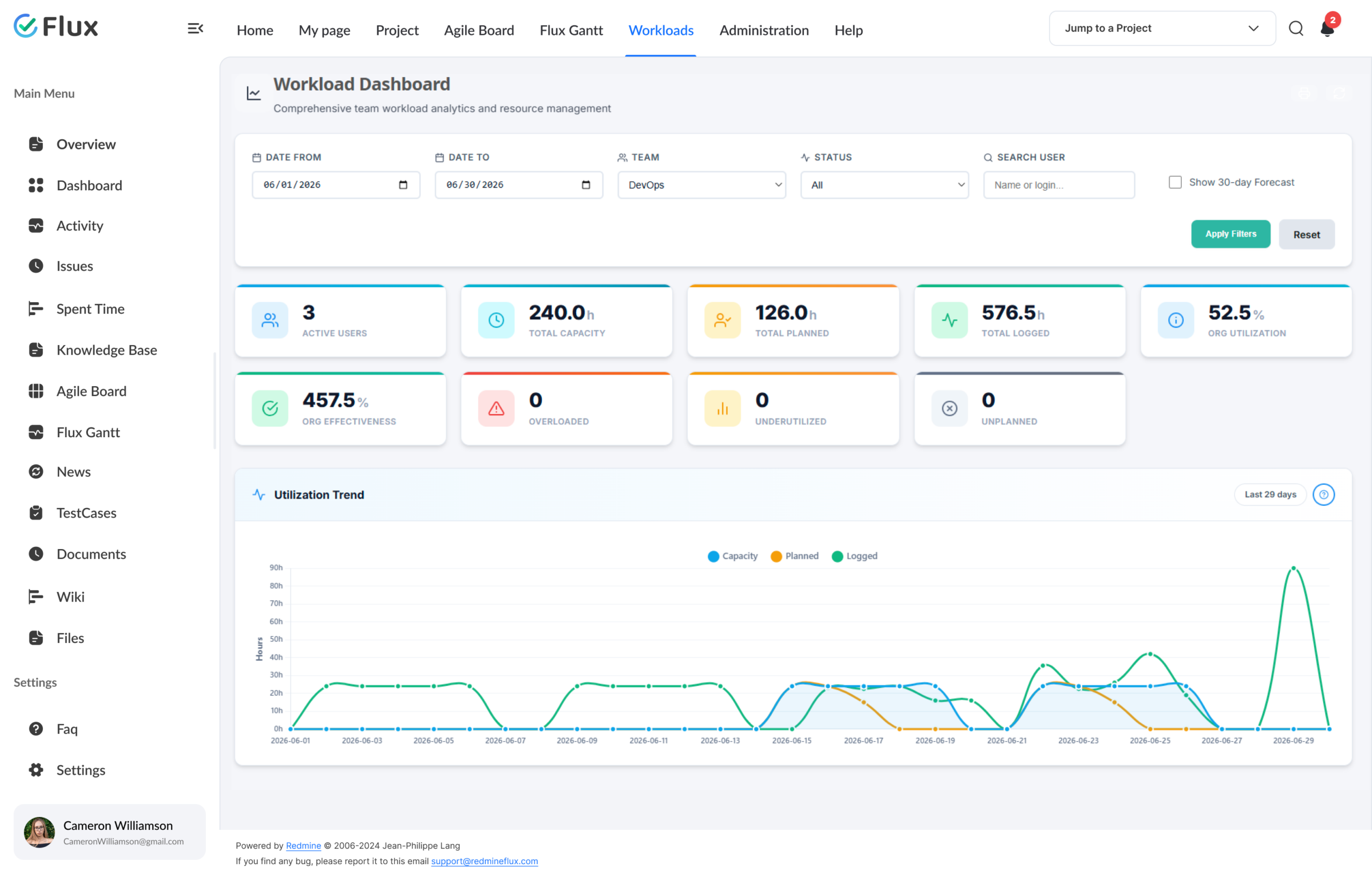
Redmineflux Workload is a capacity-planning plugin for Redmine. It shows committed hours per person, per sprint, against configured availability – inside the Redmine workspace your team already uses. Plan sprints with real numbers instead of guesses, and rebalance work before delivery is at risk.
Capacity, not opinion.
Every capacity number on the Workload view is derived from real Redmine assignments and real configured availability – not from a PM’s memory or a stale weekly spreadsheet.
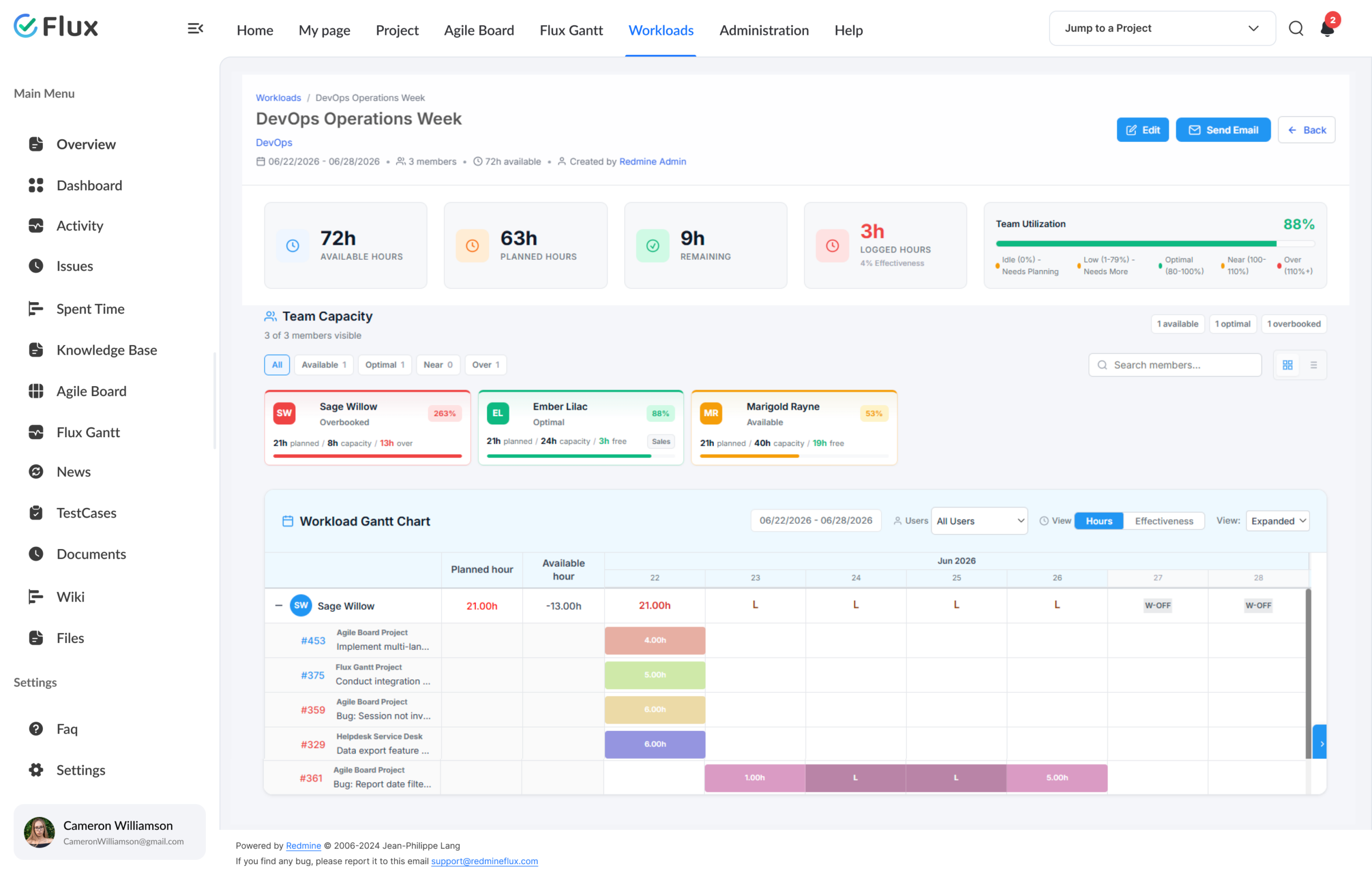
Availability reads from configured working hours, holiday schemes, and approved leave. Load comes from current ticket assignments. Adjust the Gantt timeline and the load numbers update immediately. The plan matches reality because the plan is reality.
What your team gains
Specific shifts, not vague benefits.
Click any shift to see what changes in the product.
01
See overcommitment before the sprint starts.
Workload bars surface who’s over allocation the moment you assign the 9th ticket – before the sprint is locked. Red / amber / green indicators make overload impossible to miss, even across 20-person teams. No more retro-discovering burnout.
02
Hours that match reality.
Availability reads from configured working hours per day, holiday schemes, and approved leave — no HR module required. No duplicate capacity config to maintain, no weekly spreadsheet drift. The numbers in Workload are the numbers.
03
Reschedule without an all-hands.
Drag a task on the Gantt timeline to shift its dates, or resize to change its duration. Load numbers update immediately — no meeting, no back-and-forth. Your 4pm “who has bandwidth?” discussion happens on-screen instead.
04
Cross-workload conflicts surface at planning.
Engineers split across workloads see all their load in one consolidated view. Conflicts are visible while they can still be resolved – not during delivery crunch at 11pm. Cross-workload conflict detection becomes part of planning, not a late discovery.
05
Spot risks before they become incidents.
The dashboard surfaces cross-workload conflicts, availability heatmaps, and forecast data in one view. Risks that used to surface during a retro now appear at planning — before the deadline is already at risk.
06
Less reactive firefighting.
Delivery risk drops because capacity is a planning input, not a post-mortem finding. Managers stop absorbing pressure the data could absorb instead. The team ships on time more often because the plan matches what the team can actually do.
Core capabilities
The specifics, for people who want them.
Plan sprints against real availability.
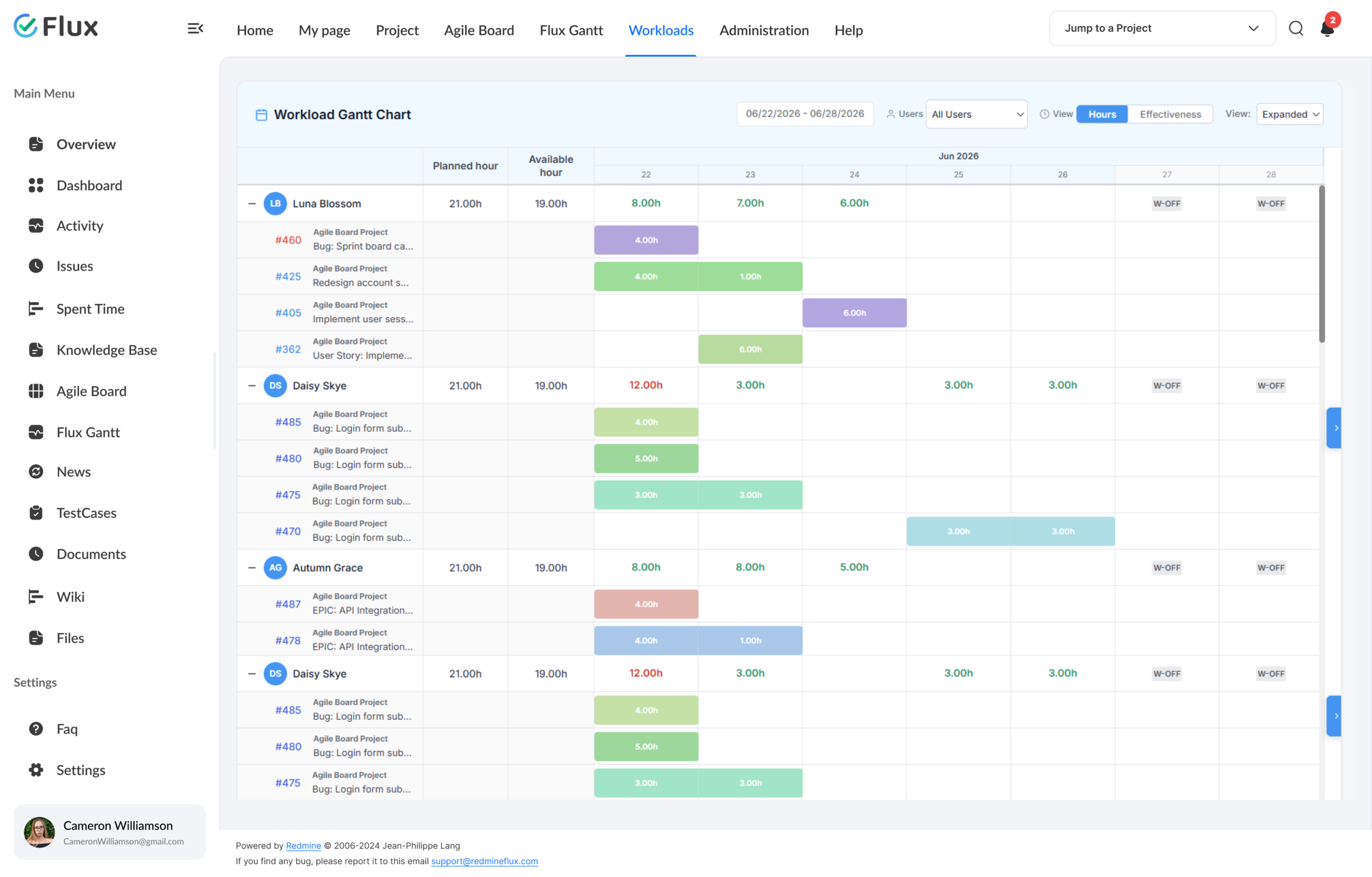
- Daily hour budgets per team member
- Rolling availability from approved leave and holiday schemes
- Gantt drag to shift task dates; resize to change duration
- Workload matrix by team and user
- Allocation drilldown for per-user detail
Red, amber, green at a glance.
- Overload indicators surface the moment they occur
- Filter by team, workload, user, or status
- Daily, weekly, monthly granularity
- Today-line marker for current position
- Gantt drag-and-drop to adjust task timing and duration
One view for the whole picture.
- KPI summary: capacity, planned work, and overload at a glance
- Capacity and planned work trend charts
- User availability heatmap for forward-looking planning
- Cross-workload conflict detection
- Forecast data and allocation drilldown
200+
teams trust Redmineflux worldwide
6 yrs
focused on Redmine, nothing else
5000+
plugin downloads powering real projects
Before Workload, I found out someone was overloaded when they missed a deadline. Now I can see who is close to capacity before I add another task. We have not had an overload situation we did not see coming in three months.
Deployment
Run it your way.
Managed Cloud
- Hosted by Redmineflux · every plugin included
- Daily backups · SLA-backed uptime
- No per-plugin licences – all-inclusive pricing
$3.99 / user / month
Get a Free demoSelf-hosted
- Drop-in install on your own Redmine
- One-time purchase · 1 year of support included
- Your infrastructure, your security perimeter
From $499 one-time
Buy plugin →Role by role
What Workload changes for each role.
CTO / IT DirectorGovernance + oversight
Cross-workload capacity visibility at a glance. Delivery risk becomes measurable, not anecdotal.
Project ManagerSprint planning, forecasting
Sprint plans that match reality, not optimism. Assignment decisions take seconds with real capacity data.
Engineering LeadTeam load balancing
Committed hours vs. availability visible before the sprint starts. Drag tasks on the Gantt to shift dates or resize duration — load numbers update immediately across the team view.
Delivery HeadMulti-project oversight
Cross-workload conflicts visible at planning – before they turn into delivery crises. One consolidated view across all workloads.
Pricing
Three ways to get Workload.
Buy this plugin
Workload – self-hosted
Support renewal after 1 year 30% of plugin price
One-time purchase · 1 year of support included · install on your Redmine in 15 minutes.
Buy Workload →Save with a Bundle
All Plugins Bundle
Includes all 15 Redmineflux paid plugins + themes + free plugins in one license.
See the Bundle →Or use Managed Cloud
Redmineflux Cloud
Every plugin included, AI bundled, agent seats, no infrastructure work. Book a free demo →
See Cloud plans →Try it on your team’s data
See Workload with your real sprints.
Book a free demo and see Workload live, or install the plugin on your existing Redmine and have capacity planning live in 15 minutes.
Frequently asked
Questions before you install.
The questions teams actually ask before adopting Workload. If yours isn't here, check pricing or contact support.
How is this different from Redmine’s core assignment view?
Core Redmine shows who’s assigned to what. Workload shows who has capacity for what – hours against availability, not just a count of tickets. Core Redmine doesn’t model working hours, PTO, or overload. Workload does, and updates in real time when assignments change.
Will it work with my Redmine version?
Yes — the plugin supports all Redmine versions. Compatibility is verified with each plugin update. Ruby 3.x required.
How do working hours and PTO get into the plugin?
Availability is derived from configured working hours per day, weekend settings, holiday schemes, and approved leave. A person on approved leave has 0 capacity for that day. Holiday schemes can be configured per region or per team.
How does Workload detect cross-workload conflicts?
The dashboard surfaces cross-workload conflicts automatically — when a team member is over capacity across multiple workloads, the conflict appears in the dashboard before it becomes a delivery problem. Filter by team, workload, user, or status to drill into specific situations.
What happens to my data if I uninstall the plugin?
Nothing. Workload derives its view from standard Redmine assignment data – it doesn’t introduce a separate data model. Uninstall the plugin and your Redmine issues, users, projects, and HR data remain untouched. No lock-in.
How much does the Workload Plugin cost?
$499 one-time for self-hosted – 1 year of support included. Support renewal after 1 year 30% of plugin price. Bundle with the All Plugins Bundle ($4,754 one-time) for all 15 Redmineflux paid plugins in one license. Or hosted at $3.99/user/month via Redmineflux Cloud Pro – every plugin included. See the pricing section above.
Is there a free demo available?
Yes – request a free demo and we’ll send a personalised demo link straight to your inbox. No credit card required, no commitment. Explore the real product at full capacity, at your own pace. Cloud starts at $1.99/user/month.