
Redmine Agile Board – Kanban and sprint management.
For project managers and Scrum masters running Agile delivery on Redmine.
one-time purchase · 1 year of support included
Support renewal after 1 year 30% of plugin price
Today in Redmine
Redmine’s issue list shows what exists. It doesn’t show what’s flowing.
Without a board view, standups become status-gathering sessions rather than delivery reviews. Sprint scope lives in someone’s head or a separate tool. WIP limits go unenforced. Blockers surface at 5pm Friday rather than during planning. Agile delivery inside Redmine means managing two separate systems – and reconciling them manually before every meeting.
In plain words
What is the Redmineflux Agile Board Plugin?
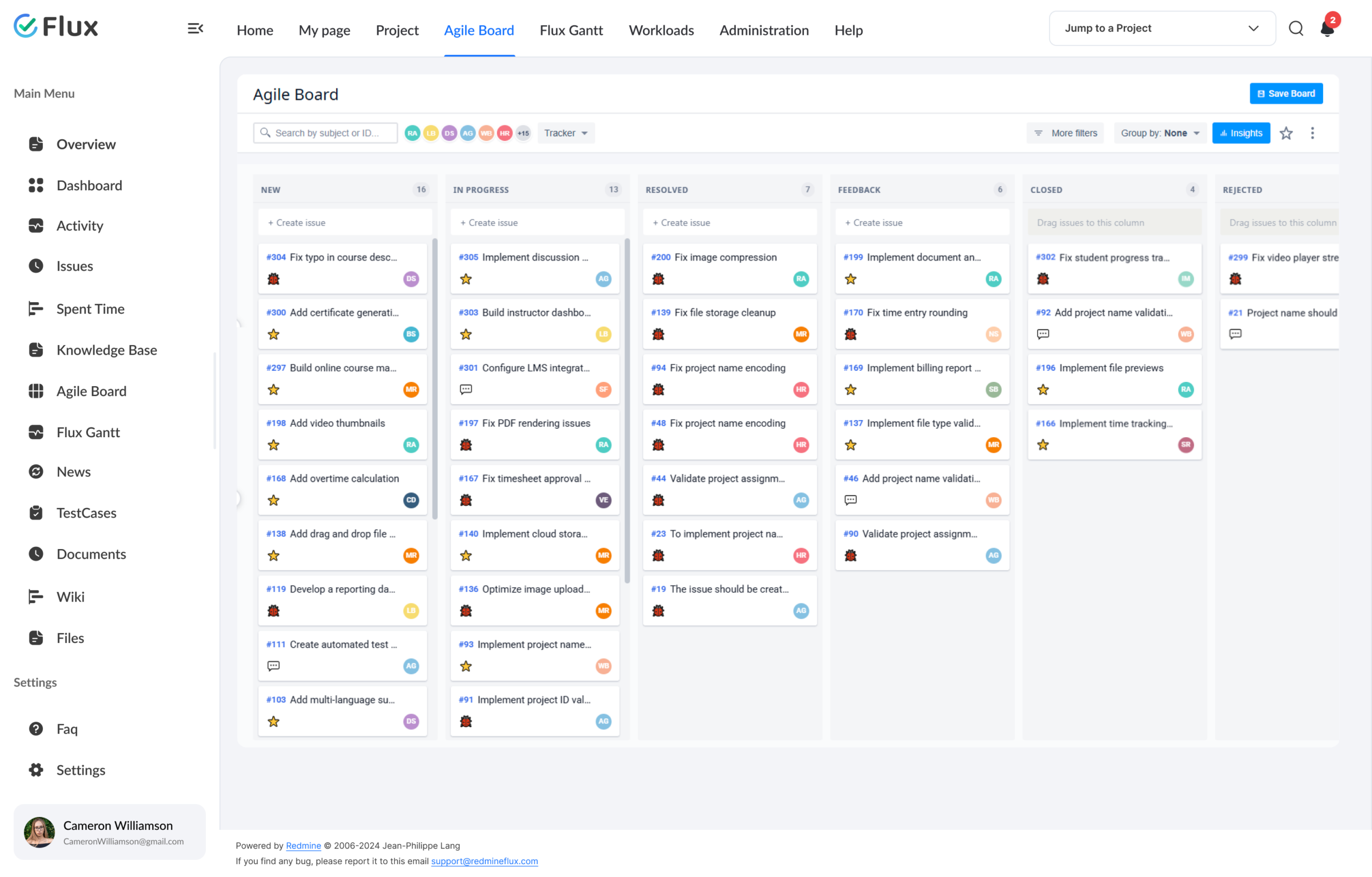
Redmineflux Agile Board is a visual project management plugin for Redmine. It adds Kanban boards, sprint containers, WIP limits, story points, swimlanes, and drag-and-drop status updates – natively inside Redmine. Teams get the workflow visibility of a dedicated Agile tool without leaving the platform they already use for issue tracking, time logging, and delivery governance.
The board is the truth.
Every column, card, and sprint container maps directly to Redmine issues. Drag a card between columns and the issue status updates in real time – no sync, no export, no second system. The board and Redmine are the same data, presented for how your team actually works.
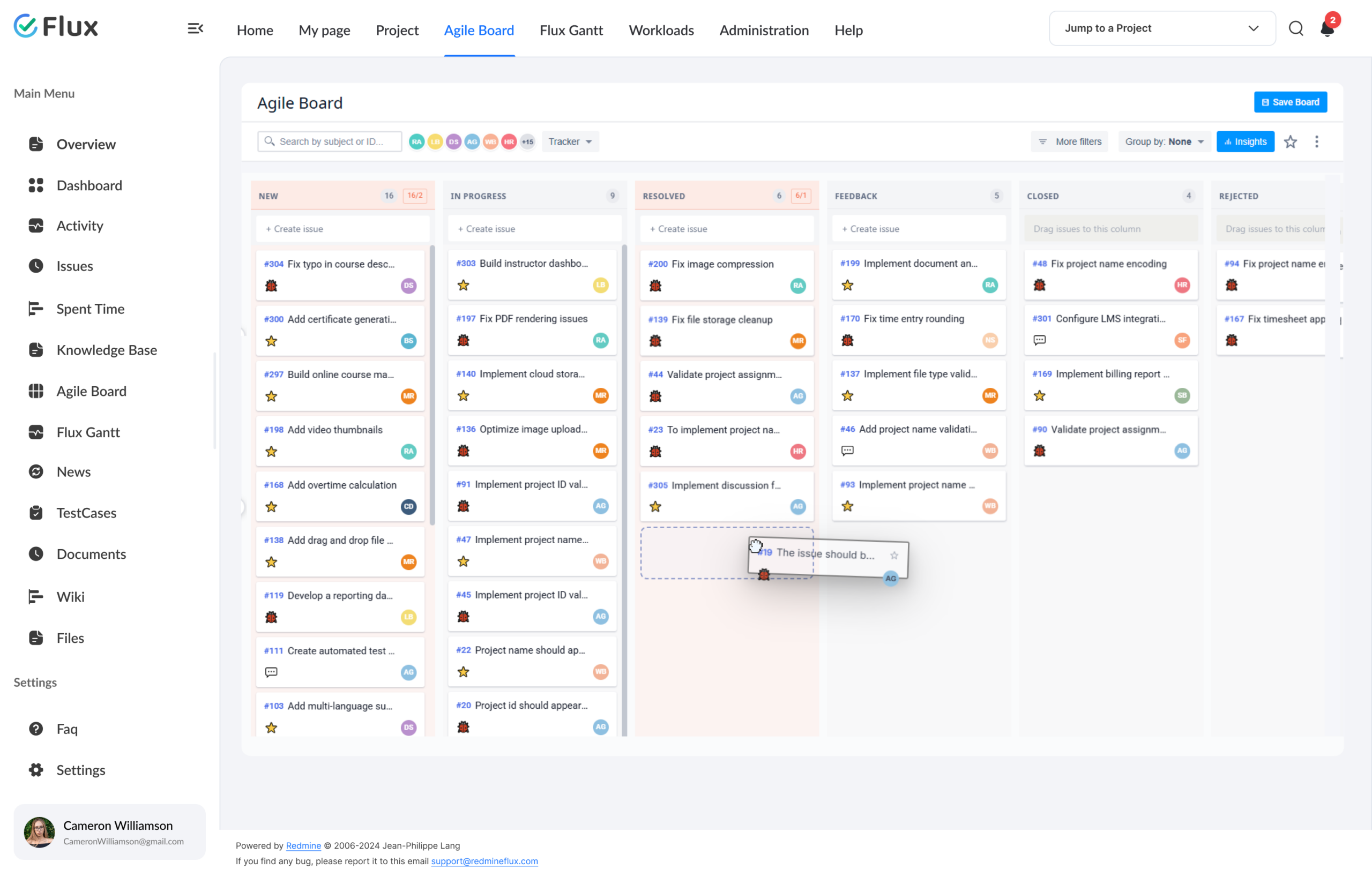
WIP limits surface bottlenecks the moment a column fills. Swimlanes separate delivery streams without creating separate boards. The Backlog gives teams a planning view alongside the board — drag issues into sprint or version columns, keep unassigned work visible until it’s ready to commit. Redmine agile delivery becomes a structured, visible process – not a workaround.
What your team gains
Specific shifts, not vague benefits.
Click any shift to see what changes in the product.
01
Blockers visible before they slow the sprint.
WIP limit indicators flag congested columns before delivery slows. WIP breach indicators make overloaded columns visible the moment a limit is exceeded. Engineers know a column is full without checking in with a manager. Standup becomes a review of the board state, not a status-gathering session.
02
Status updates without opening individual issues.
Drag an issue card between columns and its Redmine status updates in real time. Engineers spend less time on administrative issue management and more time on delivery. Daily standups shrink from 20 minutes to 5 because the board already shows what everyone is working on.
03
Plan sprints from the Backlog.
The Backlog gives teams a dedicated planning view alongside the board. Drag issues into sprint columns for Scrum planning, or into version columns for release planning. Unassigned work stays visible in its own section until committed — no planning in a separate tool.
04
Multi-team boards without separate tools.
Swimlanes separate delivery streams – by user, project, category, or custom field – within a single board. Collapse individual swimlanes to focus on specific teams without creating separate boards or losing context across the programme. One board, multiple delivery streams.
05
A custom board for every team perspective.
Save different board configurations for the same project — dev board, QA board, management reporting, bug triage, or release monitoring, each with its own columns, card fields, filters, and grouping. Switch between them in one click without changing anyone else’s view.
06
All delivery data stays inside Redmine.
Board changes update Redmine issues in real time with no sync step. Time tracking from the Timesheet plugin, capacity data from Workload, and milestone dates from Gantt Chart all share the same Redmine issue foundation. No reconciliation between tools. No context switching. Redmine is the single source of truth.
Core capabilities
The specifics, for people who want them.
Visualise every issue in real-time workflow columns.
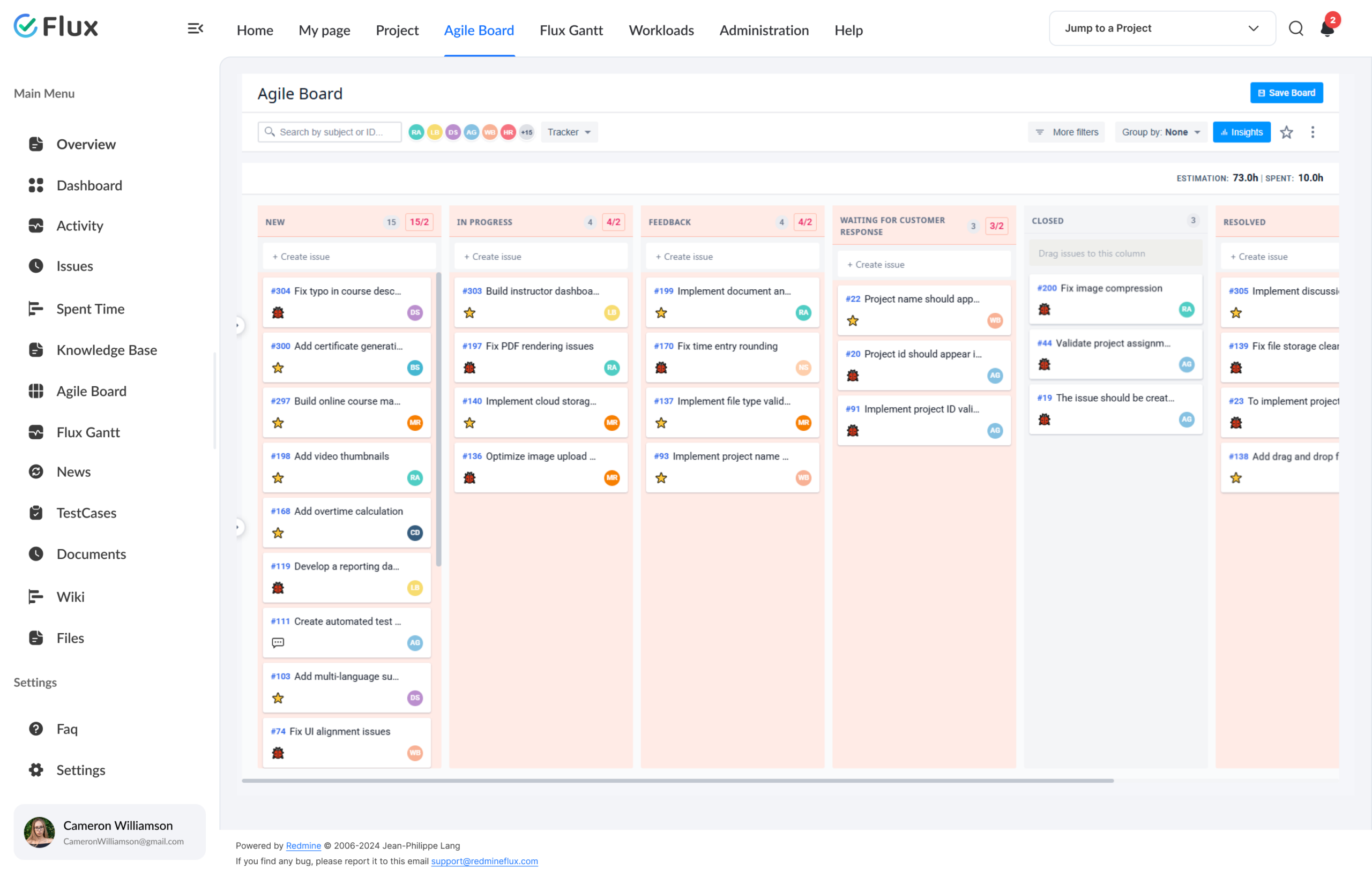
- Drag-and-drop cards update Redmine issue status instantly
- WIP limits per column with visual breach indicators
- Tracker and priority icons on each card for quick visual scanning
- Double-click any card to edit subject and description directly on the board
- Columns map to your existing Redmine workflow states
Plan and track iterations without leaving Redmine.
- Sprint containers with defined scope, dates, and story points
- Scrum mode to filter the board by active sprint
- Backlog and sprint board views side by side
- Drag issues from the Backlog into sprint or version columns
- Story points tracked at issue level, rolled up to sprint
Organise complex team workflows on one board.
- Swimlanes group issues by user, project, or custom field
- Expand or collapse individual swimlanes per session
- Board columns configurable without modifying Redmine trackers
- Version planning board for backlog and release management
- Works with Gantt Chart, Timesheet, and Workload plugins
200+
teams trust Redmineflux worldwide
6 yrs
focused on Redmine, nothing else
5000+
plugin downloads powering real projects
The Agile Board gave us Kanban visibility without changing anything about how we use Redmine. Standups are now based on the board state – not a manually prepared update.
Deployment
Run it your way.
Managed Cloud
- Hosted by Redmineflux · every plugin included
- Daily backups · SLA-backed uptime
- No per-plugin licences – all-inclusive pricing
$3.99 / user / month
Get a Free demoSelf-hosted
- Drop-in install on your own Redmine
- One-time purchase · 1 year of support included
- Your infrastructure, your security perimeter
From $499 one-time
Buy plugin →Every plugin in Cloud also runs on self-hosted Redmine.
Role by role
What Agile Board changes for each role.
Project ManagerSprint planning, delivery visibility
Sprint planning, delivery visibility, and iteration tracking in one environment – without a separate Agile tool or daily status round-up.
Engineering LeadTeam load, workflow clarity
WIP limits, workflow clarity, and real-time team progress visibility. Bottlenecks surface before they slow the sprint, not during retro.
Scrum MasterStory points, sprint planning
Sprint planning and story points without external Agile tools. Sprint scope, dates, and story point totals all managed inside the same Redmine workspace.
CTO / IT DirectorGovernance + oversight
Agile governance inside the existing Redmine setup – no new platform, no additional licence, no separate data silo to govern.
Pricing
Three ways to get Agile Board.
Buy this plugin
Agile Board – self-hosted
Support renewal after 1 year 30% of plugin price
One-time purchase · 1 year of support included · install on your Redmine in 15 minutes.
Buy Agile Board →Save with a Bundle
Project Management Bundle
Includes Agile Board + Gantt Chart + Custom Dashboard + Timesheet + Knowledge Base + Issue Template + Notification.
See the Bundle →Or use Managed Cloud
Redmineflux Cloud
Every plugin included, AI bundled, agent seats, no infrastructure work. Book a free demo →
See Cloud plans →Try it on your team’s sprints
See the Agile Board with your sprints.
Book a free demo and see Agile Board live, or install the plugin on your existing Redmine and have Kanban and sprint boards live in 15 minutes.
Frequently asked
Questions before you install.
The questions teams actually ask before adopting Agile Board. If yours isn't here, check pricing or contact support.
How do I set up a Kanban board in Redmine using this plugin?
Install the Agile Board Plugin and it maps your existing Redmine issue statuses to configurable board columns. Each project gets its own board view. Drag issues between columns to update status in real time, set WIP limits per column to surface bottlenecks, and use swimlanes to organise issues by user or category – all without reconfiguring your existing Redmine workflow.
Is the Agile Board Plugin compatible with all Redmine versions?
Yes. The Redmineflux Agile Board Plugin is tested and maintained against all Redmine versions. Compatibility is verified with each plugin update.
Does the plugin support story points and swimlanes?
Yes. Story Points are disabled by default and must be enabled in plugin configuration before they appear anywhere in the plugin. Once enabled, they are tracked at the issue level and can be displayed as totals on boards and in the Backlog. Swimlanes group issues by user, project, category, or other supported fields within the board — no Redmine workflow modifications required.
How much does the Agile Board Plugin cost?
$499 one-time for self-hosted – 1 year of support included. Support renewal after 1 year 30% of plugin price. Bundle with the Project Management Bundle ($2,456 one-time) for Agile Board + Gantt Chart + Custom Dashboard + Timesheet + Knowledge Base + Issue Template + more. Or hosted at $3.99/user/month via Redmineflux Cloud Pro – every plugin included. See the pricing section above.
What happens to my Redmine data if I uninstall the plugin?
Nothing. The Agile Board Plugin works on top of standard Redmine issue data – your issues, statuses, projects, and history remain intact. Sprint data is stored in plugin-created tables within the Redmine database and is removed only if you run the rollback migration during uninstall. Take a database backup before uninstalling.
Is there a free demo available?
Yes – request a free demo and we’ll send a personalised demo link straight to your inbox. No credit card required, no commitment. Explore the real product at full capacity, at your own pace. Cloud starts at $1.99/user/month.