
Redmine Issue Template – standardise every task from the start.
For project managers and engineering leads who need consistent, complete issues every time.
one-time purchase · 1 year of support included
Support renewal after 1 year 30% of plugin price · install in 10 minutes
Today in Redmine
Incomplete issues cost more time than the task itself.
When teams create issues without a standard format, required fields turn up missing mid-sprint and work stops while context gets filled in retrospectively. Developers spend time asking for clarification on poorly written or incomplete issues. QA teams lack acceptance criteria and cannot test reliably when the definition of done was never written into the original issue.
In plain words
What is the Redmineflux Issue Template Plugin?
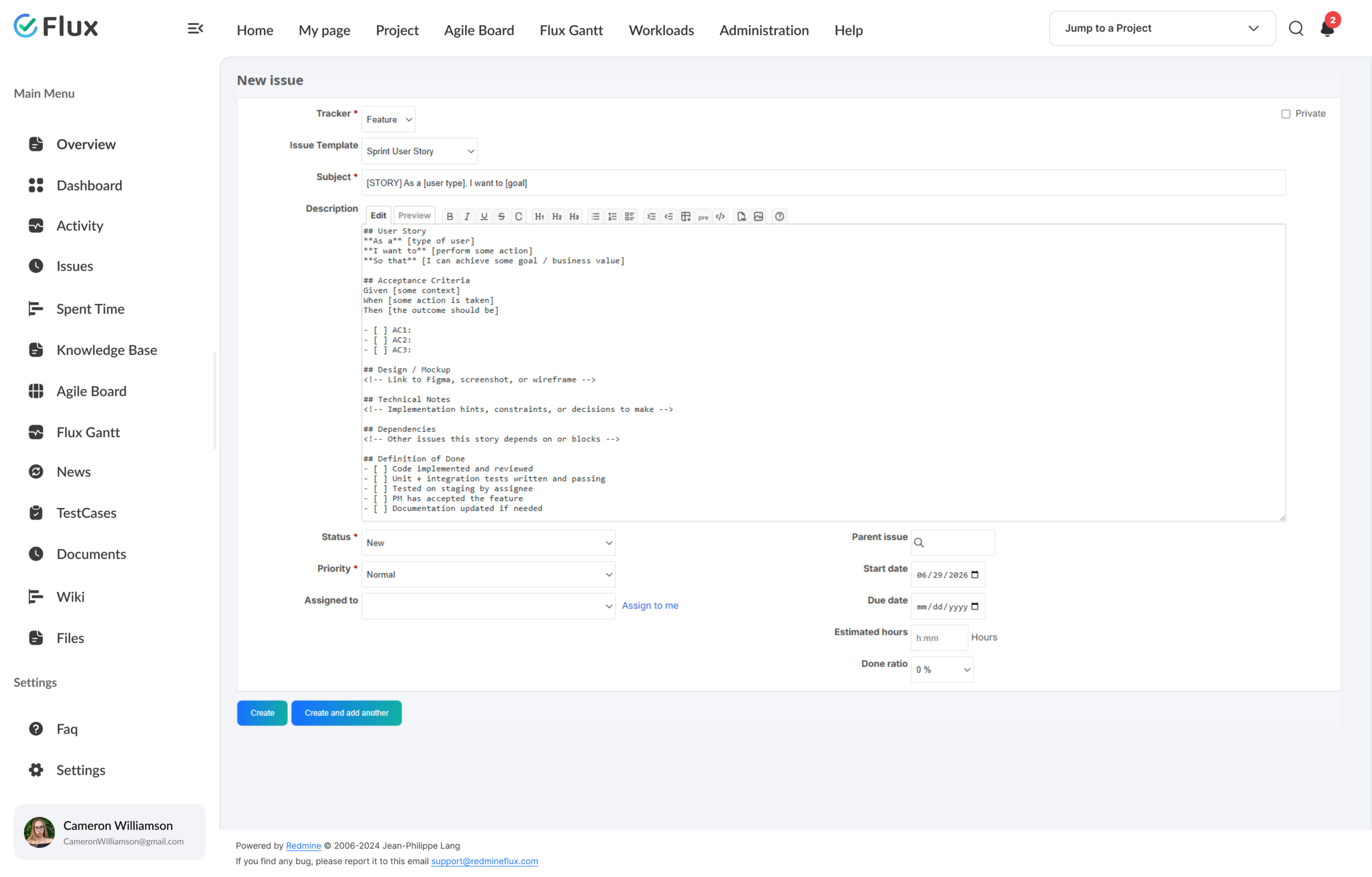
The Redmineflux Issue Template Plugin adds reusable templates to Redmine’s issue creation flow. When a team member creates a new issue, they select the relevant template and the description structure and subject are pre-filled instantly. Every issue starts with the right context.
Standards enforced at creation, not corrected after.
The Issue Template Plugin works as a structured creation layer at the start of every task. Every template enforces the right format for its tracker type. Every issue created from a template carries the correct context from the first line.
Teams that previously relied on convention – or on project managers correcting incomplete issues before sprint start – replace that overhead with a structural standard that applies automatically whenever a new issue is created.
What your team gains
Specific shifts, not vague benefits.
Click any shift to see what changes in the product.
01
Every issue starts with the right context, always.
Tasks created from a template contain complete information and the correct structure for their tracker type. No missing fields, no absent acceptance criteria, and no vague descriptions to correct before work can begin.
02
No more back-and-forth between creator and assignee.
Missing context does not surface mid-sprint when it was never missing in the first place. Developers receive issues that contain everything they need to begin work without requesting clarification from the original reporter.
03
Sprint planning without the issue-repair round.
Well-formed issues require no repair before sprint assignment. Project managers spend less time correcting templates during planning and more time assessing priority and sequencing the work that actually delivers value.
04
QA readiness from the moment of creation.
Acceptance criteria are present from the moment of creation rather than added as an afterthought. QA teams can plan testing cycles before sprint work begins rather than waiting for requirements to be retrofitted into existing issues.
05
New team members follow the right format from day one.
New engineers and project staff follow the right format from day one without needing training on what each tracker type requires. The template enforces the standard structurally – no manual oversight required.
Core capabilities
The specifics, for people who want them.
Build structured templates for any issue type your team uses.
- Rich text template body for any tracker – Bug, Feature, Task, Support, custom
- Tracker and project scope configured per template for context-specific availability
- Templates scoped to specific projects or made globally available across all projects
- Default template auto-loaded by tracker type when a new issue is created
Apply the right template to the right context, automatically.
- Templates assigned to specific trackers within specific projects
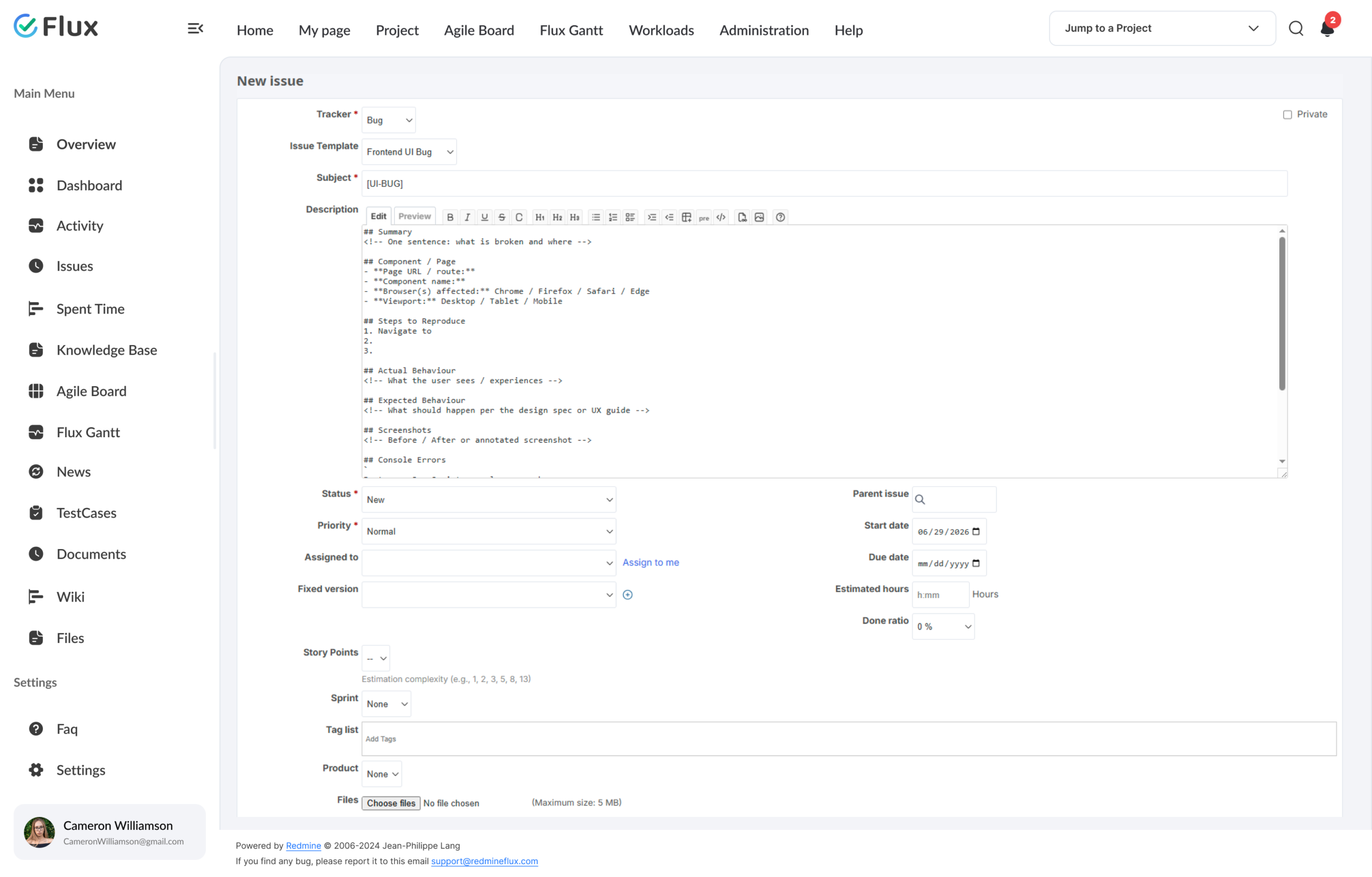
- Multiple templates per tracker for different use cases
- Global templates available across all projects
- Default template auto-selected by tracker type when creating a new issue
Subject and description pre-filled the moment a new issue opens.
- Subject and description pre-filled from the template at issue creation
- Default template auto-loaded by the selected tracker type
- Switch templates at creation time if multiple templates exist for that tracker
- Global templates available alongside project-specific ones in every project
Manage your full set of templates from one admin interface.
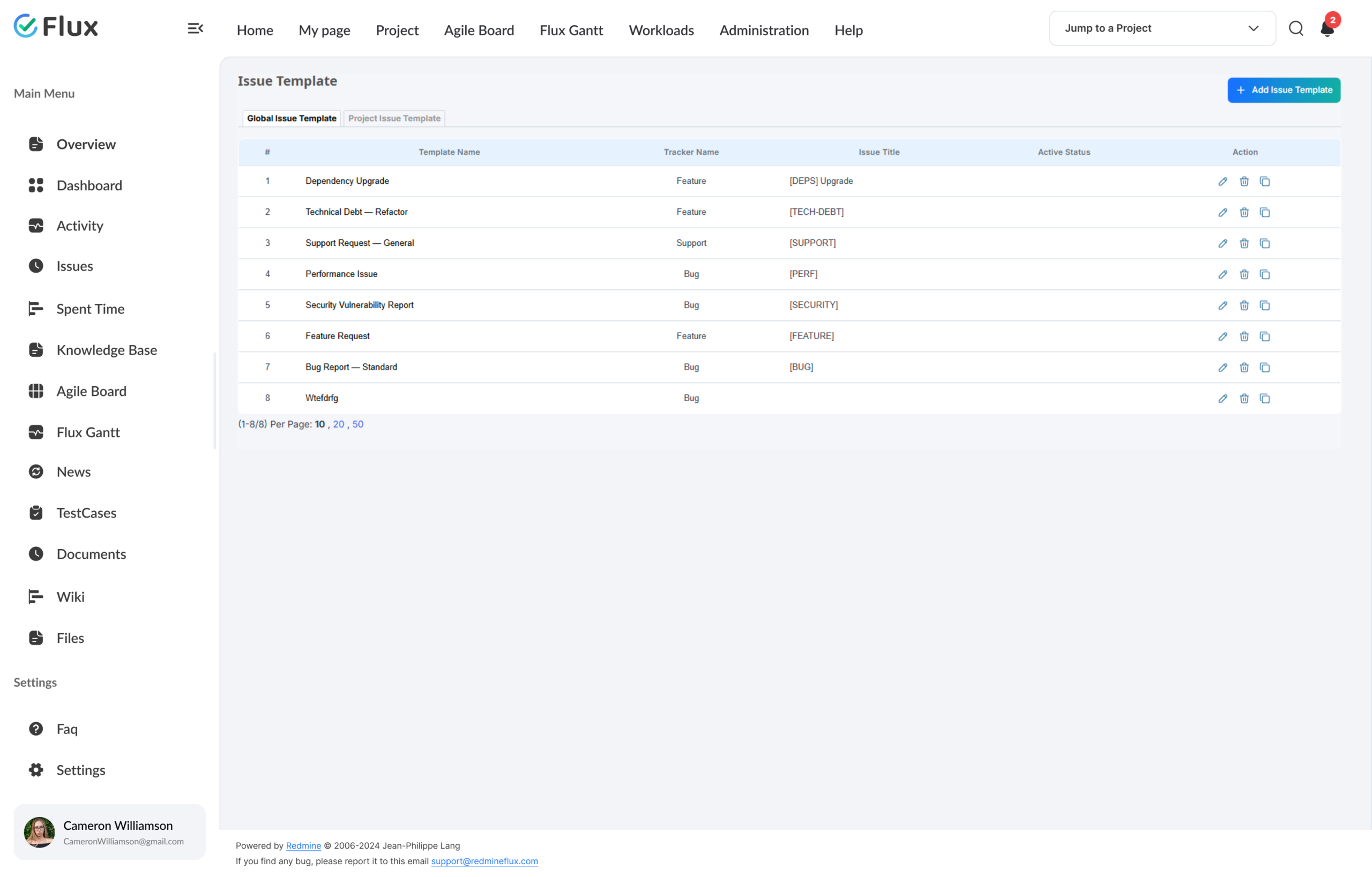
- Centralised interface for creating, editing, and deleting templates
- Global templates managed in Administration > Issue Template
- Project templates visible alongside global templates within each project
- Project filter with auto-scroll for fast project assignment when editing templates
Control who can create and modify templates.
- Role-based permissions for template creation vs. application
- Users can apply templates without editing them
- Project-level admin control per template scope
- Project members can apply templates without permission to edit them
200+
teams trust Redmineflux worldwide
6 yrs
focused on Redmine, nothing else
5000+
plugin downloads powering real projects
Sprint planning used to include a round of fixing incomplete issues. Since we deployed templates, every issue that enters planning is already complete. We save at least an hour per sprint.
Deployment
Run it your way.
Managed Cloud
- Hosted by Redmineflux · included in every Cloud plan
- Daily backups · SLA-backed uptime
- No per-plugin licences – all-inclusive pricing
$1.99 / user / month
Get a Free Demo →Self-hosted
- One-time purchase · 1 year of support included
- Your infrastructure, your security perimeter
- Perpetual licence · install in 10 minutes
From $99 one-time
Buy plugin →Every plugin in Cloud also runs on self-hosted Redmine.
Role by role
What Issue Template changes for each role.
Project ManagerIssue quality, triage speed
Consistent issue quality and faster triage across all projects and trackers – without a manual review round before every sprint.
Engineering LeadTask clarity, context completeness
Clear, complete tasks from creation – no time lost correcting missing context or chasing reporters for additional information mid-sprint.
QA LeadAcceptance criteria, test readiness
Acceptance criteria present in every issue before it reaches the QA stage – no waiting for requirements to be retrofitted into existing tickets.
IT DirectorGovernance, data consistency
Standardised workflow governance and consistent data across the Redmine instance – enforced at the point of creation, not corrected after the fact.
Pricing
Three ways to get Issue Template.
Buy this plugin
Issue Template – self-hosted
Support renewal after 1 year 30% of plugin price
1 year of support included · install in 10 minutes
Buy Issue Template →Save with a Bundle
Project Management Bundle
Includes Issue Template + Agile Board + Gantt Chart + Timesheet + Knowledge Base + Custom Dashboard + Notification.
See the Bundle →Or use Managed Cloud
Redmineflux Cloud
Included in every Cloud plan from $1.99/user/month. Managed Redmine, no infrastructure work.
See Cloud plans →See consistent issues on your trackers
See Issue Template running in your Redmine.
Real templates, real issue creation flow, subject and description pre-filled — inside Redmine.
Frequently asked
Questions before you install.
The questions teams actually ask before adopting Issue Template. If yours isn't here, check pricing or contact support.
Can templates be assigned to specific projects or trackers?
Yes. Templates in the Redmineflux Issue Template Plugin can be assigned to specific projects, specific trackers, or both. When a team member creates a new issue, the relevant templates for that tracker are shown. You can also configure a default template that loads automatically for the selected tracker.
Can I create multiple templates for the same tracker?
Yes. You can create as many templates as needed for a single tracker. A Bug tracker can have separate templates for frontend bugs, backend bugs, and performance issues – each with a different subject prefix and description structure. The team member selects the most relevant template at creation time.
How does default template auto-selection work?
When creating a new issue, the user selects a template based on the tracker type. Once selected, the subject and description are automatically pre-filled. Multiple templates can exist for the same tracker, and the user can switch between them at creation time.
Which Redmine versions are supported?
The Redmineflux Issue Template Plugin supports all Redmine versions. Compatibility is verified with each plugin update.
How much does the Issue Template Plugin cost?
$99 one-time for self-hosted – 1 year of support included. Support renewal after 1 year 30% of plugin price. Bundle with the Project Management Bundle ($2,456 one-time) for Issue Template + Agile Board + Gantt Chart + more. Or hosted at $1.99/user/month via Redmineflux Cloud – included in every plan. See the pricing section above.
Is there a free demo available?
Yes – request a free demo and we’ll send a personalised demo link straight to your inbox. No credit card required, no commitment. Explore the real product at full capacity, at your own pace. Cloud starts at $1.99/user/month.