
Redmine Invoice – generate client invoices from time logs.
For finance leads, project managers, and IT directors billing clients from Redmine – without rebuilding data in a separate billing tool.
one-time purchase · 1 year of support included
Support renewal after 1 year 30% of plugin price
Where billing breaks down
Time is in Redmine. Invoices are somewhere else. That gap costs money.
Most Redmine teams already capture time against issues and projects. But invoicing still happens somewhere else – in spreadsheets, accounting software, or email. Hours logged in Redmine are manually transferred to another tool, which leads to missed or miscounted entries, especially near period close. Billing rates are applied inconsistently because there is no enforced rule by project or team member. Compiling invoice data manually takes days, which delays invoice delivery beyond agreed payment terms and slows revenue collection. When clients dispute billed hours, there is often no direct link between the invoice line item and the original Redmine time entry needed to resolve the dispute.
In plain words
What is the Redmineflux Invoice Plugin?
The Redmineflux Invoice Plugin is a Redmine billing plugin that generates client invoices directly from logged time entries. It supports configurable billing rates per project or per user, a Draft → Sent → Paid invoice workflow, Stripe payment integration, customer management, and a central invoice dashboard – all inside Redmine. Compatible with all Redmine versions.
Invoices that reflect actual work, not estimates.
The Invoice Plugin closes the gap between time tracking and client billing. Generate invoices directly from Redmine time log entries, within the same workspace your team uses to plan and track work. No exports, no manual reconstruction, no second system to maintain.
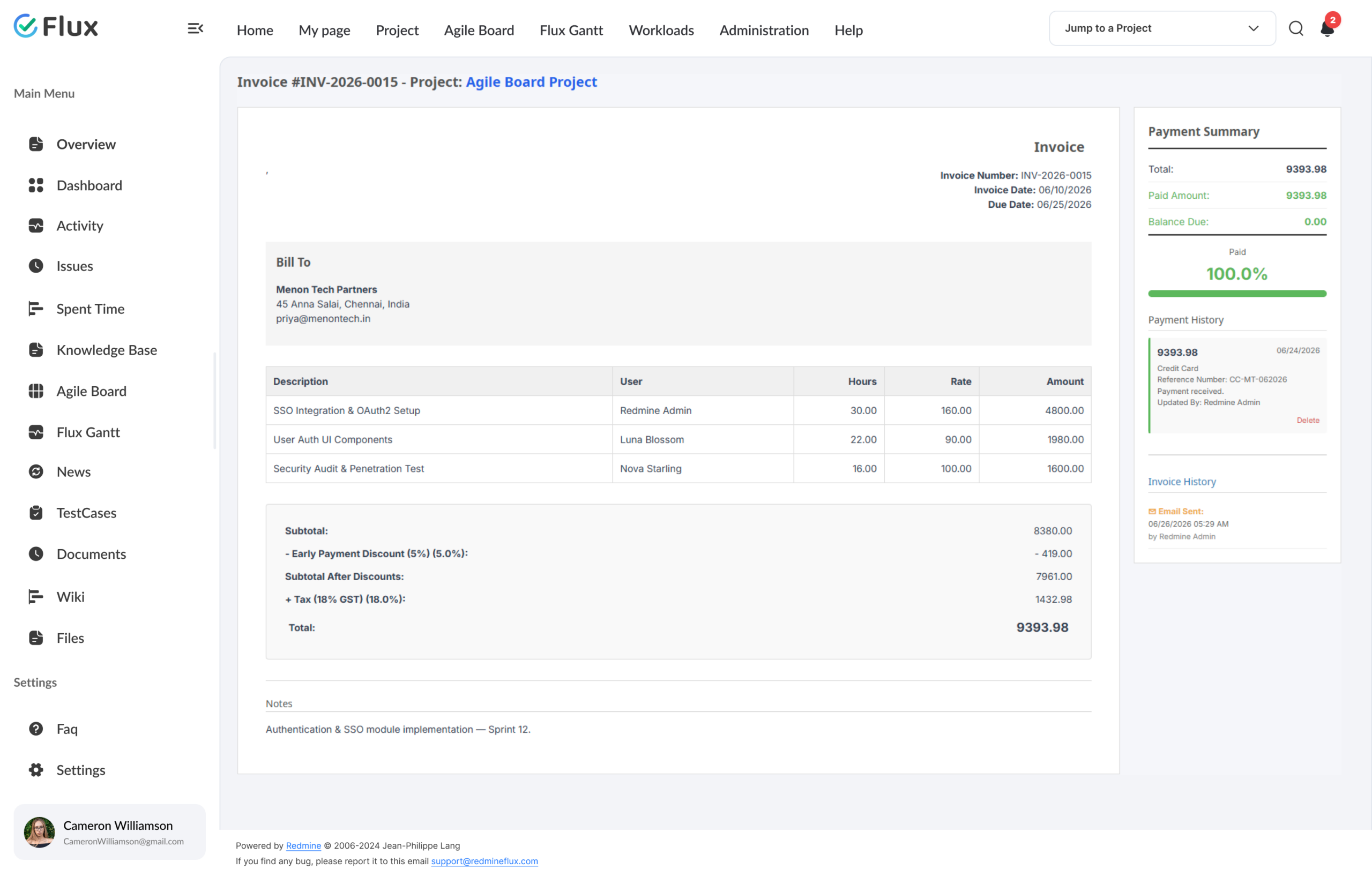
Each invoice is built from actual time entries, filtered by date range and billable activity, and applied against project-specific or user-specific billing rates you configure. The result is a clear, traceable connection between logged hours and the billed amount.
Every plugin in Cloud also runs on self-hosted Redmine.
What your team gains
Specific shifts, not vague benefits.
Click any shift to see what changes in the product.
01
Full visibility into billable hours before an invoice is sent.
Review exactly what is being billed – by activity, by team member, by date – before dispatching to the client. Draft invoices are fully editable. Adjustments happen inside Redmine, not in a spreadsheet reconstruction.
02
Every invoice line item traces back to a Redmine time entry.
Invoices reflect actual work, not estimates. Every line item links back to a logged Redmine time entry with a date, user, and activity. Disputes are resolved against a verifiable record – not a spreadsheet no one can now locate.
03
Generate, review, and send invoices without leaving Redmine.
Generate, review, and send invoices directly from Redmine. Stripe integration supports online payment links so clients can pay from the invoice email. Faster invoice-to-payment cycles – because the process doesn’t leave the project workspace.
04
Billing rules configured once, applied consistently across every cycle.
Set project hourly rates, define billable activities, and configure per-user team rates in one place. The plugin applies those rules automatically when invoices are generated. No more inconsistent billing from manually applied rates.
05
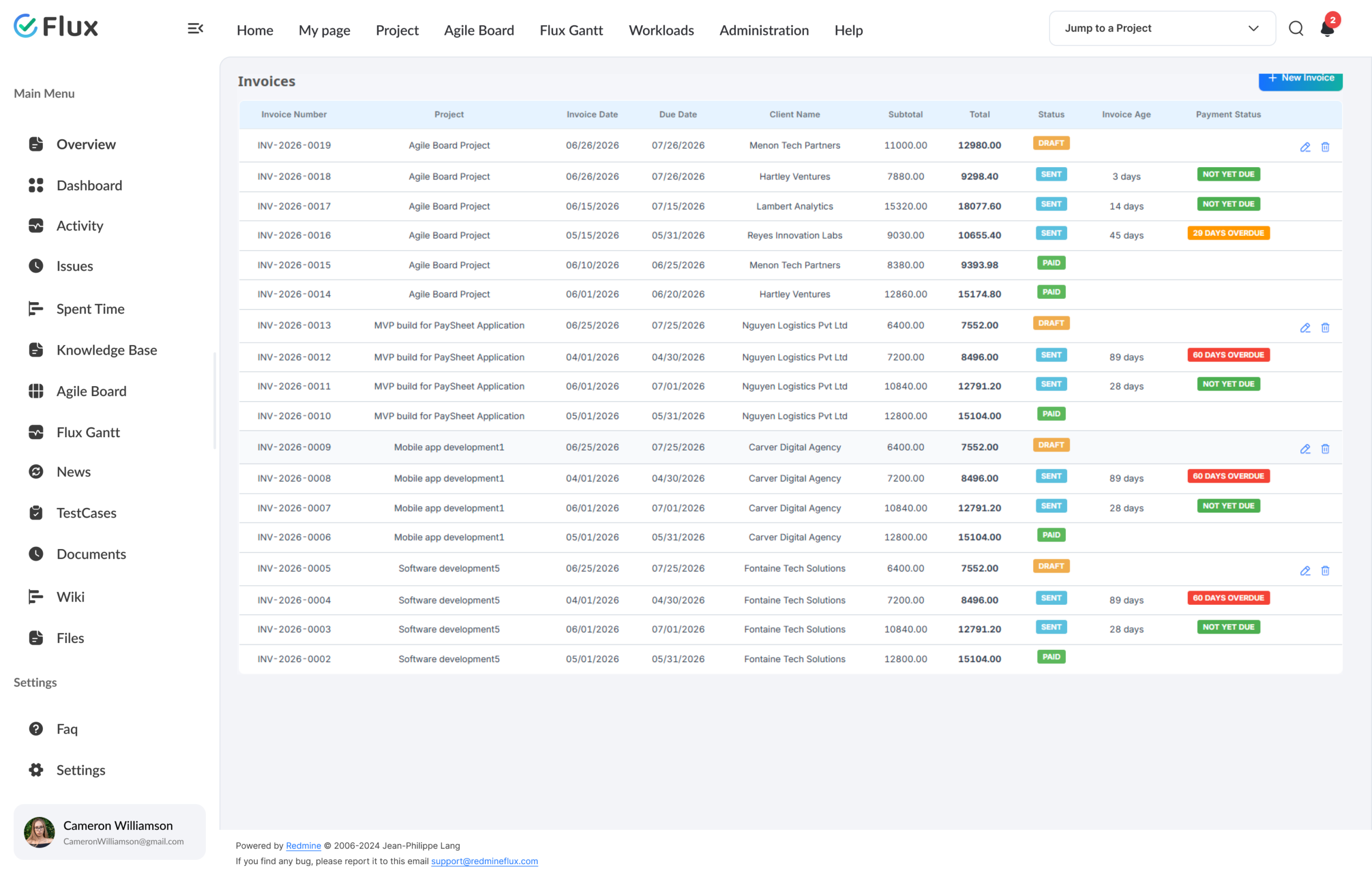
Complete billing status visible across all projects from one dashboard.
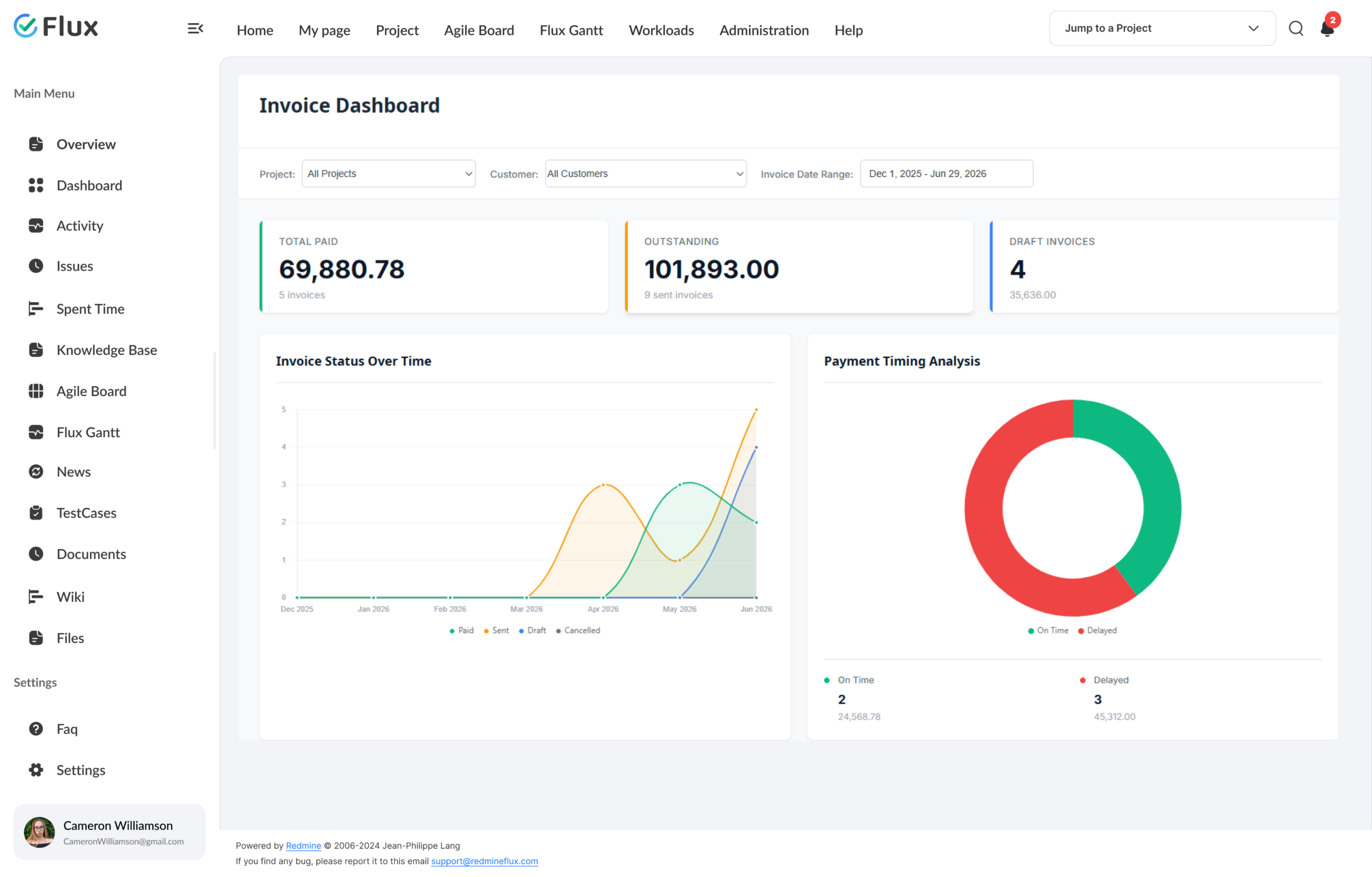
View all invoices across every project – paid, sent, and unpaid – from a single dashboard. Track outstanding revenue and payment status without navigating project by project. Finance leads and business owners see the full billing picture in one place.
Core capabilities
The specifics, for people who want them.
Built from real Redmine time entries, not reconstructed from memory.
- Select project, date range, and billable activities – plugin builds the rest
- Project hourly rates applied uniformly; per-user Team Rates override per member
- Draft → Sent → Paid status path with locked editing after dispatch
- Custom invoice and email templates with branded layout
- Entire billing workflow stays inside Redmine from first draft to payment
Central client records across all invoice-generating projects.
- Global customer module accessible across all projects
- Contact details, billing address, and invoice history per client
- Link each project to its customer – invoices always associated correctly
- One consistent client record across all invoice-generating projects
- Payment terms and branding configured once, applied to all invoices
Online payment directly from the invoice email.
- Configure Stripe credentials in payment gateway settings
- Payment link generated inside every dispatched invoice
- Clients pay directly from the invoice email – no extra setup
- Manual payment recording gives finance control over reconciliation
- Invoice dashboard tracks paid, sent, and unpaid status across all projects
200+
teams trust Redmineflux worldwide
6 yrs
focused on Redmine, nothing else
5000+
plugin downloads powering real projects
Month-end billing used to take two days. I was pulling time from Redmine and building invoices in Excel. Now it’s one export and a review. Half a day at most.
Deployment
Run it your way, when it ships.
Managed Cloud
- Hosted by Redmineflux · included from Standard plan
- Invoice Plugin included · all plugins available in Cloud
- No per-plugin licences – all-inclusive pricing
$2.99 / user / month
Get a Free Demo →Self-hosted
- Drop-in install on your own Redmine
- one-time purchase · 1 year of support included
- Join waitlist – notified when licence is available
$199 one-time
Join waitlist →Every plugin in Cloud also runs on self-hosted Redmine.
Role by role
Who gets the most from Invoice Plugin.
Finance LeadInvoice generation + dispatch
Invoices built from verified Redmine time data – no spreadsheet reconstruction, no manually applied rates, no period-close panic.
Project ManagerTime logs → billing
Billing accuracy improves because every invoice line item is traceable to a logged time entry. Disputes are resolved against a verifiable record, not a memory.
IT DirectorGovernance over billing data
One system of record for project work and client invoicing – with a full audit trail, inside the Redmine environment your team already governs.
Business OwnerRevenue visibility
Outstanding, sent, and paid invoices visible from a single dashboard across all active client engagements – without navigating project by project.
Not the right fit for: Teams on fixed-price contracts with no per-hour billing requirement.
Pricing
Three ways to get Invoice Plugin.
Self-hosted
Invoice – self-hosted
one-time purchase · 1 year of support included · flat for the whole team.
Support renewal after 1 year 30% of plugin price
Buy Invoice Plugin →Ships in All Plugins Bundle
All Plugins Bundle
Invoice is included in the All Plugins Bundle – included automatically under your existing bundle renewal.
Save 10% See the Bundle →Hosted · Invoice ships in Cloud
Redmineflux Cloud
Includes Invoice when it ships. Included in Standard and Pro Cloud plans, no infrastructure work.
See Cloud plans →Available now
Stop rebuilding timesheet data in a separate billing tool.
Invoice your clients directly from Redmine time logs. One-time purchase, flat pricing for your whole team — no subscription required.
Frequently asked
Questions about Invoice Plugin.
Common questions about Invoice Plugin. If yours isn’t here, check pricing or contact support.
Which Redmine versions does the Invoice Plugin support?
The Invoice Plugin supports all Redmine versions. Compatibility is tested and maintained with each plugin update.
How are invoices generated from Redmine time entries?
Go to Project → Invoice Tab, open Invoice Settings, select a date range, and click Save. The plugin reads all matching Redmine time entries within that range and builds the invoice automatically based on your configured billing rates and activities. No manual data entry required.
Can I set different billing rates for different team members on the same project?
Yes. The plugin supports a Team Rate configuration at the project level. Assign a specific hourly rate to individual users within each project. When an invoice is generated, the plugin applies the correct rate per user from matching time entries automatically.
Can I edit an invoice after it has been sent?
No. Invoices are only editable in Draft status. Once you click Send Email and the invoice status changes to Sent, it becomes non-editable. Review and adjust all line items, rates, and date ranges before dispatch.
Can clients pay invoices online?
Yes. Configure Stripe credentials (Publishable Key and Secret Key from your Stripe Dashboard) in the payment gateway settings. The plugin generates a payment link in every dispatched invoice email. Clients pay directly without additional setup on their end.
Does Invoice Plugin use Redmine’s existing roles and permissions?
Yes. Enable the invoice module per project through Redmine’s standard module settings. Billing configuration and customer assignment follow your existing Redmine project permissions – no separate access system is needed.
What is the licensing model?
One-time purchase with 1 year of support included. Support renewal after 1 year 30% of plugin price. Launch price is $199.
How much does the Invoice Plugin cost?
$199 one-time for self-hosted – 1 year of support included. Support renewal after 1 year 30% of plugin price. Bundle with the All Plugins Bundle ($4,754 one-time) for all plugins. Or hosted at $2.99/user/month via Redmineflux Cloud Standard and above.
Is there a free demo available?
Yes – request a free demo and we’ll send a personalised demo link straight to your inbox. No credit card required, no commitment. Explore the real product at full capacity, at your own pace. Cloud starts at $1.99/user/month.