
Redmine CRM – contact and deal management inside Redmine.
For sales leads, delivery heads, and IT directors running services businesses on Redmine.
one-time purchase · 1 year of support included
Support renewal after 1 year 30% of plugin price
The gap between sales and delivery
Deal context gets lost the moment the contract is signed.
The handoff between sales closing a deal and delivery beginning work is one of the most information-lossy transitions in any services organisation. Deal details, client requirements, and negotiated scope live in a CRM the delivery team cannot access – which means the project starts without the context the sales team spent weeks gathering. Every manual transfer introduces duplication errors and omissions that surface later as misaligned client expectations. Contact history stays siloed in the sales tool throughout the project lifecycle, so support escalations and relationship decisions are made without the full picture.
In plain words
What is the Redmineflux CRM Plugin?
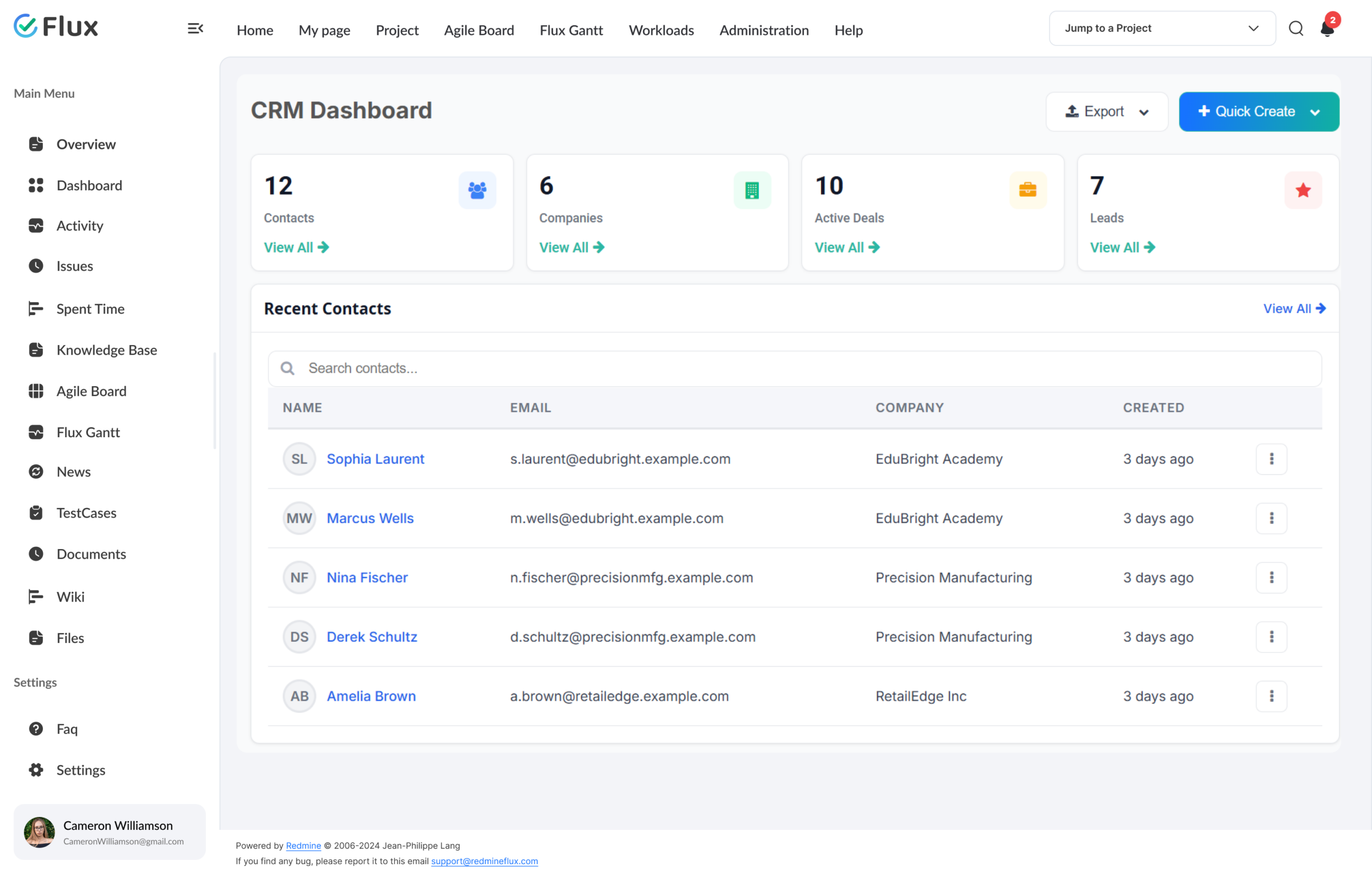
The Redmineflux CRM Plugin adds a structured contact and deal management layer natively inside Redmine. Create and manage contacts and companies, track deals through a configurable pipeline, and log calls, emails, and meetings as activities against contacts or deals. When a deal closes, link it to a Redmine issue – keeping deal context connected to the delivery work without a separate handoff document.
Sales and delivery in the same environment.
The CRM Plugin enhances Redmine without replacing it. It extends the tool your delivery team already works in to cover the pre-sales cycle that precedes every project. When the deal closes, everything the project team needs is already in Redmine – because it never left.
Support escalations managed through the Helpdesk Plugin can reference the full client deal and contact history directly from the same issue view. Project managers reviewing delivery progress through the Dashboard Plugin see the sales context alongside the delivery metrics, without switching systems.
Every plugin in Cloud also runs on self-hosted Redmine.
What your team gains
Specific shifts, not vague benefits.
Click any shift to see what changes in the product.
01
No sales-to-delivery handoff friction – context carries forward.
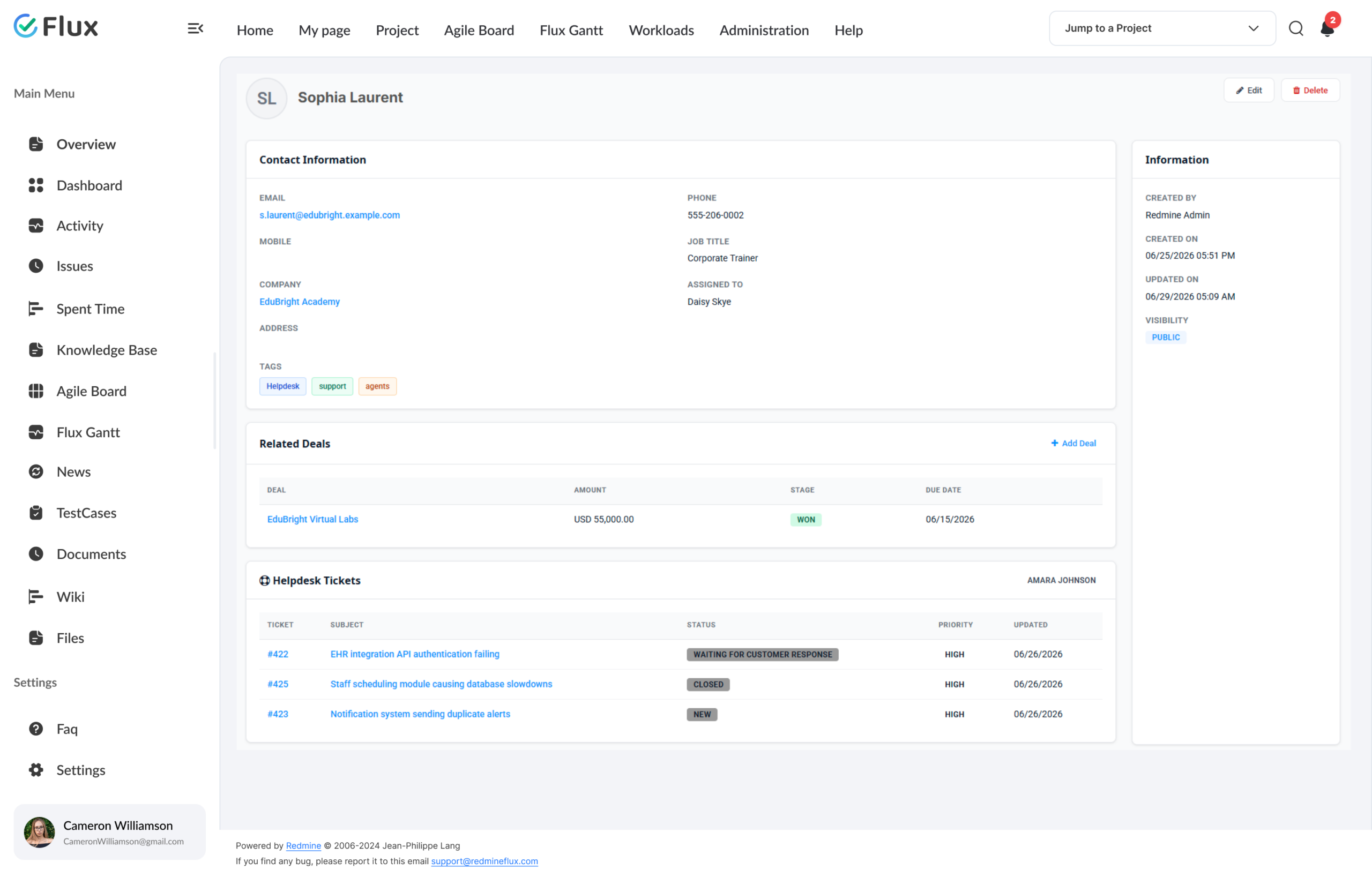
When a deal is marked closed, it links to a Redmine issue with the contact record and deal activity history attached. The delivery team begins work with the same information the sales team gathered – no briefing document, no context reconstruction, no gaps.
02
Full contact history visible in one place, every interaction in one record.
Every interaction with a contact – emails, calls, meetings, demos, and proposals – appears in a single chronological record inside Redmine. Support and delivery teams see the full relationship history before every client-facing conversation, which enables better decisions and more informed responses.
03
Pipeline visibility without a separate CRM subscription.
Deal stage, value, close probability, and owner are visible from within Redmine for every sales team member. Management reporting on pipeline health and win rates pulls from the same environment as delivery reporting – with no cross-tool data export required.
04
Every client interaction logged inside Redmine.
Calls, emails, meetings, and follow-up tasks are logged against contacts and deals as structured activity records. Billing and project time tracked through the Timesheet Plugin integrates with deal activity records to give management a complete view of pre-sale and delivery investment per client.
05
Unified reporting – pipeline and delivery in the same system.
Win rate, average deal value, and weighted pipeline forecast are all reportable from within Redmine without joining data from separate tools. Management visibility into the full sales pipeline is available in one place for the first time.
Core capabilities
The specifics, for people who want them.
A structured record of every client and prospect.
- Contact profiles with company, role, and full interaction history
- Company records link all contacts and deals in one view
- Custom fields for industry, region, and client segmentation
- CSV import from existing contact databases
- Lead conversion from Qualified status creates a contact and optionally a linked deal
Track opportunities from first contact to closed deal.
- Configurable pipeline stages matching your actual sales process
- Deal value, close probability, expected date, and owner per deal
- Board view with drag-and-drop stage progression
- Auditable deal history log – every stage change and activity recorded
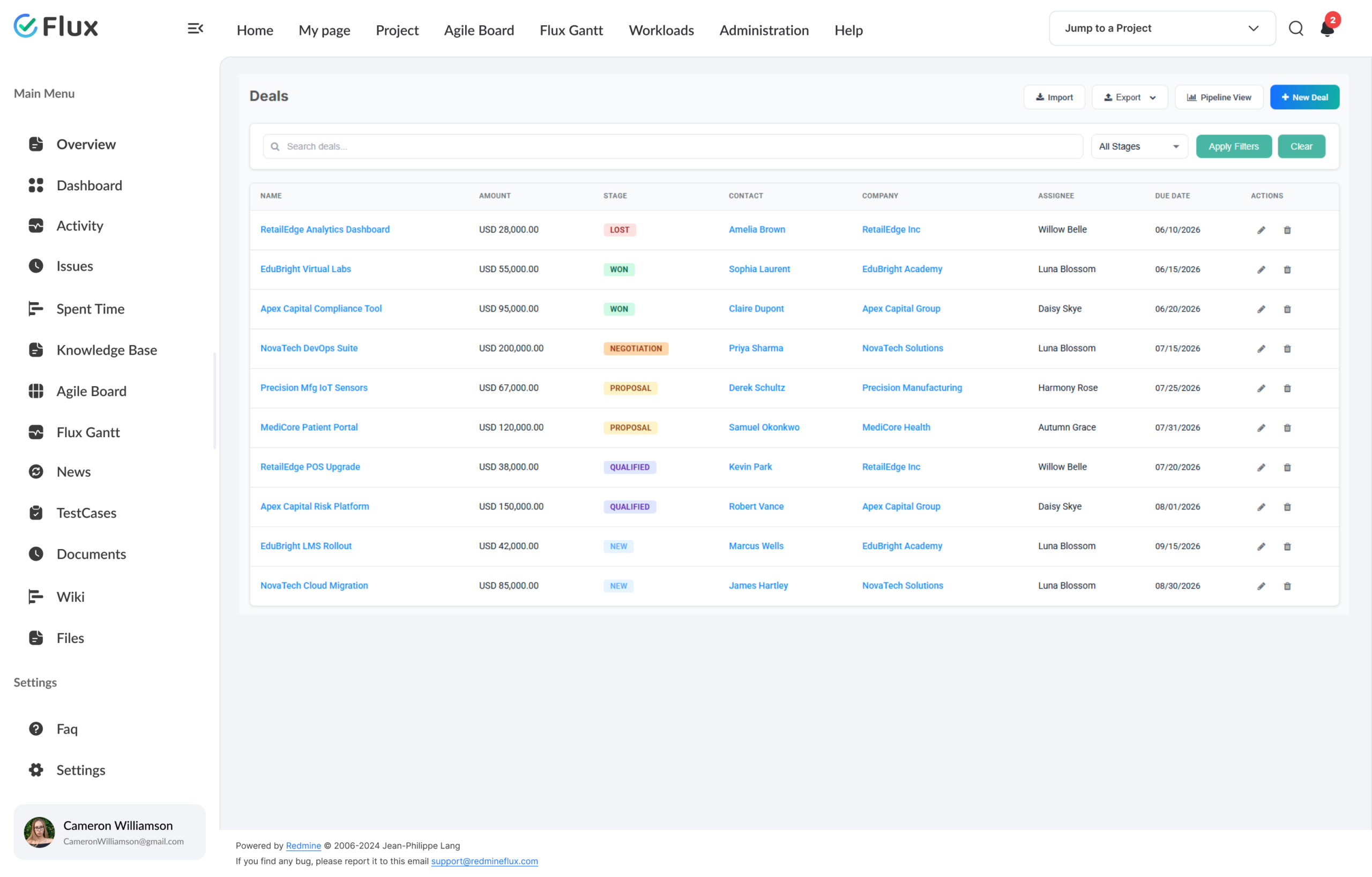
- Deal stages: New, Qualified, Proposal, Negotiation, Won, and Lost
Close a deal – link it to a Redmine issue with full deal context attached.
- One-action link from any closed deal to an existing Redmine issue
- Deal context and activity history accessible from the linked issue
- Linked issue shows the full deal history; deal record shows issue status
- Win rate, average deal value, and weighted forecast analytics in one system
- CSV export for finance and management reporting
200+
teams trust Redmineflux worldwide
6 yrs
focused on Redmine, nothing else
5000+
plugin downloads powering real projects
Sales had all the client history in HubSpot. Delivery had the project in Redmine. Every handoff was a thirty-minute briefing. Now the project team can read the full deal history before the project even starts.
Deployment
Run it your way.
Managed Cloud
- Hosted by Redmineflux · every plugin included
- Daily backups · SLA-backed uptime
- No per-plugin licences – all-inclusive pricing
$3.99 / user / month
Get a Free Demo →Self-hosted
- Drop-in install on your own Redmine
- one-time purchase · 1 year of support included
- Your infrastructure, your security perimeter
From $299 one-time
Buy plugin →Every plugin in Cloud also runs on self-hosted Redmine.
Role by role
What CRM Plugin changes for each role.
Sales LeadPipeline + contact management
Full CRM pipeline and contact management inside the tool the delivery team already uses daily – no separate CRM login required.
Project ManagerDeal context at project start
Complete deal context available from project start – no handoff document to chase or reconstruct from a summary email.
Delivery HeadMulti-project oversight
Sales pipeline visibility alongside delivery status in one environment – no cross-tool reporting, no data exports.
IT DirectorGovernance + one data store
CRM and project delivery in one system – one data store, one audit trail, one tool to govern. Simplifies access control and compliance reporting.
Pricing
Three ways to get CRM Plugin.
Buy this plugin
CRM – self-hosted
one-time purchase · 1 year of support included
Support renewal after 1 year 30% of plugin price
Buy CRM Plugin →Save with All Plugins Bundle
All Plugins Bundle
Every plugin included – CRM, Timesheet, Helpdesk, Invoice, and 11 more. One renewal.
Save 10% See the Bundle →Or use Managed Cloud
Redmineflux Cloud
Every plugin included, AI bundled, agent seats, no infrastructure work.
See Cloud plans →Try it on your team’s data
See CRM Plugin running in your Redmine.
The gap between closing a deal and starting delivery is where context gets lost. CRM Plugin keeps it in Redmine from the first contact call to the final delivery milestone.
Frequently asked
Questions before you install.
The questions sales and delivery teams ask before adopting CRM Plugin. If yours isn’t here, check pricing or contact support.
Can I import contacts from an existing CRM?
Yes. The CRM Plugin supports contact import from CSV. The plugin expects fixed column names for the import – export your existing contacts in the required CSV format and the data maps directly into the plugin’s contact fields. Check the documentation for the required column structure before importing.
Can the deal pipeline stages be customised to match our process?
The CRM Plugin comes with a built-in sales pipeline with six stages: New, Qualified, Proposal, Negotiation, Won, and Lost. All deals in the instance flow through this single pipeline. Check the plugin documentation for configuration options available in your Redmine version.
Does CRM Plugin integrate with email?
The CRM Plugin supports manual activity logging for emails, calls, and meetings from within Redmine. Automatic email sync – connecting a mailbox to log email threads automatically – is available via configuration with the Helpdesk Plugin’s email integration. Check the plugin documentation for setup details.
Which Redmine versions are supported?
The Redmineflux CRM Plugin is tested and maintained against the three most recent stable Redmine releases, including all Redmine versions. Compatibility is verified with each plugin update.
How much does it cost?
$299 one-time for self-hosted – 1 year of support included. Support renewal after 1 year 30% of plugin price. Bundle with the All Plugins Bundle ($4,754 one-time) for all plugins. Or hosted at $3.99/user/month via Redmineflux Cloud Pro – every plugin included.
What is the licensing model?
One-time purchase with 1 year of support included. Support renewal after 1 year 30% of plugin price.
Is there a free demo available?
Yes – request a free demo and we’ll send a personalised demo link straight to your inbox. No credit card required, no commitment. Explore the real product at full capacity, at your own pace. Cloud starts at $1.99/user/month.