



Custom Dashboard Redmine Plugin

$499.00

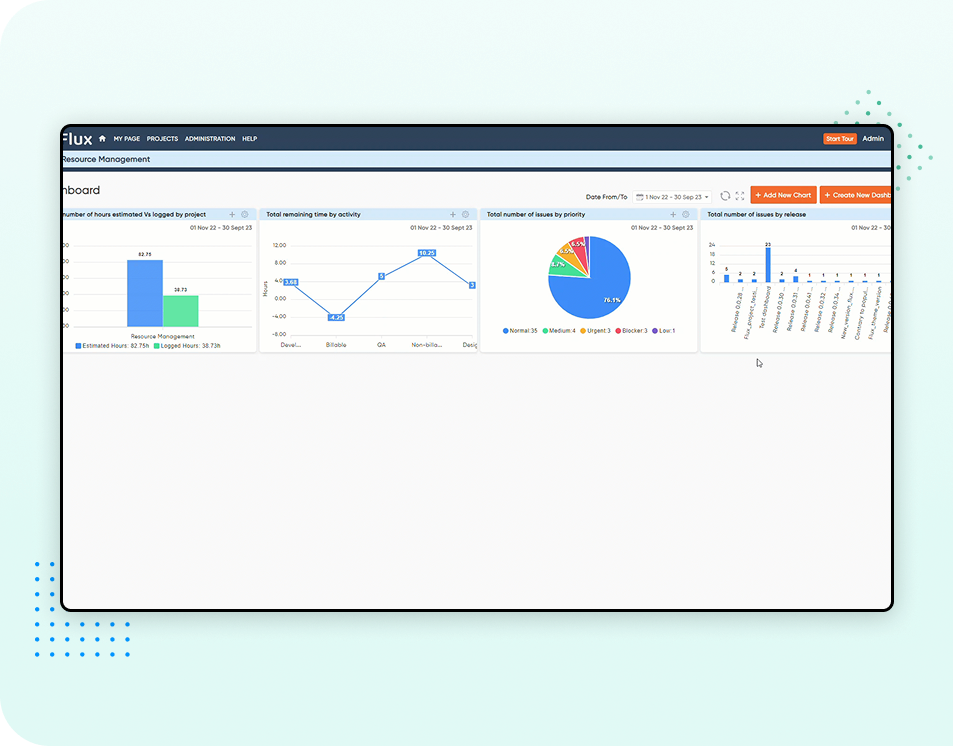
Customizable dashboards that give an overview of achievements, & project status. Get real-time insights to facilitate confident & well-informed decision-making.(Charts and Graphs) 

SKU: N/A Category:

Description

Redmineflux Custom
Dashboard Plugin 

Transform Redmineflux into a Real-Time Productivity Command Center

Redmineflux Custom Dashboard Plugin
Easy Installation
Works with Existing Redmine
Secure AWS Hosting
Cloud & On-Prem Support
Redmineflux Custom dashboard

What does Redmineflux Custom Dashboard Plugin do? 

The Redmineflux Custom Dashboard Plugin turns Redmineflux into a powerful and personalized custom project dashboard tool. Instead of wasting time digging through menus, reports, and project pages, your team gets instant visibility into tasks, deadlines, workloads, and project performance metrics, all from a single customizable dashboard. 

Whether you’re managing multiple projects or handling your own daily tasks, this plugin helps you stay focused, aligned, and in control using real-time project analytics and data visualization dashboards. 

Key Capabilities

Key Capabilities  

  • Build custom project dashboards using Redmine’s default and custom queries.

  • Create visual charts such as bar, line, pie, donut, and others for project reporting.

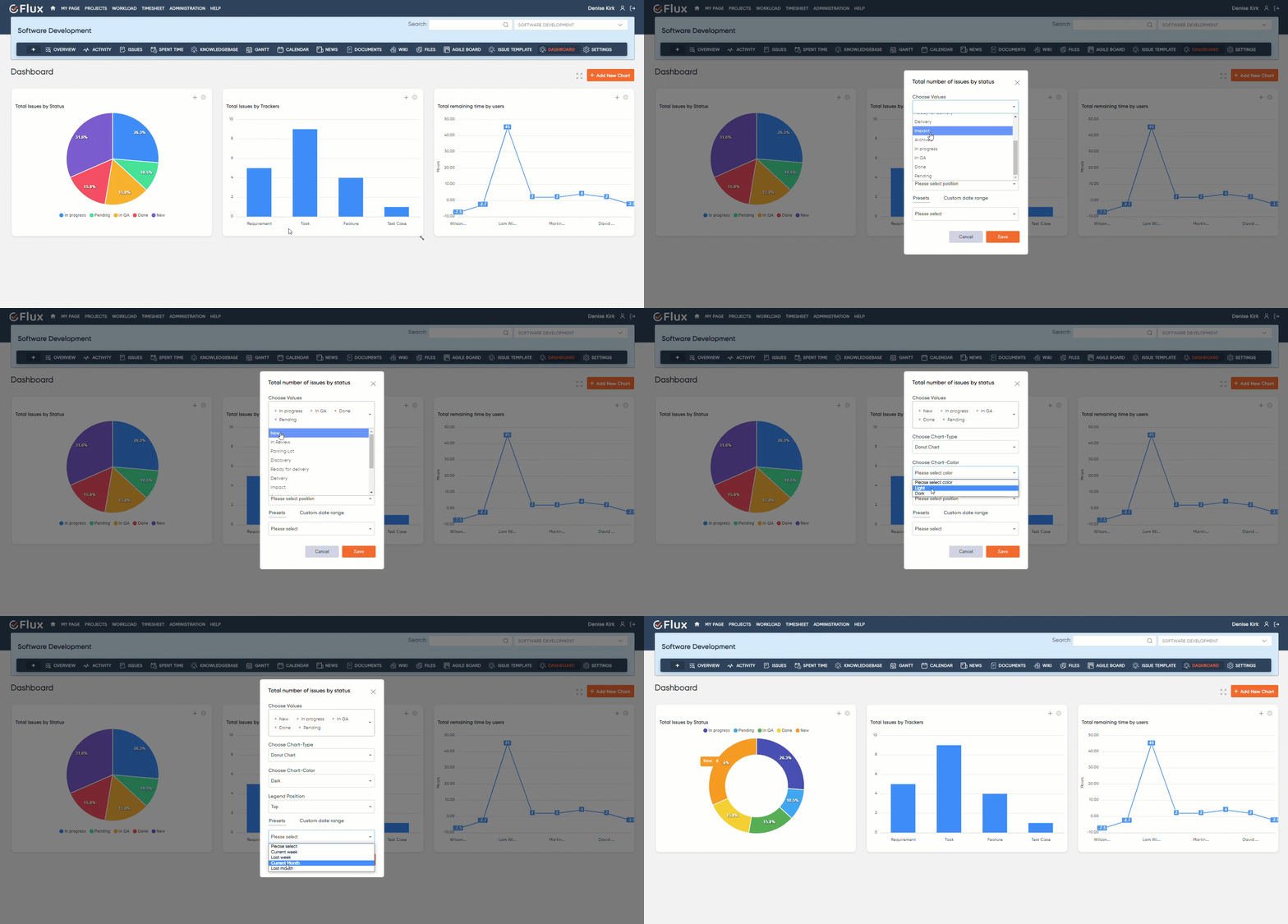
  • Customize charts with different types, colours (light/dark), legend positions, and status filters for flexible data visualization.

  • Apply chart-specific or global date ranges for a fully adaptive real-time dashboard tool.

  • Rearrange and resize dashboard elements easily with drag-and-drop.

  • Use 2D tables for tabular project data visualization from custom queries.

  • Refresh dashboards or switch to full-screen mode for focused viewing.

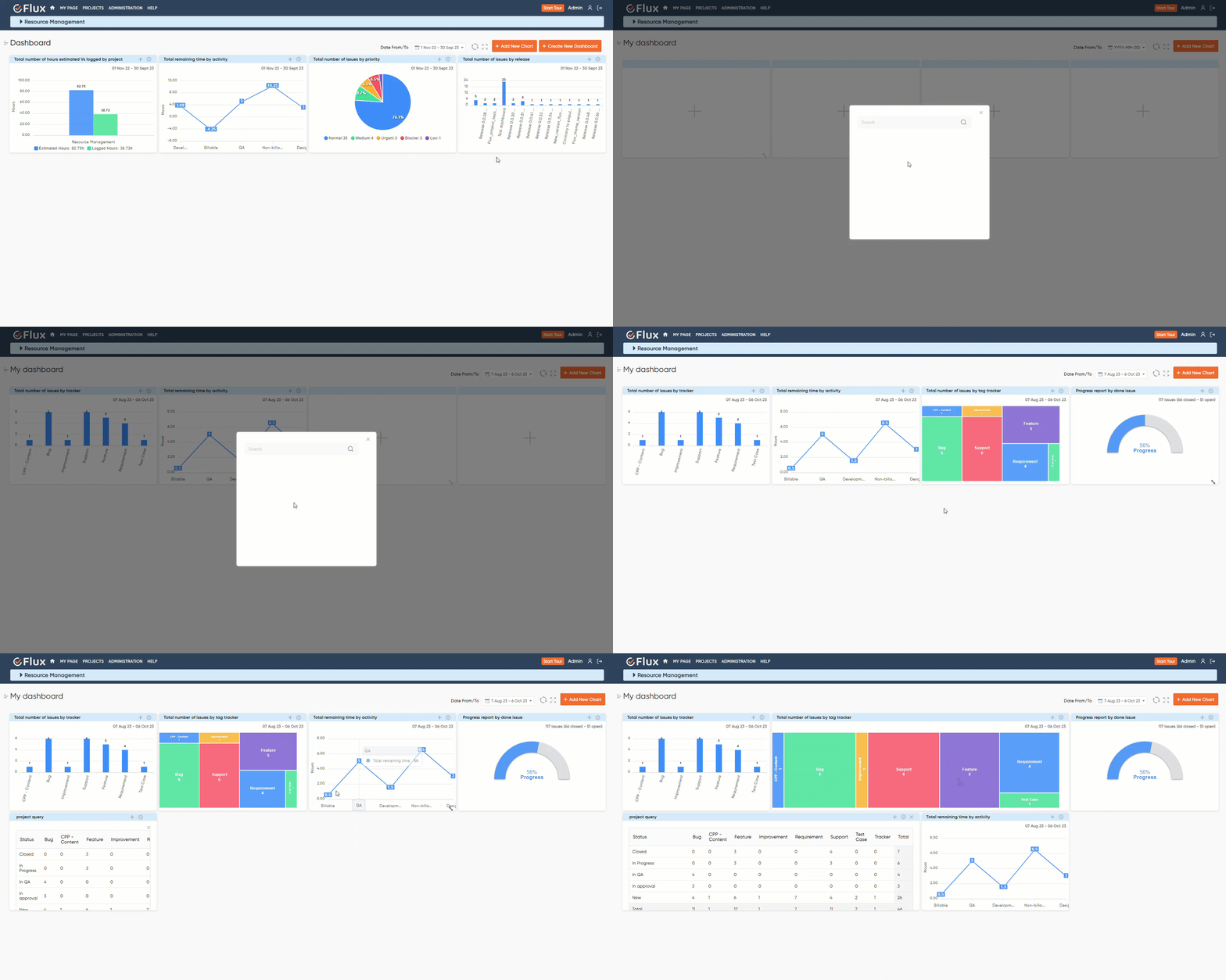
  • Create and manage multiple dashboards within the same project for PMO reporting or team-specific views.

Why Teams Love our Custom Dashboard Plugin?

Turn complex Redmineflux data into clear, actionable insights 

Instantly generate visual dashboards from Redmineflux queries for project planning and tracking

Monitor project progress in real time with performance monitoring tools 

Identify blockers that impact task execution and workflow efficiency 

Keep teams aligned with real-time project insights and KPIs 

Turn complex Redmineflux data
Testimonial
What People are Saying!
Alex Tucker

Project Manager, Newyork

Alfred Fleischer

Project Manager

Chen Jun Hao

Project Manager, Singapore

Marlena Sievers

CEO

Alex Tucker

Redmineflux plugins have been a game-changer for our Redmine setup. The enhanced features like advanced time tracking, custom workflows, and improved reporting have significantly boosted our productivity. The integration was seamless, and the support team was fantastic. Highly recommend these plugins to any Redmine user!

Alfred Fleischer

Getting all of my business data organized in one place is all I wanted. With Redmineflux, I can filter data and simplify my agile operations.

Chen Jun Hao

Redmineflux themes have completely transformed the look and feel of our Redmine instance. We were looking for a way to make our Redmine more visually appealing and user-friendly, and these themes delivered on both fronts. The customization options are fantastic, allowing us to tailor the design to our company’s branding.

Marlena Sievers

Redmineflux has an easy-to-use interface & is easily customizable. It helps active coordination and focuses project resources in one direction.

image 25

Enhance collaboration, elevate productivity,
& meet goals with Redmineflux.

Enhance collaboration, elevate productivity, & meet goals with Redmineflux.

Latest from our blog

Meet your project deadlines with advanced features and systematic data representation.  
Mask group 12
Comparison

Redmineflux vs Pivotal Tracker: What’s the Difference? 

In the fast-paced world of business, success is about more than just staying ahead of the curve. It’s about being nimble, adapting quickly to changes, and responding to market conditions and customer needs with speed and precision. It’s about being able to turn ideas into realities, launching new products and

2 Min Read
image 59
Comparison

Redmineflux vs. VersionOne: Which is Better for Your Business?

Project management has evolved significantly over the years, with technological changes, globalization, and business environments. Here are some of the major ways project management has evolved:  In summary, project management has evolved from being an ad-hoc process to a well-defined discipline that emphasizes stakeholder management, uses advanced technology, incorporates agile

2 Min Read

FAQ’s

What does the Redmineflux Custom Dashboard plugin do? 

It allows you to create interactive project dashboards using data from your Redmineflux queries. You can generate charts, tables, customize layouts, apply date ranges, and manage multiple dashboards within a single project. 

Can I create more than one dashboard within a project? 

Lorem ipsum dolor sit amet, consectetur adipisicing elit, sed do eiusmod tempor incididunt ut labore et dolore magna aliqua. Ut enim ad minim veniam, quis nostrud exercitation ullamco laboris nisi ut aliquip ex ea commodo consequat. Duis aute irure dolor in reprehenderit in voluptate velit esse cillum dolore eu fugiat nulla pariatur.

What types of visualizations can I build? 

Lorem ipsum dolor sit amet, consectetur adipisicing elit, sed do eiusmod tempor incididunt ut labore et dolore magna aliqua. Ut enim ad minim veniam, quis nostrud exercitation ullamco laboris nisi ut aliquip ex ea commodo consequat. Duis aute irure dolor in reprehenderit in voluptate velit esse cillum dolore eu fugiat nulla pariatur.

Can I customize how my charts look? 

Lorem ipsum dolor sit amet, consectetur adipisicing elit, sed do eiusmod tempor incididunt ut labore et dolore magna aliqua. Ut enim ad minim veniam, quis nostrud exercitation ullamco laboris nisi ut aliquip ex ea commodo consequat. Duis aute irure dolor in reprehenderit in voluptate velit esse cillum dolore eu fugiat nulla pariatur.

Does the plugin support flexible dashboard layouts? 

Lorem ipsum dolor sit amet, consectetur adipisicing elit, sed do eiusmod tempor incididunt ut labore et dolore magna aliqua. Ut enim ad minim veniam, quis nostrud exercitation ullamco laboris nisi ut aliquip ex ea commodo consequat. Duis aute irure dolor in reprehenderit in voluptate velit esse cillum dolore eu fugiat nulla pariatur.

Can I apply date ranges to control what data is displayed? 

Lorem ipsum dolor sit amet, consectetur adipisicing elit, sed do eiusmod tempor incididunt ut labore et dolore magna aliqua. Ut enim ad minim veniam, quis nostrud exercitation ullamco laboris nisi ut aliquip ex ea commodo consequat. Duis aute irure dolor in reprehenderit in voluptate velit esse cillum dolore eu fugiat nulla pariatur.

Can I use my existing Redmineflux queries? 

Lorem ipsum dolor sit amet, consectetur adipisicing elit, sed do eiusmod tempor incididunt ut labore et dolore magna aliqua. Ut enim ad minim veniam, quis nostrud exercitation ullamco laboris nisi ut aliquip ex ea commodo consequat. Duis aute irure dolor in reprehenderit in voluptate velit esse cillum dolore eu fugiat nulla pariatur.

Does the plugin include presentation-friendly features?

Lorem ipsum dolor sit amet, consectetur adipisicing elit, sed do eiusmod tempor incididunt ut labore et dolore magna aliqua. Ut enim ad minim veniam, quis nostrud exercitation ullamco laboris nisi ut aliquip ex ea commodo consequat. Duis aute irure dolor in reprehenderit in voluptate velit esse cillum dolore eu fugiat nulla pariatur.

amazon
google
Paypal
spotify
shopify

Subscribe to our newsletter

Get the latest news & updates on Redmineflux delivered straight to your inbox. 

Custom Dashboard Plugin for Redmine

$499*
Buy Now

Custom Dashboard Plugin for Redmine

Track project progress & boost efficiency to drive results.

Redmine Versions

$499*
Buy Now
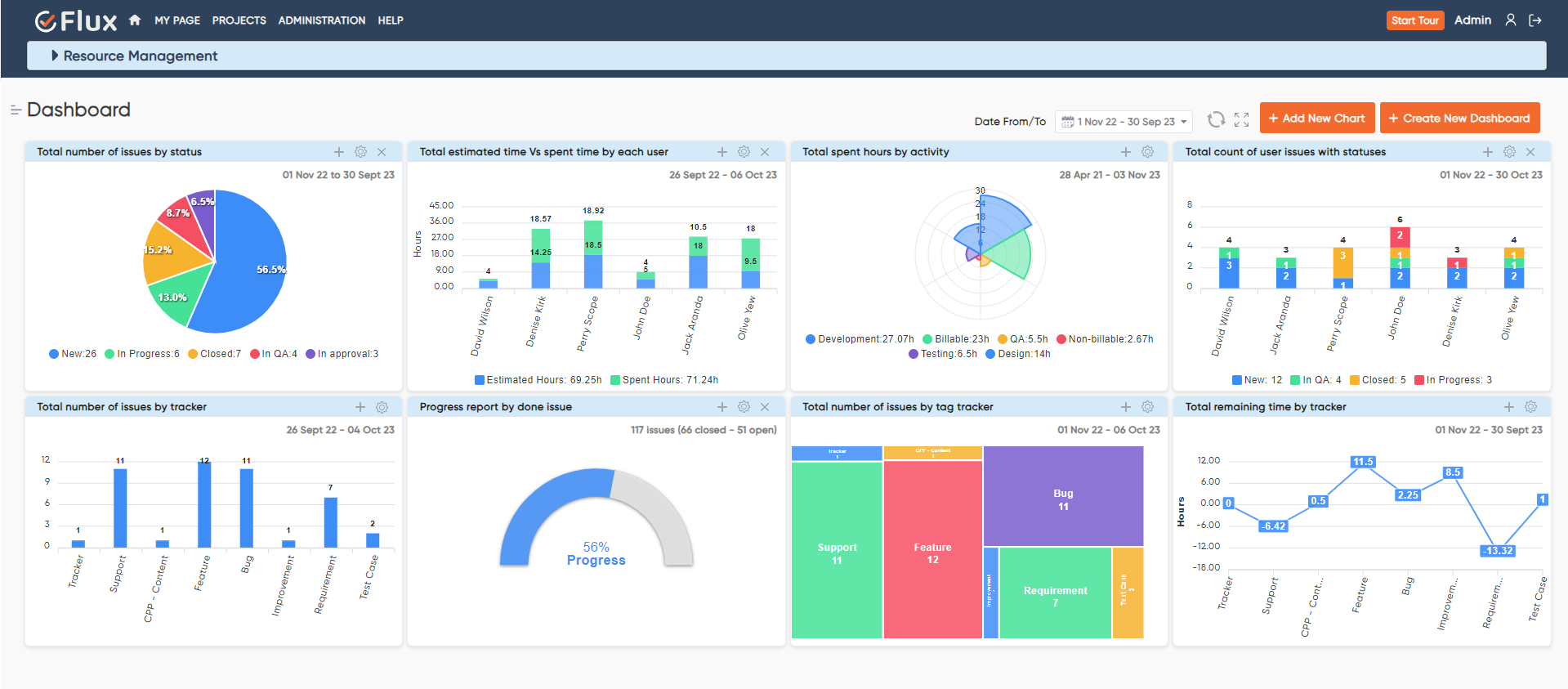
redmineflux dashboard plugin main dashboard

Customizable dashboards with charts & graphs for data visualization.

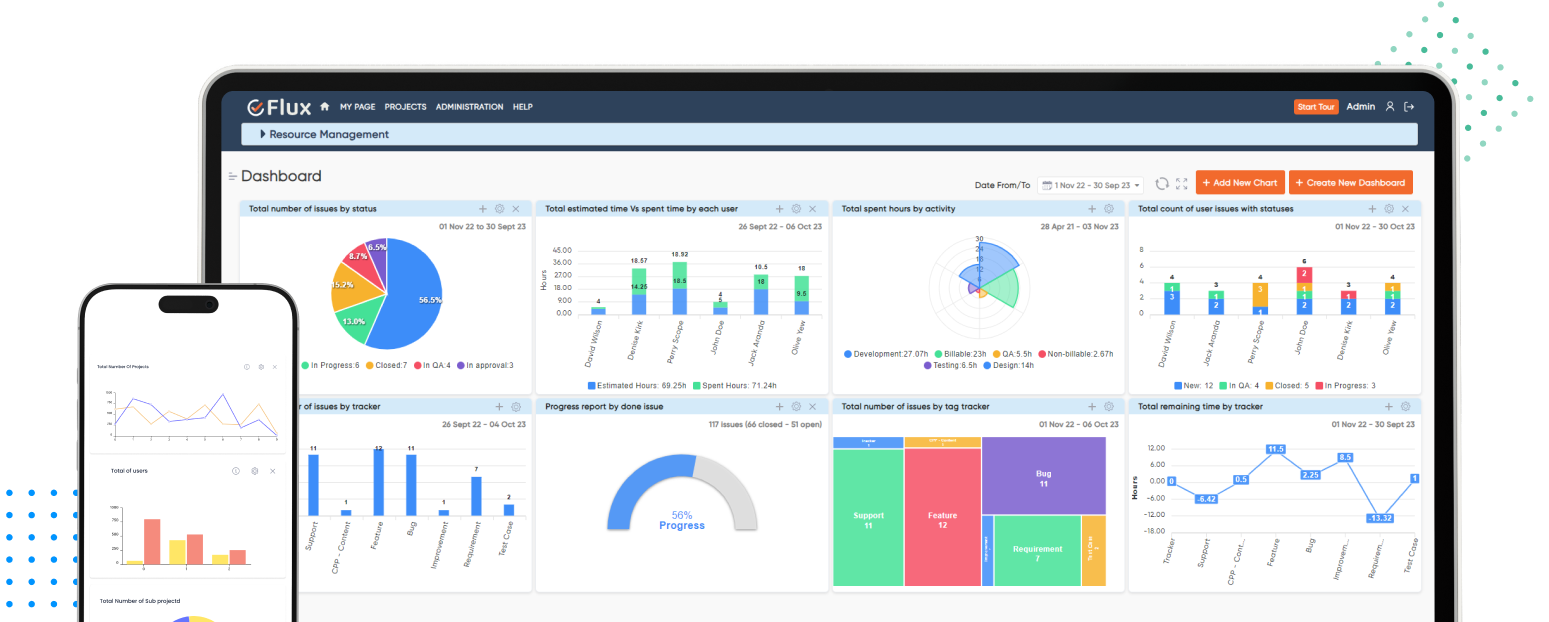
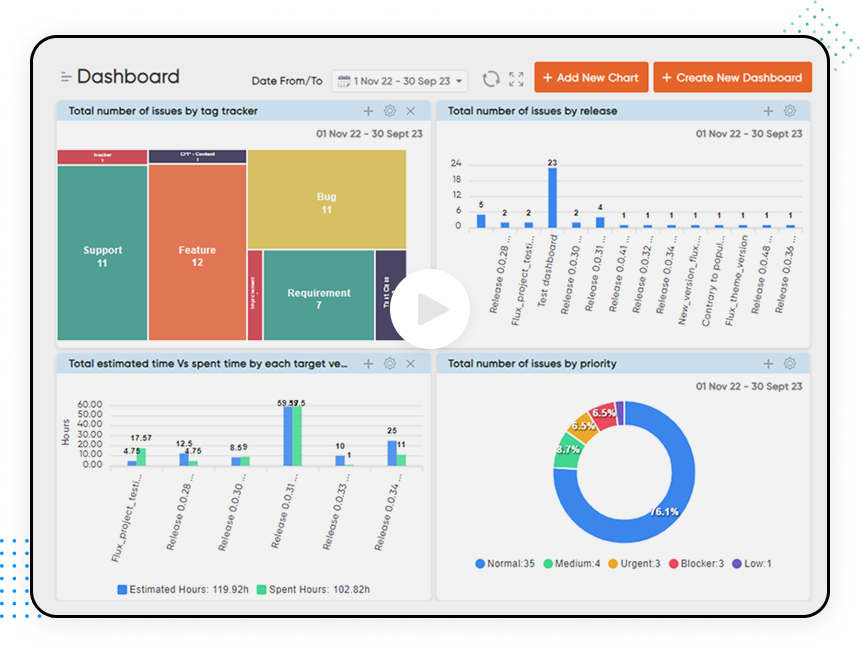
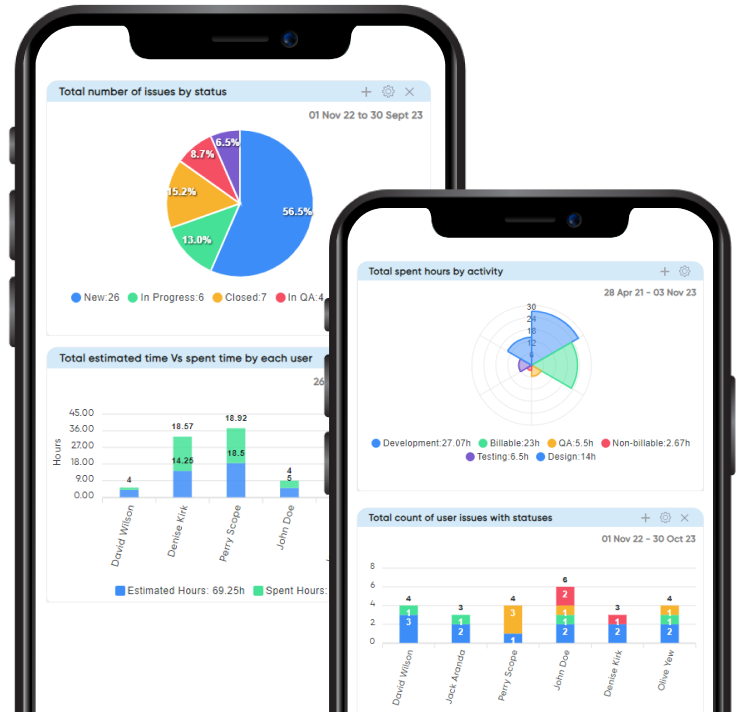
Feature-rich dashboards that give you and your team a comprehensive overview of data and real-time insights for confident decision-making. Run reports, analyze data, & track the progress of tasks & projects – all in one place.

Clear overview

Get a detailed, higher-level rundown of your data, tasks, projects, & organization with Custom Dashboards.

Improved decisions

Equip your team with powerful features & functionalities that facilitate insight-based, informed decision making.

Accelerate delivery

Identify & eradicate obstacles, challenges, & bottlenecks causing delays in the organization to speed up project completion & delivery.

MicrosoftTeams image 1 1

Customizable dashboards with charts & graphs for data visualization.

Feature-rich dashboards that give you and your team a comprehensive overview of data and real-time insights for confident decision-making. Run reports, analyze data, & track the progress of tasks & projects – all in one place.

Clear overview

Get a detailed, higher-level rundown of your data, tasks, projects, & organization with Custom Dashboards.

Improved decisions

Equip your team with powerful features & functionalities that facilitate insight-based, informed decision making.

Accelerate delivery

Identify & eradicate obstacles, challenges, & bottlenecks causing delays in the organization to speed up project completion & delivery.

Modify your dashboard as per your business needs

redmineflux dashboard plugin create chart

Empower your data visualization

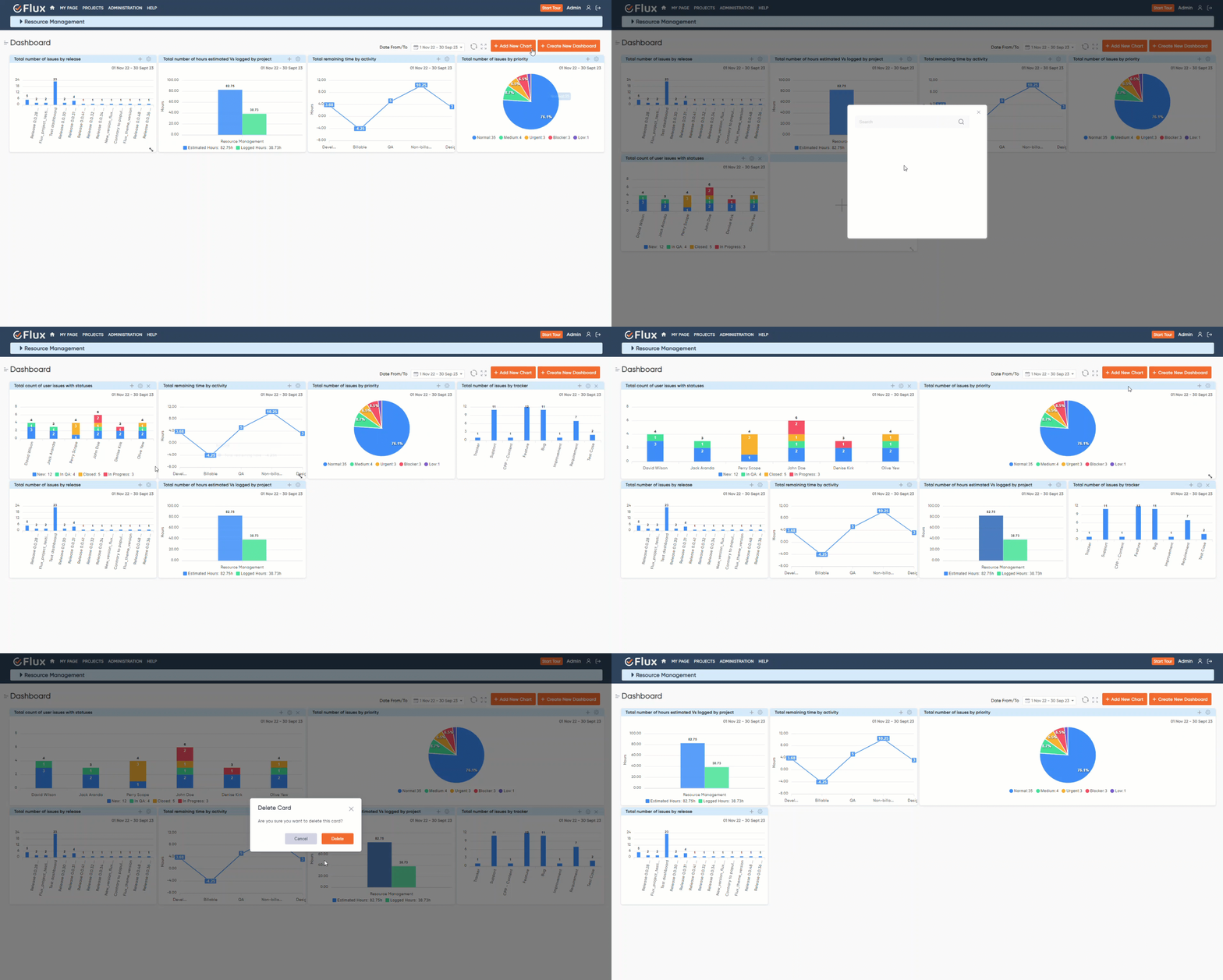
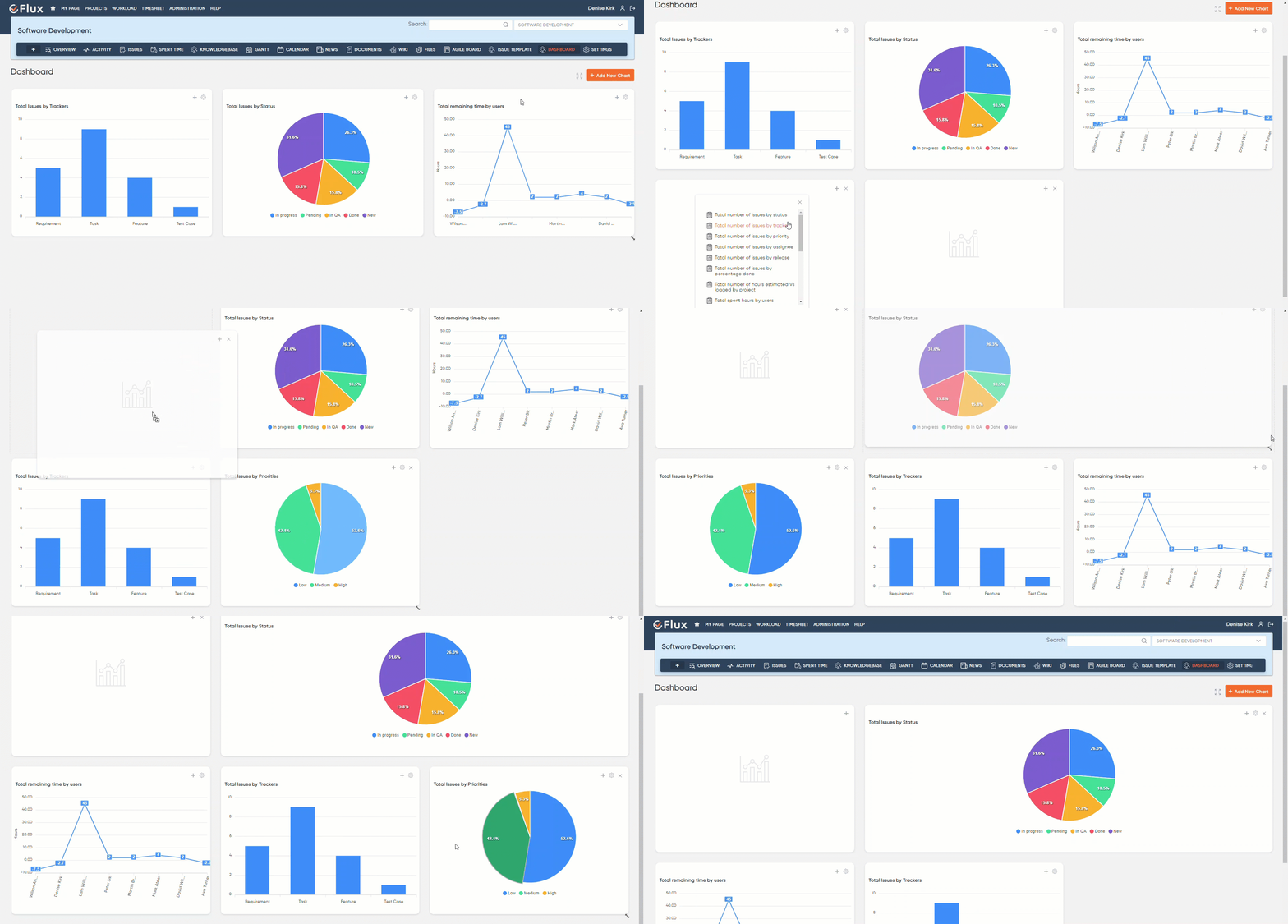
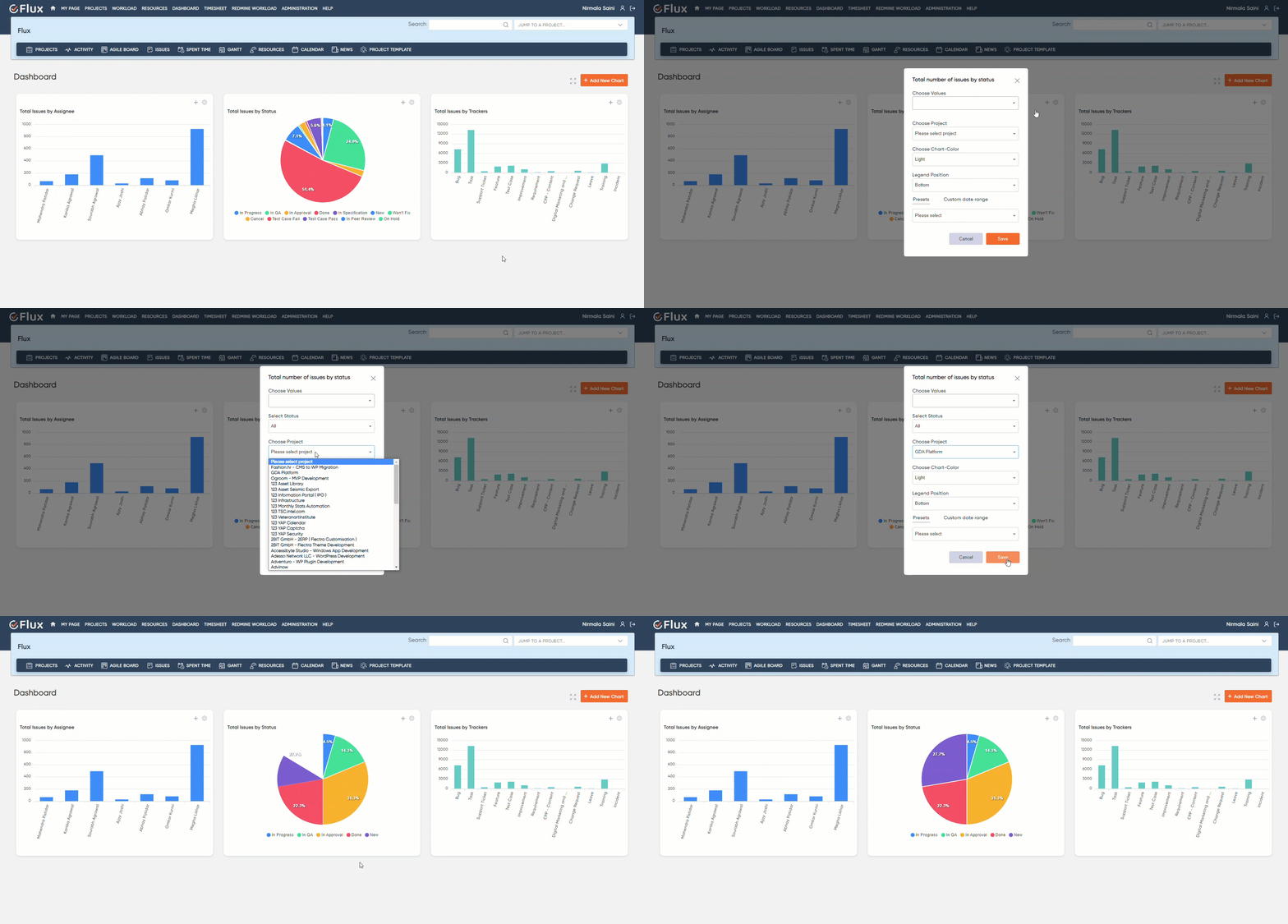
Empower your data visualization with Redmineflux Custom Dashboard Plugin. Seamlessly personalize your charts by adding, deleting, dragging, resizing, or rearranging cards and charts according to your unique requirements. Enjoy a comprehensive dashboard experience with the option to view it in full-screen mode.

Dashboard

Instant insights at your fingertips

Gain immediate insights with our query-based cards feature. Redmineflux Custom Dashboard Plugin enables you to incorporate specific data queries, presenting essential information such as issue tracking, priorities, project details, time estimation, and more. Effortlessly remove queries to tailor your dashboard to your exact needs.

deletechart
redmineflux dashboard plugin multiple dashboard create
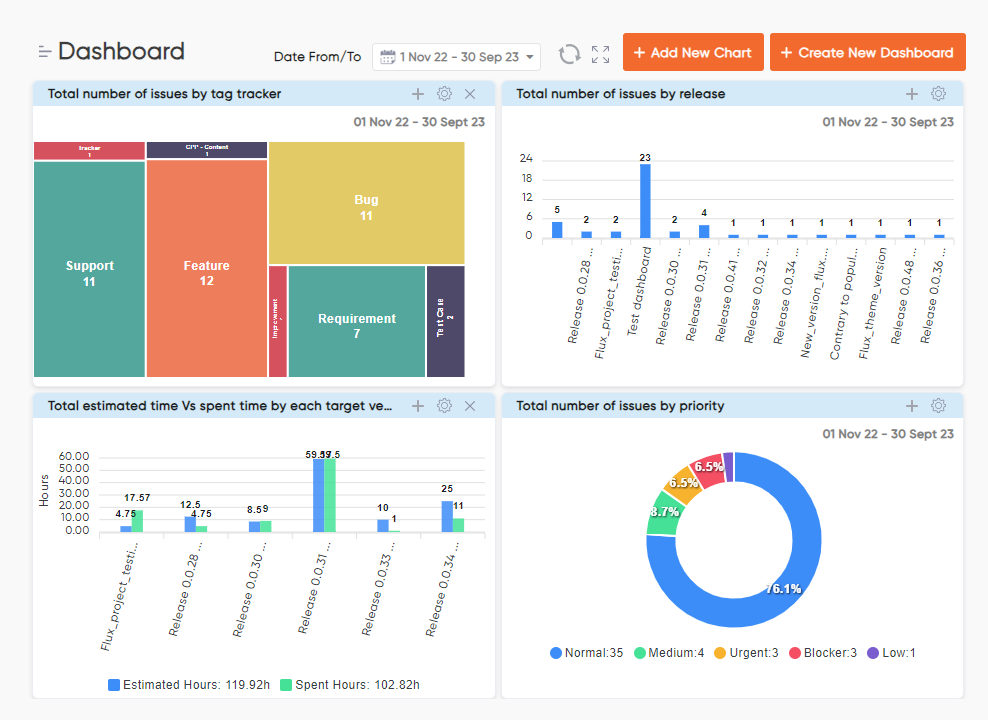
remineflux dashboard plugin chart settings

Unleash the potential of data visualization

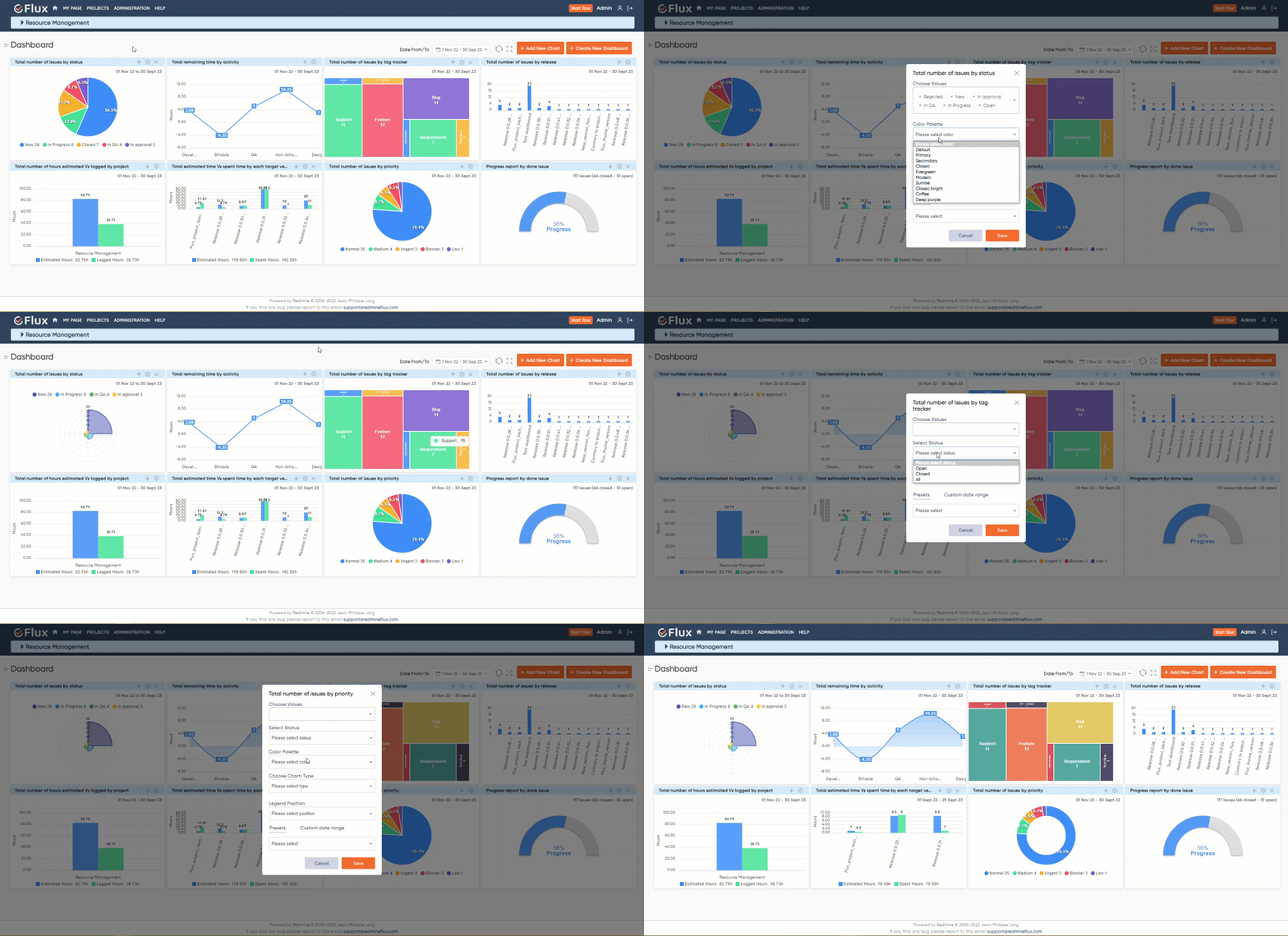
Unleash the potential of your data visualization with our custom charts and graphs functionality. Choose from a diverse range of chart types, including line, bar, pie, area, polar, and radial charts. Customize colors, legends, and status indicators, and apply custom date ranges to create visually striking representations of your data.

chart change

Effortless navigation through projects

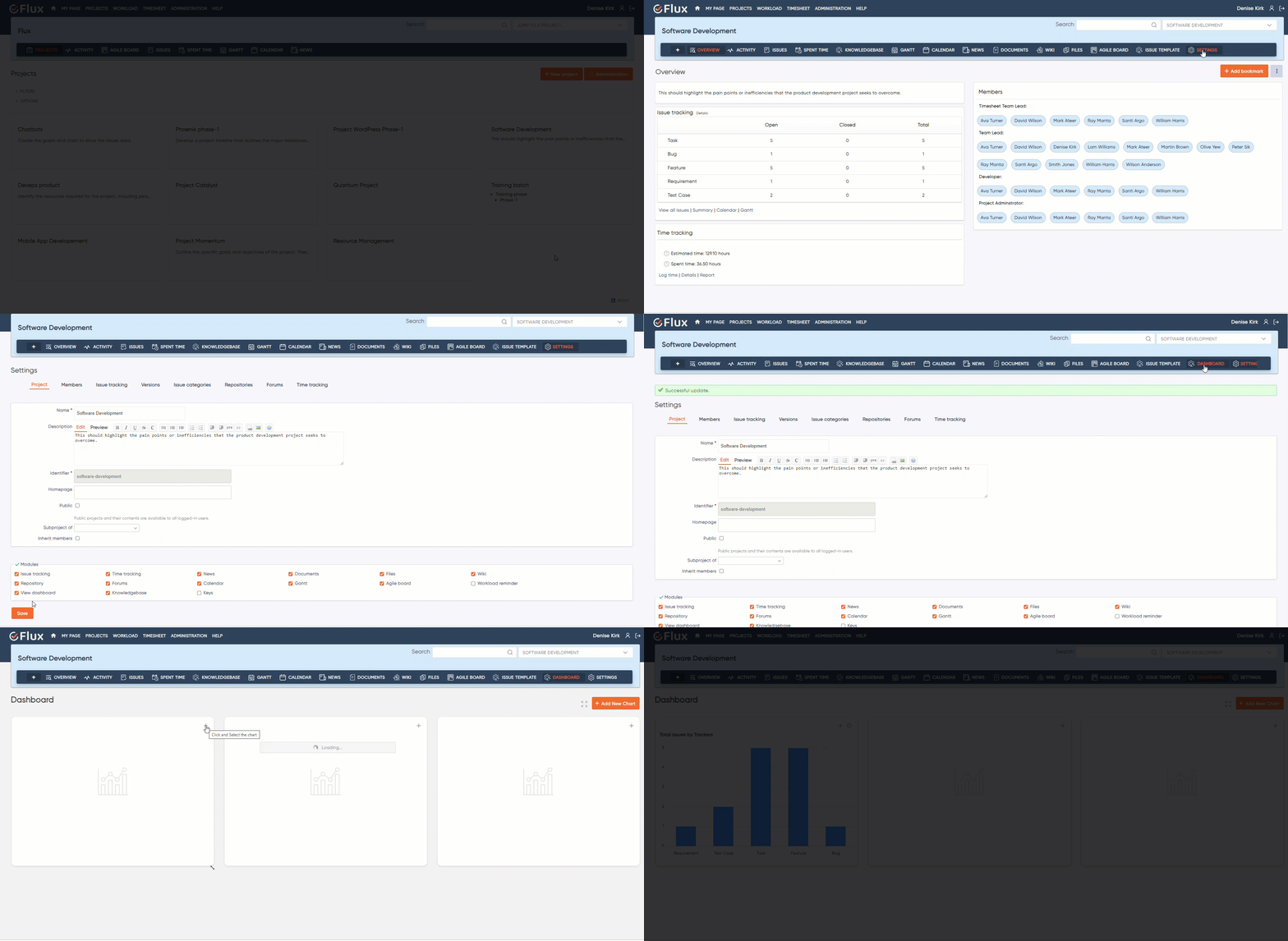
Effortlessly navigate through your projects with our intuitive project selection feature. Choose any project from the dropdown menu to gain valuable insights and analyze its progress. Whether you require an overview of all projects or a focused analysis, our custom dashboards by Redmineflux provide the flexibility you need.

dashboard project
dashboard project

Requirements

Redmine4.1.x – 5.0.8
Ruby2.6+
DatabaseMySQL, PostgreSQL

Compatible With

Redmine 4.1.x – Redmine-5.0.8 (default Redmine)
Default Redmine Themes (default, alternate, classic)
All plugins you can see within the Redmineflux Demo
For support and feedback Email us

Testimonial

What people are saying!

Redmineflux plugins have been a game-changer for our Redmine setup. The enhanced features like advanced time tracking, custom workflows, and improved reporting have significantly boosted our productivity. The integration was seamless, and the support team was fantastic. Highly recommend these plugins to any Redmine user!

profile

Alex Tucker

Project Manager, Newyork

Getting all of my business data organized in one place is all I wanted. With Redmineflux, I can filter data and simplify my agile operations.

profile

Alfred Fleischer

Project Manager

Redmineflux themes have completely transformed the look and feel of our Redmine instance. We were looking for a way to make our Redmine more visually appealing and user-friendly, and these themes delivered on both fronts. The customization options are fantastic, allowing us to tailor the design to our company’s branding.

profile

Chen Jun Hao

Project Manager, Singapore

Redmineflux has an easy-to-use interface & is easily customizable. It helps active coordination and focuses project resources in one direction.

profile

Marlena Sievers

CEO

image 25

Enhance collaboration, elevate productivity, & meet goals with Redmineflux.

Enhance collaboration, elevate productivity, & meet goals with Redmineflux.

FAQ’s

Redmineflux Custom Dashboard Plugin is intended to give Redmine users a quick overview of their projects. As a result, users can gain deep insights into their project and evaluate its progress. The dashboard contains every detail about the work being done around the project and in the company, which includes users, task details, and time logs.

Redmineflux Custom Dashboard Plugin is designed to enhance Redmine’s existing project management capabilities & experiences and provide its users with solutions that are both affordable and simple to use. The plugin generates critical insights about the company’s projects, which aids in decision-making. One notable feature of the plugin is its ability to be customized, allowing Redmine users to add custom fields and change the color, name, and columns to suit their specific needs.

To use our Redmineflux Custom Dashboard Plugin, you must first have a Redmine account. After paying the amount required for the plugin, you get access to your own customizable dashboard that you can leverage to view all your projects at once and dive deep into any of them to generate meaningful insight & their track progress.

No, Redmineflux Custom Dashboard Plugin is only available to current Redmine users. To use the plugin’s full potential, you must first have a Redmine account.

Subscribe to our newsletter

Get the latest news & updates on Redmineflux delivered straight to your inbox.

Additional information

Version

5.0, 6.0

Reviews

There are no reviews yet.

Be the first to review “Custom Dashboard Redmine Plugin”

Your email address will not be published. Required fields are marked *