
Redmine Knowledge Base – centralised documentation inside your projects.
For project managers and IT directors who need searchable docs linked to Redmine projects.
one-time purchase · 1 year of support included
Support renewal after 1 year 30% of plugin price
Today in Redmine
Documentation scattered across tools costs more than it looks.
When project knowledge lives in Confluence, Google Docs, email, and chat threads with no connection to the project context it describes, onboarding slows, questions repeat, and version history becomes unclear. Teams cannot tell whether a document is current, outdated, or superseded by something written elsewhere.
In plain words
What is the Redmineflux Knowledge Base Plugin?
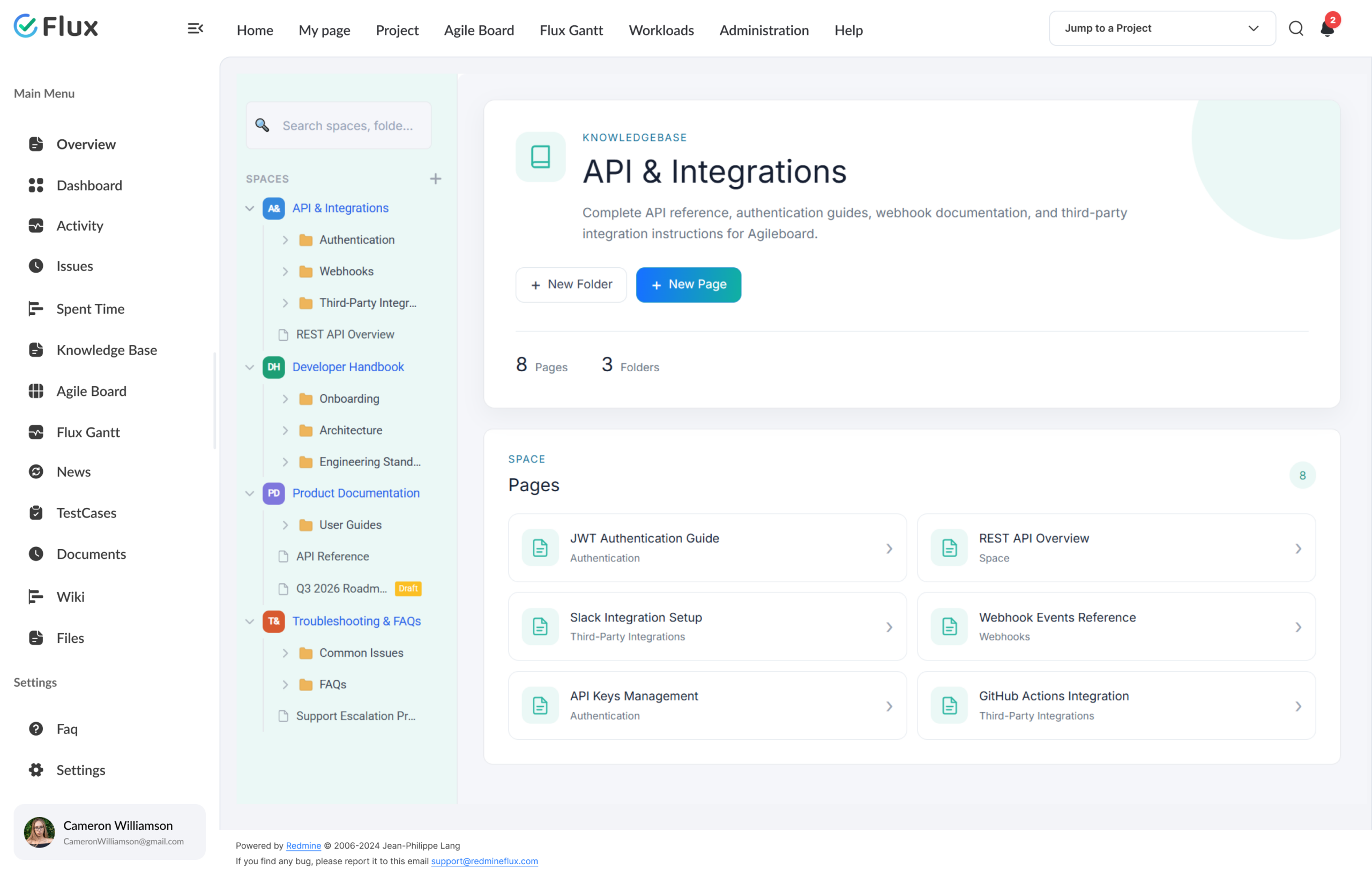
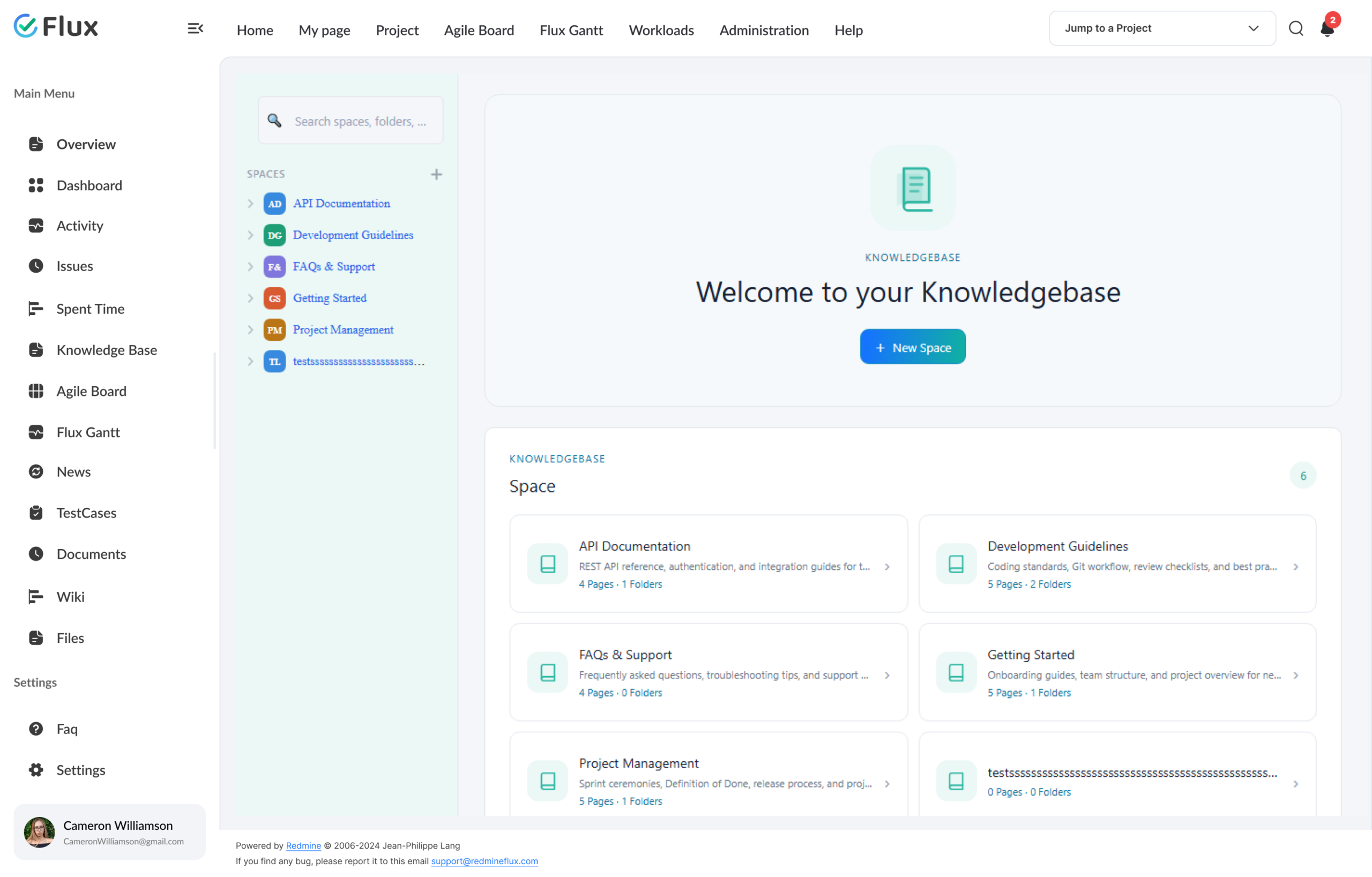
Redmineflux Knowledge Base is a structured documentation system built natively inside Redmine. Create pages, organise them into Spaces and Folders, and navigate all documentation from the sidebar — with every page linkable to specific Redmine issues for direct operational context.
Documentation that belongs inside your project tool.
Every article sits next to the issues it supports. Every team member finds answers in the same tool where work gets done. Teams that previously maintained a separate wiki alongside Redmine can consolidate documentation into one environment – eliminating synchronisation overhead and the context-switching cost of maintaining two tools.
The result is faster onboarding, clearer process documentation, and a version-controlled knowledge layer that grows with the team rather than drifting out of sync.
What your team gains
Documentation that people actually find.
Click any shift to see what changes in the product.
01
New team members onboard without asking repeatedly.
When the relevant SOPs, runbooks, and guides are centralised in Redmine and organised in Spaces and Folders, new engineers navigate directly to what they need without asking three senior colleagues in the first week. Onboarding time decreases when the knowledge is structured and linked to the actual work.
02
Documentation stays connected to the project context.
Articles link directly to the Redmine projects and issues they relate to. When a team member opens an issue, the relevant guides surface in the same view – not buried in a separate application that requires a separate search.
03
Knowledge standards apply consistently across distributed teams.
Remote and distributed teams work from the same documented standards stored in Redmine. Knowledge drift – where different team members follow different undocumented conventions – becomes addressable when the standard is written and accessible.
04
Version history makes documentation traceable, not just findable.
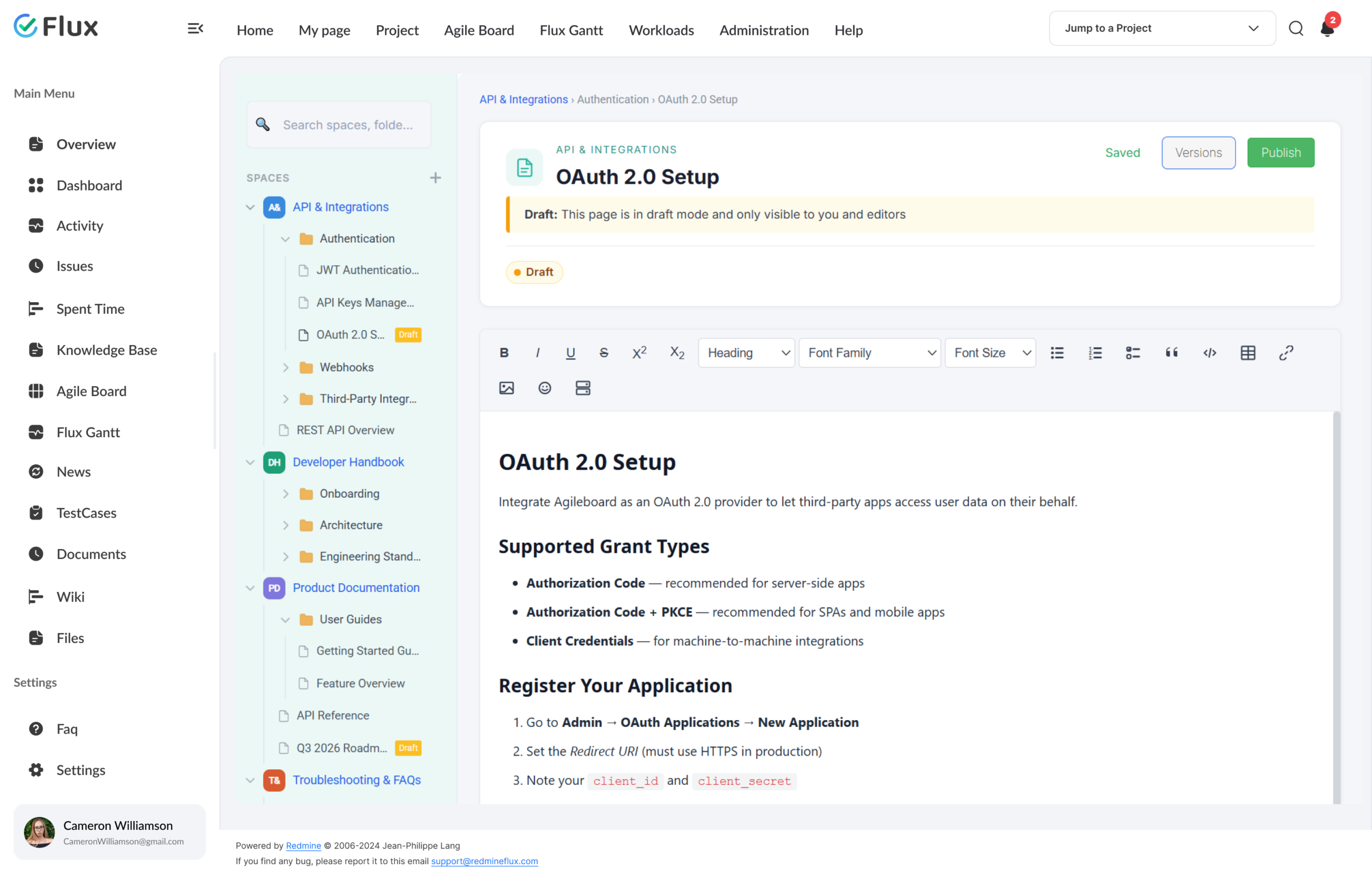
Every published version is recorded with author, timestamp, and an optional publish comment. Previous versions restore with a single click — the page publishes immediately with the restored content, and a new version entry records the action. Version history keeps documentation traceable, not just findable.
05
No new tool to adopt, no second login to manage.
Documentation lives inside the Redmine environment the team already uses daily. No additional login, no separate subscription, no synchronisation work required to keep documentation aligned with project reality.
Core capabilities
The specifics, for people who want them.
Structure knowledge so teams can navigate it reliably.
- Spaces as top-level sections, Folders as nested organizers, Pages as rich text documents
- Draft and publish workflow — draft pages are private; published pages are visible to the project team
- Article versioning with edit history and rollback support
- Sidebar search filters spaces, folders, and pages by name instantly — no page reload
Navigate to what you need from the sidebar.
- Client-side sidebar search filters spaces, folders, and pages by name as you type
- Project-scoped — search stays within the current project knowledge base
- Six built-in content templates: Meeting Notes, PRD, API Docs, Architecture Review, Annual Plan, Budget Proposal
- Sub-projects inherit and display parent project spaces in read-only mode in their sidebar
Connect documentation to the context where it is needed.
- Articles link directly to Redmine projects and individual issues
- Related documentation surfaces within the relevant issue or project page
- Type #issue number in a KB page to link it — the page appears in that issue’s Related KB Pages section
- Public URL sharing — generate a 64-character secure token for any published page; external readers need no Redmine account
Manage who can read, create, and edit documentation.
- Three project-level permissions: view_knowledgebase, manage_knowledgebase_spaces, manage_knowledgebase_pages
- Project-scoped visibility restricts articles to relevant teams
- Public and private article settings per knowledge base section
- Version history records author and timestamp for every published version — restore any version in one click
Keep documentation current and traceable.
- Full edit history per article with timestamps and author attribution
- Restore any previous version in one click — the page publishes immediately with the restored content
- Any previous version restores with a single action
- @mention users in the editor to send them an email notification when the page is published
200+
teams trust Redmineflux worldwide
6 yrs
focused on Redmine, nothing else
5000+
plugin downloads powering real projects
We moved all our project documentation into the Knowledge Base Plugin and linked it to the relevant issues. The team now finds what it needs inside Redmine – the separate Confluence space is no longer necessary.
Deployment
Run it your way.
Managed Cloud
- Hosted by Redmineflux · included from Standard plan
- Daily backups · SLA-backed uptime
- No per-plugin licences – all-inclusive pricing
$2.99 / user / month
Get a Free demoSelf-hosted
- Drop-in install on your own Redmine
- One-time purchase · 1 year of support included
- Your infrastructure, your security perimeter
From $299 one-time
Buy plugin →Every plugin in Cloud also runs on self-hosted Redmine.
Role by role
What Knowledge Base changes for each role.
Project ManagerDocumentation, SOPs, runbooks
Project documentation, SOPs, and runbooks in one searchable location – no more hunting across Confluence, Google Docs, and email threads before a delivery call.
Engineering LeadTechnical docs, issue context
Technical docs connected directly to the issue context they support. Engineers open an issue and the relevant runbook or deployment guide surfaces in the same view.
IT DirectorGovernance, access control, audit
Governance over internal knowledge assets with role-based access control and version history — without requiring a separate enterprise wiki or knowledge management platform.
Support LeadTroubleshooting guides, templates
Structured troubleshooting guides and customer-facing documentation templates accessible inside the same Redmine environment where support issues are tracked and resolved.
Pricing
Three ways to get Knowledge Base.
Buy this plugin
Knowledge Base – self-hosted
Support renewal after 1 year 30% of plugin price
One-time purchase · 1 year of support included · install on your Redmine in 15 minutes.
Buy Knowledge Base →Save with a Bundle
Project Management Bundle
Includes Knowledge Base + Gantt Chart + Agile Board + Timesheet + Issue Template + Custom Dashboard + Notification.
See the Bundle →Or use Managed Cloud
Redmineflux Cloud
Included in Standard and Pro Cloud plans. Managed Redmine, no infrastructure work. Book a free demo →
See Cloud plans →See documentation inside your projects
See Knowledge Base running in your Redmine.
Book a free demo and see Knowledge Base live, or install the plugin on your existing Redmine and have centralised documentation live in 15 minutes.
Frequently asked
Questions before you install.
The questions teams actually ask before adopting Knowledge Base. If yours isn't here, check pricing or contact support.
Can articles be linked to specific issues or projects?
Yes. In the KB page editor, type # followed by an issue number to link that page to a Redmine issue. The linked page then appears in the Related Knowledge Base Pages section at the bottom of the issue’s detail view — so team members see relevant documentation directly from their issue context.
How does search work in the Knowledge Base Plugin?
The plugin includes a client-side sidebar search that filters spaces, folders, and pages by name as you type. Results appear instantly without a page reload. The search is scoped to the current project’s knowledge base — there is no global search across all projects.
Can access to articles be restricted by role or project?
Yes. The Knowledge Base module exposes three permissions assigned through Redmine’s standard role system: view_knowledgebase (view published pages), manage_knowledgebase_spaces (create and manage spaces), and manage_knowledgebase_pages (create, edit, publish, and delete pages). Permissions are configured per role at the project level — not per individual page or folder.
Which Redmine versions are supported?
The Redmineflux Knowledge Base Plugin supports all Redmine versions. Compatibility is verified with each plugin update.
How much does the Knowledge Base Plugin cost?
$299 one-time for self-hosted – 1 year of support included. Support renewal after 1 year 30% of plugin price. Bundle with the Project Management Bundle ($2,456 one-time) for Knowledge Base + Gantt Chart + Agile Board + Timesheet + Issue Template + Custom Dashboard + more. Or hosted at $2.99/user/month via Redmineflux Cloud Standard and above. See the pricing section above.
Is there a free demo available?
Yes – request a free demo and we’ll send a personalised demo link straight to your inbox. No credit card required, no commitment. Explore the real product at full capacity, at your own pace. Cloud starts at $1.99/user/month.