




Balance Workloads Prevent Burnout.
Plan Smarter in Redmineflux

A visual planning engine that helps project managers forecast capacity, eliminate overload,
and keep every project running on schedule. 

Plan Smarter in Redmineflux
Easy Installation
Works with Existing Redmine
Secure AWS Hosting
Cloud & On-Prem Support

The Workload Management Edge 
You Get with Redmineflux 

The Redmineflux Helpdesk Plugin is a fully integrated support management system built on top of the existing Redmine platform, designed to bring order to your support inbox. Compatible with Remine 5.0.x and 5.1.x versions, it enables support teams to streamline customer communication, automate workflows, and improve response efficiency, functioning as a ticket management system and Redmine helpdesk solution for teams that need structure and speed.  

Instant visibility into team capacity
Data-driven resource allocation
Fast drag-and-drop task planning
Seamless, native Redmine experience 
Balanced, sustainable team utilisation
Scales effortlessly with up to 100 active users at once
Data driven resource allocation

Who Gets the Most Value
from Workload Plugin

Who Gets the Most Value from Workload Plugin
Project Managers 

Gain real-time visibility into team capacity, balance workloads effortlessly, and eliminate bottlenecks before they impact delivery. 

Program Managers & PMOs 

Monitor capacity across multiple teams and projects, streamline resource allocation, and improve portfolio-level planning accuracy. 

Agencies & Consultancies 

Gain real-time visibility into team capacity, balance workloads effortlessly, and eliminate bottlenecks before they impact delivery. 

IT & Engineering Teams 

Manage sprints, feature development, bug cycles, and maintenance work with clear capacity insights and simplified task distribution. 

Remote & Distributed Teams 

Set working hours, availability, and region-specific holidays to ensure realistic capacity planning. Perfect for distributed teams. 

The Capabilities That Power Smarter
Workload Management 

Effortless Drag-and-Drop 
Workload Planning 

Seamless Email-to-Ticket Conversion 

Automatically convert incoming customer emails into actionable helpdesk tickets, ensuring that requests are tracked from the moment they arrive. 

Detailed Email Configuration 

Each project can configure its own Incoming Email Configuration (IMAP details) and Outgoing Email Configuration (SMTP details), guaranteeing that tickets are created automatically, and replies are sent correctly from the project's dedicated support address. 

Manual Ticket Creation

Users with appropriate roles (Admin or Support) can manually create new support tickets, entering details such as subject, priority, status, and organization. 

Helpdesk Dashboard 

Gain a global overview of support activities with the Helpdesk Dashboard, which shows the overall status of tickets for the current month (including Unassigned, Open, On Hold, Overdue, and Unresolved cards). Data can be filtered using custom date ranges. 

Advanced Ticket Management
Works Seamlessly on Redmineflux Cloud

Works Seamlessly on Redmineflux Cloud and On-Premise

Whether you’re using Redmineflux Cloud or your own self-hosted Redmineflux server, the Workload Plugin is fully compatible and ready to install.

No extra setup. No special configuration. 100% native integration. 

Supported environments

Redmineflux for Cloud 

Redmineflux for On-Premise (self-hosted) 

Testimonial
What People are Saying!
Alex Tucker

Project Manager, Newyork

Alfred Fleischer

Project Manager

Chen Jun Hao

Project Manager, Singapore

Marlena Sievers

CEO

Alex Tucker

Redmineflux plugins have been a game-changer for our Redmine setup. The enhanced features like advanced time tracking, custom workflows, and improved reporting have significantly boosted our productivity. The integration was seamless, and the support team was fantastic. Highly recommend these plugins to any Redmine user!

Alfred Fleischer

Getting all of my business data organized in one place is all I wanted. With Redmineflux, I can filter data and simplify my agile operations.

Chen Jun Hao

Redmineflux themes have completely transformed the look and feel of our Redmine instance. We were looking for a way to make our Redmine more visually appealing and user-friendly, and these themes delivered on both fronts. The customization options are fantastic, allowing us to tailor the design to our company’s branding.

Marlena Sievers

Redmineflux has an easy-to-use interface & is easily customizable. It helps active coordination and focuses project resources in one direction.

image 25
Take Control of Your Team’s Capacity Starting Today!

Plan smarter, allocate resources accurately, and deliver projects on time with the most powerful workload management plugin for Redmineflux.

Latest from our blog

Meet your project deadlines with advanced features and systematic data representation.  
Mask group 12
Comparison

Redmineflux vs Pivotal Tracker: What’s the Difference? 

In the fast-paced world of business, success is about more than just staying ahead of the curve. It’s about being nimble, adapting quickly to changes, and responding to market conditions and customer needs with speed and precision. It’s about being able to turn ideas into realities, launching new products and

2 Min Read
image 59
Comparison

Redmineflux vs. VersionOne: Which is Better for Your Business?

Project management has evolved significantly over the years, with technological changes, globalization, and business environments. Here are some of the major ways project management has evolved:  In summary, project management has evolved from being an ad-hoc process to a well-defined discipline that emphasizes stakeholder management, uses advanced technology, incorporates agile

2 Min Read

FAQ’s

What does the Redmineflux Custom Dashboard plugin do? 
It allows you to create interactive project dashboards using data from your Redmineflux queries. You can generate charts, tables, customize layouts, apply date ranges, and manage multiple dashboards within a single project. 
Can I create more than one dashboard within a project? 

Lorem ipsum dolor sit amet, consectetur adipisicing elit, sed do eiusmod tempor incididunt ut labore et dolore magna aliqua. Ut enim ad minim veniam, quis nostrud exercitation ullamco laboris nisi ut aliquip ex ea commodo consequat. Duis aute irure dolor in reprehenderit in voluptate velit esse cillum dolore eu fugiat nulla pariatur.

What types of visualizations can I build? 

Lorem ipsum dolor sit amet, consectetur adipisicing elit, sed do eiusmod tempor incididunt ut labore et dolore magna aliqua. Ut enim ad minim veniam, quis nostrud exercitation ullamco laboris nisi ut aliquip ex ea commodo consequat. Duis aute irure dolor in reprehenderit in voluptate velit esse cillum dolore eu fugiat nulla pariatur.

Can I customize how my charts look? 

Lorem ipsum dolor sit amet, consectetur adipisicing elit, sed do eiusmod tempor incididunt ut labore et dolore magna aliqua. Ut enim ad minim veniam, quis nostrud exercitation ullamco laboris nisi ut aliquip ex ea commodo consequat. Duis aute irure dolor in reprehenderit in voluptate velit esse cillum dolore eu fugiat nulla pariatur.

Does the plugin support flexible dashboard layouts? 

Lorem ipsum dolor sit amet, consectetur adipisicing elit, sed do eiusmod tempor incididunt ut labore et dolore magna aliqua. Ut enim ad minim veniam, quis nostrud exercitation ullamco laboris nisi ut aliquip ex ea commodo consequat. Duis aute irure dolor in reprehenderit in voluptate velit esse cillum dolore eu fugiat nulla pariatur.

Can I apply date ranges to control what data is displayed? 

Lorem ipsum dolor sit amet, consectetur adipisicing elit, sed do eiusmod tempor incididunt ut labore et dolore magna aliqua. Ut enim ad minim veniam, quis nostrud exercitation ullamco laboris nisi ut aliquip ex ea commodo consequat. Duis aute irure dolor in reprehenderit in voluptate velit esse cillum dolore eu fugiat nulla pariatur.

Can I use my existing Redmineflux queries? 

Lorem ipsum dolor sit amet, consectetur adipisicing elit, sed do eiusmod tempor incididunt ut labore et dolore magna aliqua. Ut enim ad minim veniam, quis nostrud exercitation ullamco laboris nisi ut aliquip ex ea commodo consequat. Duis aute irure dolor in reprehenderit in voluptate velit esse cillum dolore eu fugiat nulla pariatur.

Does the plugin include presentation-friendly features? 

Lorem ipsum dolor sit amet, consectetur adipisicing elit, sed do eiusmod tempor incididunt ut labore et dolore magna aliqua. Ut enim ad minim veniam, quis nostrud exercitation ullamco laboris nisi ut aliquip ex ea commodo consequat. Duis aute irure dolor in reprehenderit in voluptate velit esse cillum dolore eu fugiat nulla pariatur.

amazon
google
Paypal
spotify
shopify

Subscribe to our newsletter

Get the latest news & updates on Redmineflux delivered straight to your inbox. 

Workload Plugin for Redmine

Unleash your team’s potential with our Workload plugin that boosts efficiency.

Workload Plugin for Redmine

$499*
Buy Now

Redmine Versions

$499*
Buy Now
Workload modified image7

Embrace improved project visibility and transparency

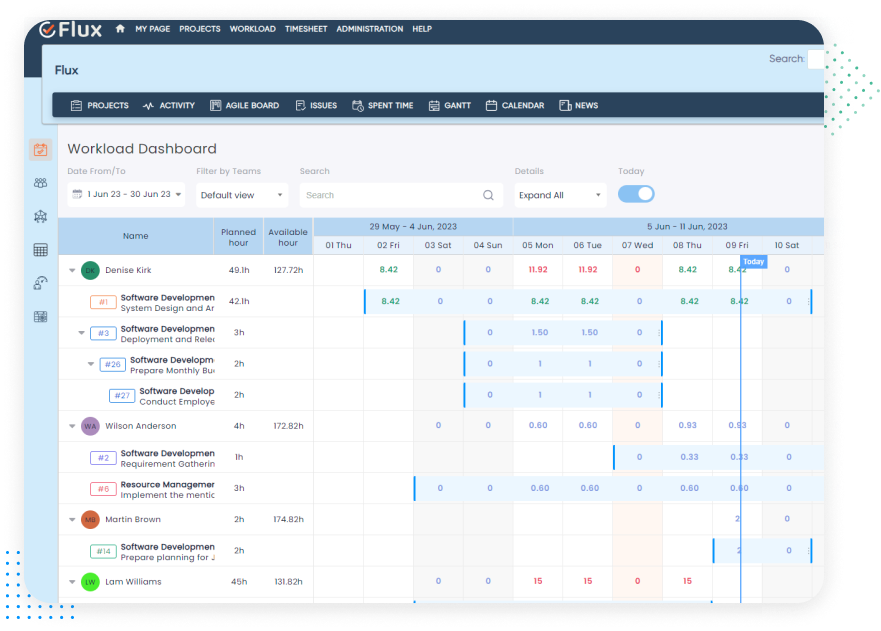
Gain a clear view of your team’s workload and optimize resource allocation. Streamline your team’s workflow to simplify task tracking and workload management.

Improved task management

Allow users to prioritize their work and allocate it effectively.

Enhanced team collaboration

Enables team members to view each other’s tasks.

Accurate resource planning

Track individual workloads and progress in real-time.

workload 2 image

Embrace improved project visibility and transparency

Gain a clear view of your team’s workload and optimize resource allocation. Streamline your team’s workflow to simplify task tracking and workload management.

Improved task management

 Allow users to prioritize their work and allocate it effectively

Enhanced team collaboration

 Enables team members to view each other’s tasks

Accurate resource planning

Track individual workloads and progress in real-time

Optimize your team’s potential with Workload plugin

Update workload

Empowering success with effective Workload planning

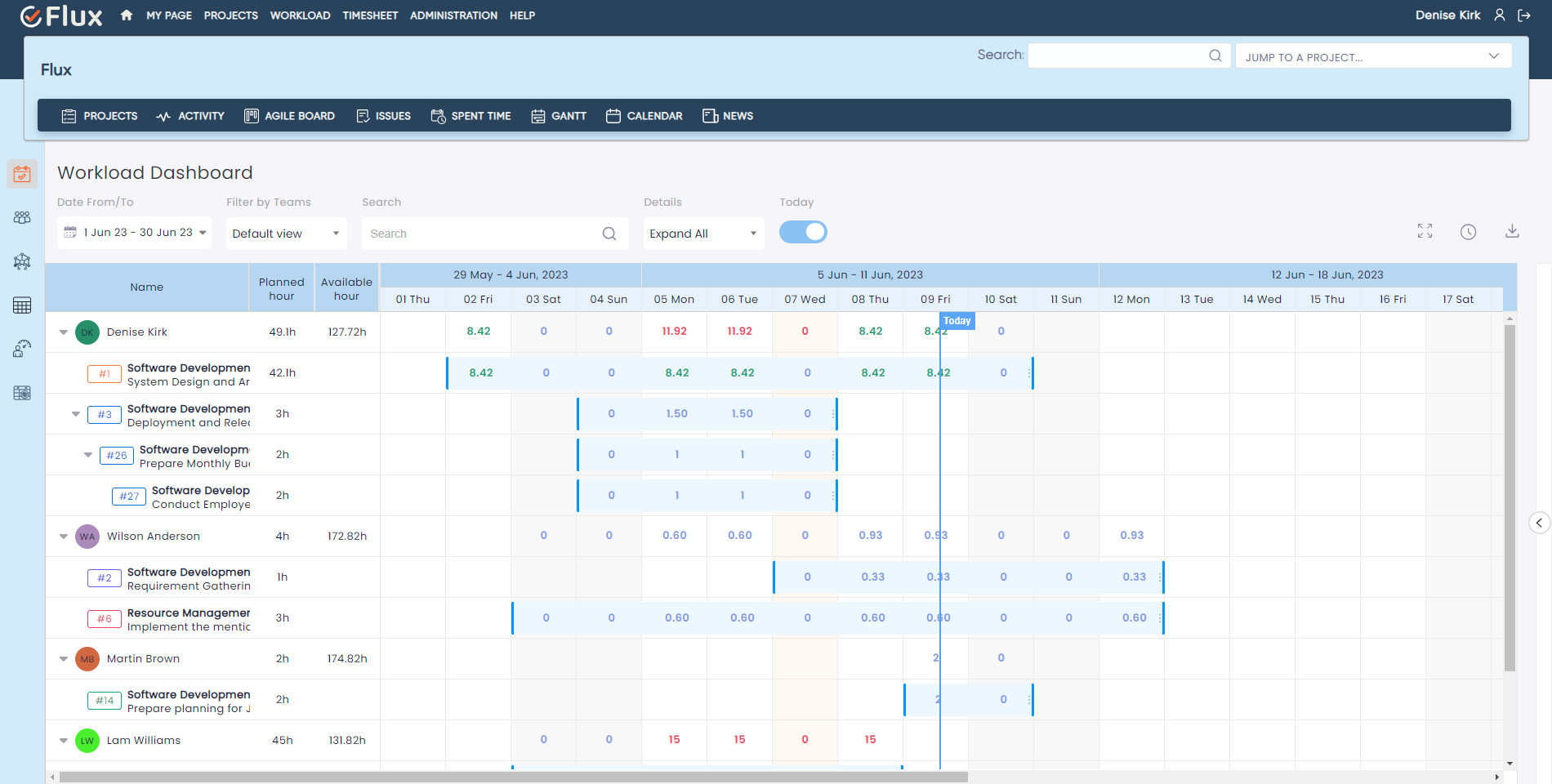
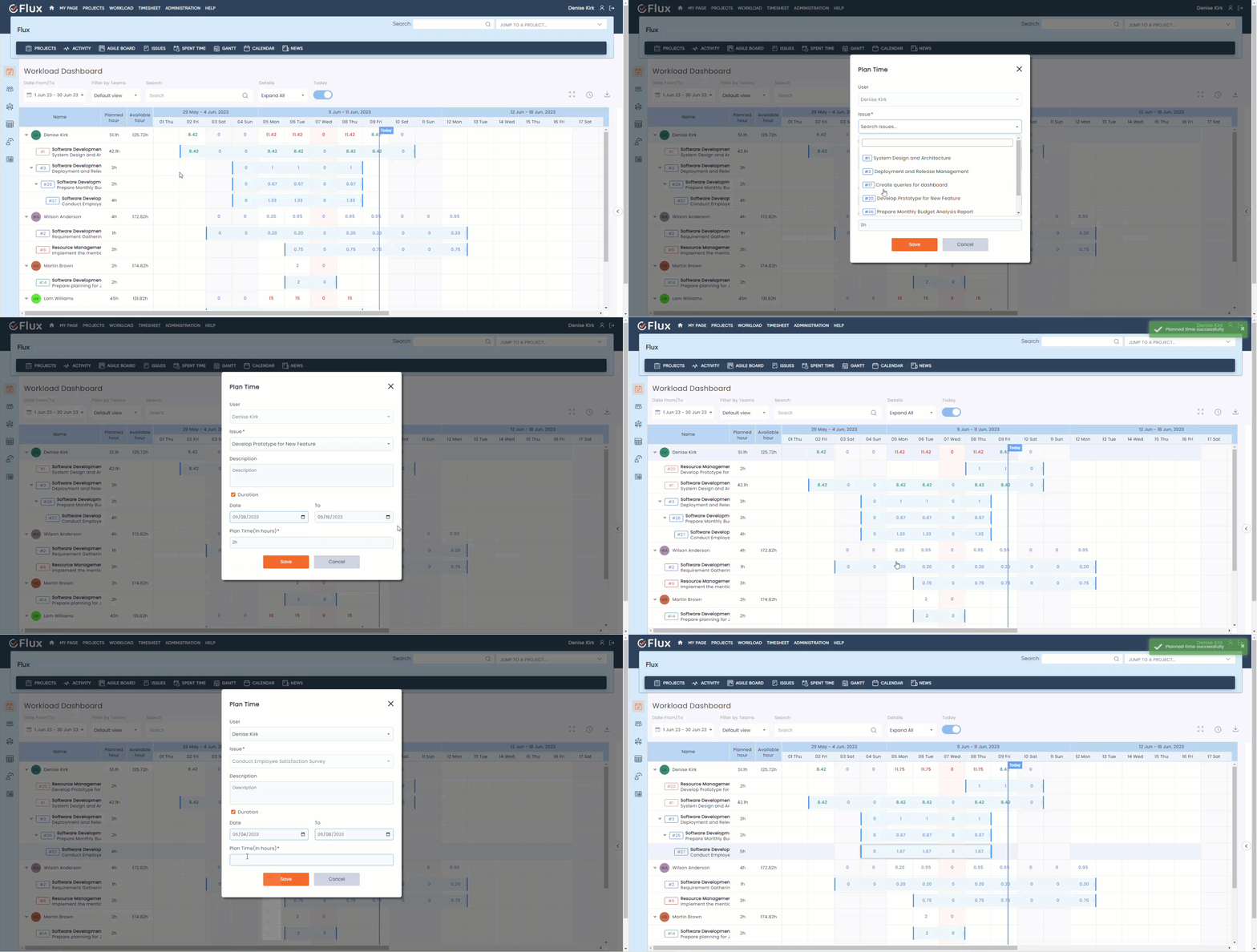
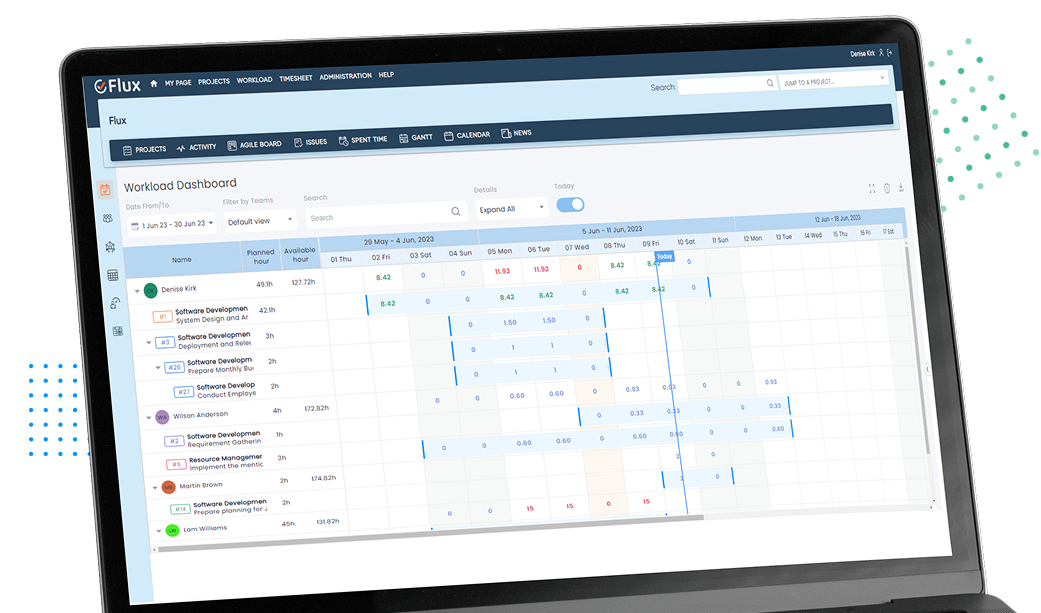
The Redmineflux Workload Plugin offers a comprehensive set of features for efficient resource management. Users can easily add tasks to the workload plan, assign them to team members, and track their progress. The plugin provides a clear overview of each user’s workload within a specified date range. 

Update workload

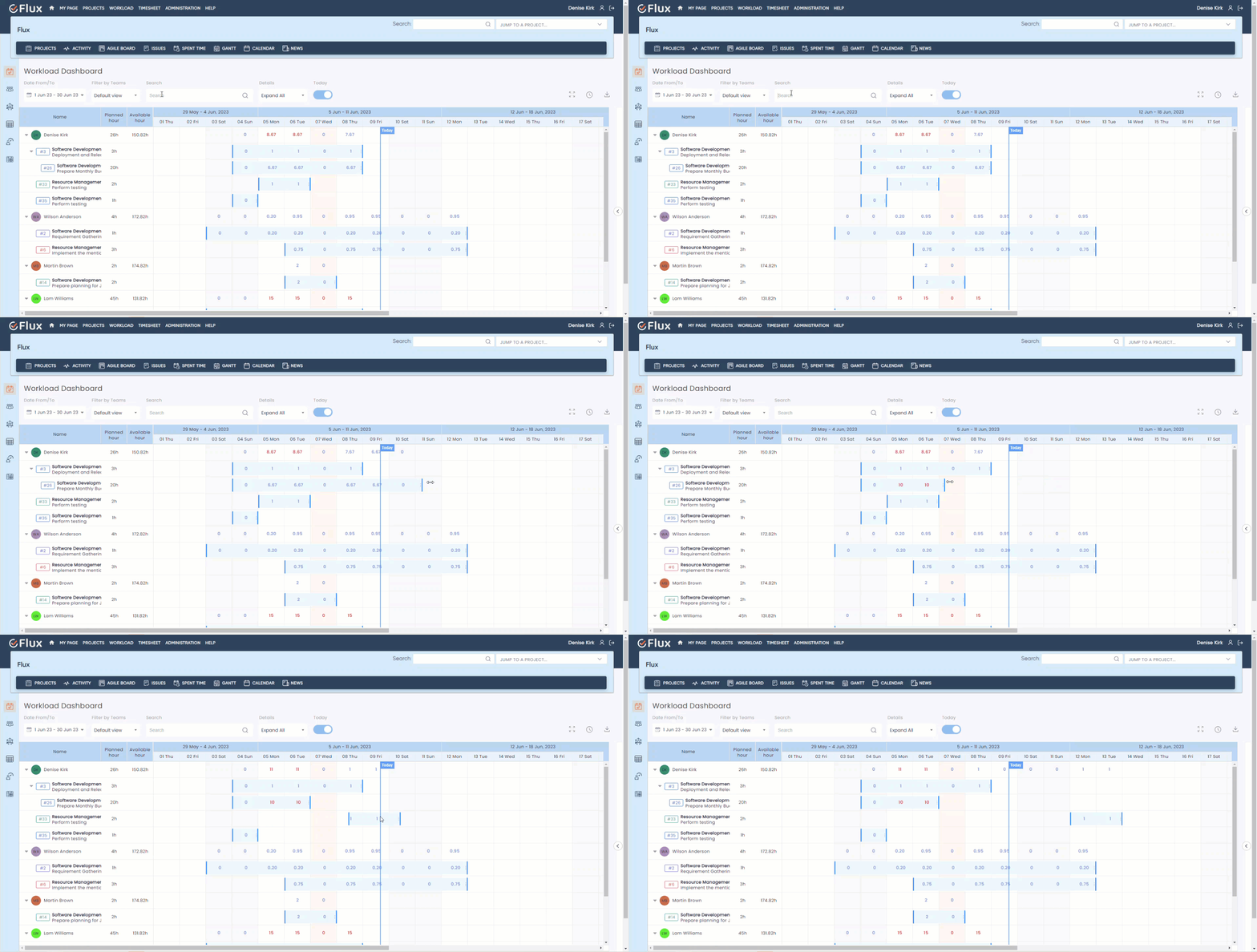
Drag and drop interface

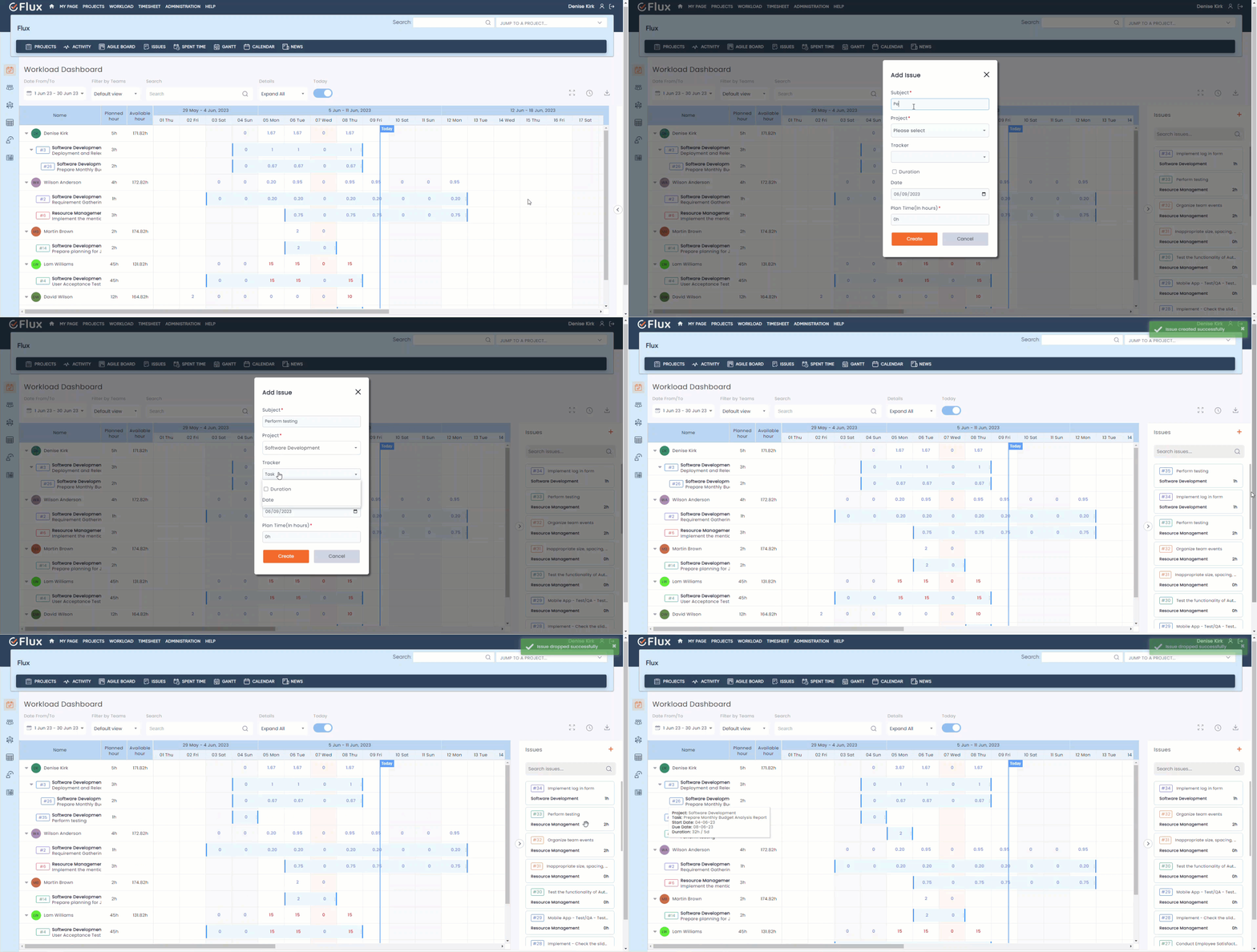
The Redmineflux Workload Plugin offers an intuitive drag-and-drop interface for task management. Users can easily assign unassigned tasks to resources by simply dragging the task and dropping it onto the desired resource. 

Workload drag and drop
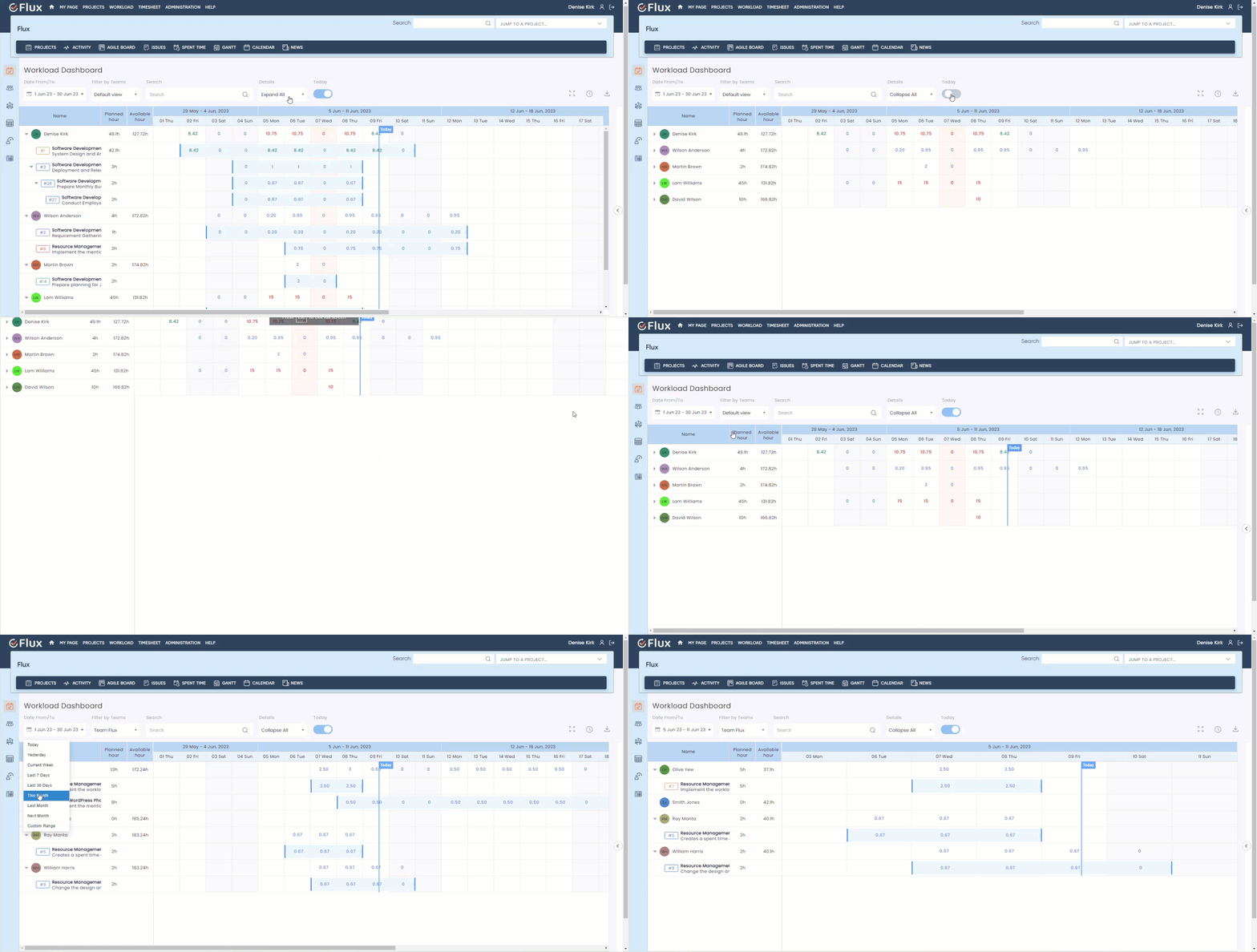
Workload expand collapse filter full screen date range

Elevate your workflow experience

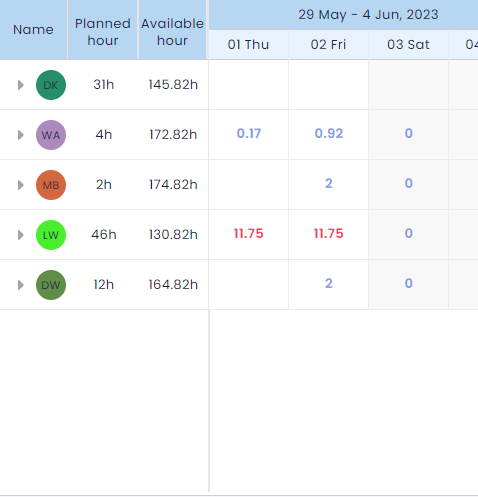
With the help of Redmineflux Workload Plugin, the user is able to see the current day in the workload timeline area, see workload in full screen mode, and expand and collapse resources. Redmineflux Workload Plugin provides a customized calendar view for the workload timeline area and shows the workload of different teams. 

Workload expand collapse filter full screen date range

Efficient resource allocation and availability

Redmineflux Workload Plugin provides a feature that tasks can be efficiently assigned to resources, considering their workload and availability. The Plugin allows users to update task start and due dates based on the allocated resources.

Workload resize move search

Requirements

Redmine4.1.x – 5.0.8
Ruby2.6+
DatabaseMySQL, PostgreSQL

Compatible With

Redmine 4.1.x – Redmine-5.0.8 (default Redmine)
Default Redmine Themes (default, alternate, classic)
All plugins you can see within the Redmineflux Demo
For support and feedback Email us

Testimonial

What people are saying!

Redmineflux plugins have been a game-changer for our Redmine setup. The enhanced features like advanced time tracking, custom workflows, and improved reporting have significantly boosted our productivity. The integration was seamless, and the support team was fantastic. Highly recommend these plugins to any Redmine user!

profile

Alex Tucker

Project Manager, Newyork

Getting all of my business data organized in one place is all I wanted. With Redmineflux, I can filter data and simplify my agile operations.

profile

Alfred Fleischer

Project Manager

Redmineflux themes have completely transformed the look and feel of our Redmine instance. We were looking for a way to make our Redmine more visually appealing and user-friendly, and these themes delivered on both fronts. The customization options are fantastic, allowing us to tailor the design to our company’s branding.

profile

Chen Jun Hao

Project Manager, Singapore

Redmineflux has an easy-to-use interface & is easily customizable. It helps active coordination and focuses project resources in one direction.

profile

Marlena Sievers

CEO

image 25

Enhance collaboration, elevate productivity, & meet goals with Redmineflux.

Enhance collaboration, elevate productivity, & meet goals with Redmineflux.

FAQ’s

Our Workload plugin can help your team in several ways. It can improve productivity by ensuring that tasks are completed on time and workloads are balanced. It can optimize resource allocation by forecasting needs and tracking usage. It can also improve collaboration and communication among team members.

Yes, most workload plugins are highly customizable to fit the specific needs of your team or organization. You can create custom reports, track specific metrics, and tailor the tool to your workflow.

Yes, most workload plugins are designed to be user-friendly and intuitive. They typically offer simple interfaces, clear navigation, and helpful tutorials or customer support to guide you through the process.

Yes, many workload plugins offer integrations with other popular tools such as project management software, calendar apps, and communication tools. This can help streamline your workflow and improve efficiency.

Subscribe to our newsletter

Get the latest news & updates on Redmineflux delivered straight to your inbox.