



The Redmineflux Gantt Chart Built
for Teams That Deliver on Time

Keep every project moving in the right direction without chaos, delays, or complexity
Plan Smarter in Redmineflux
Easy Installation
Works with Existing Redmine
Secure AWS Hosting
Cloud & On-Prem Support
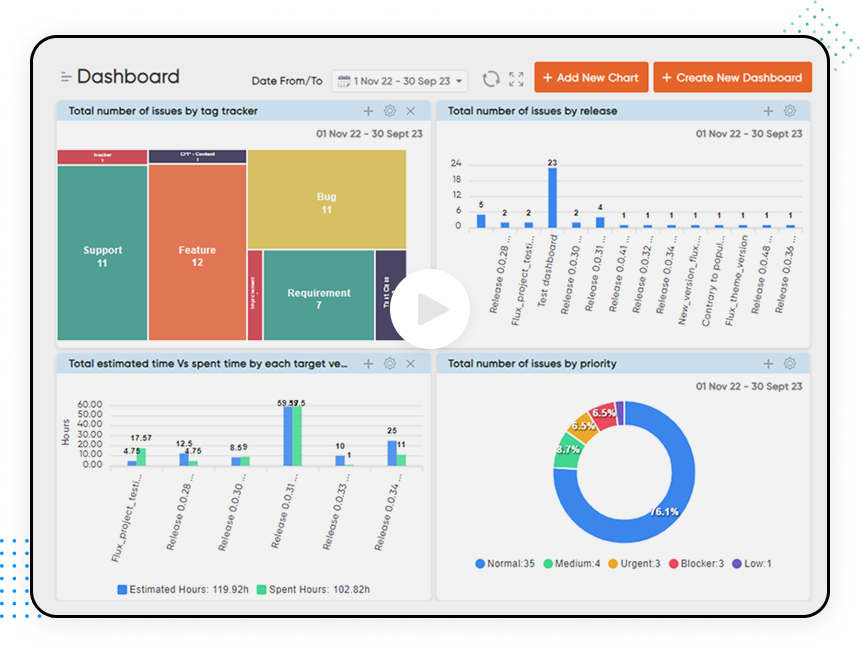
Redmineflux Custom dashboard

What the Redmineflux  Gantt Plugin Does?

Modern teams operate on velocity, clarity, and predictability and traditional task lists simply can’t provide that. 

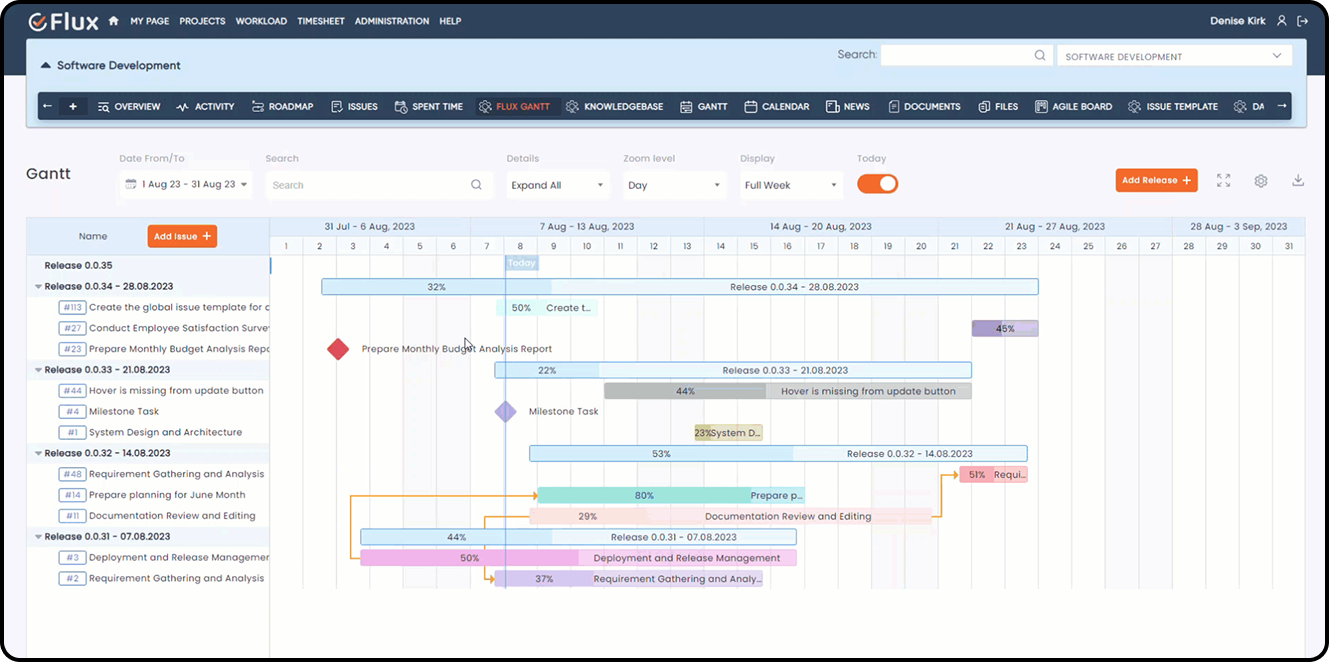
The Redmineflux Gantt Chart Plugin brings structure and foresight into your workflow by visualizing every task, timeline, milestone, dependency, and project workflow visualization in one unified planning view. 

It acts as your project’s real-time control center, allowing you to see what’s happening, what’s coming next, and what needs attention instantly. 

Our values

Interactive Visual Timeline for Project Planning 

- Clean and intuitive drag and drop interface for faster project scheduling 
- Helps teams build structured project timelines efficiently
- Supports seamless project planning with real-time updates  

Smart Task Dependencies

- Create meaningful task connections for better coordination to keep the project schedule organized and conflict free 
- Use automated dependency management to reduce delays 

Milestones & Phases

- Surface important project milestones that guide the team 
- Keep critical phases visible within the project roadmap 
- Strengthen clarity around high-impact delivery moments

Baseline Snapshots 

- Capture the original project baseline for accurate comparison 
- Monitor planned versus actual progress at any stage
- Spot slippage early with precise schedule variance tracking 

Progress Indicators

- View real-time task progress directly within the Gantt 
- Detect delays early to support proactive risk management 
- Improve progress tracking and team accountability 

Custom Fields & Configurable Columns

- Personalize the Gantt layout to match your project workflow 
- Display the task attributes your team relies on most 
- Build focused views for clearer project monitoring 

Advanced Filtering Controls

- Filter tasks by team, priority, or timeline to focus on what matters
- Narrow down project segments with flexible filtering options
- Make faster decisions with targeted resource and workload views

Zoom & Full-Screen View

- Navigate complex project timelines smoothly with adjustable zoom
- Get better visibility into long-term multi-quarter or multi-year plans
- Use full-screen mode for an uncluttered timeline view 

Why Teams Love our Custom Dashboard Plugin?

Speed & Efficiency in Planning 

Speed & Efficiency in Planning 

Drag, adjust, and reorganize tasks within seconds. It’s ideal for agile, hybrid, or waterfall project management

Role-Based Use Cases

Project Managers 

Plan and manage timelines with precision, ensuring predictable deliveries across multiple projects. 

Project Managers 

Plan and manage timelines with precision, ensuring predictable deliveries across multiple projects. 

Project Managers 

Plan and manage timelines with precision, ensuring predictable deliveries across multiple projects. 

Project Managers 

Plan and manage timelines with precision, ensuring predictable deliveries across multiple projects. 

Project Managers 

Plan and manage timelines with precision, ensuring predictable deliveries across multiple projects. 

Project Managers 

Plan and manage timelines with precision, ensuring predictable deliveries across multiple projects. 

Testimonial
What People are Saying!
Alex Tucker

Project Manager, Newyork

Alfred Fleischer

Project Manager

Chen Jun Hao

Project Manager, Singapore

Marlena Sievers

CEO

Alex Tucker

Redmineflux plugins have been a game-changer for our Redmine setup. The enhanced features like advanced time tracking, custom workflows, and improved reporting have significantly boosted our productivity. The integration was seamless, and the support team was fantastic. Highly recommend these plugins to any Redmine user!

Alfred Fleischer

Getting all of my business data organized in one place is all I wanted. With Redmineflux, I can filter data and simplify my agile operations.

Chen Jun Hao

Redmineflux themes have completely transformed the look and feel of our Redmine instance. We were looking for a way to make our Redmine more visually appealing and user-friendly, and these themes delivered on both fronts. The customization options are fantastic, allowing us to tailor the design to our company’s branding.

Marlena Sievers

Redmineflux has an easy-to-use interface & is easily customizable. It helps active coordination and focuses project resources in one direction.

image 25

Enhance collaboration, elevate productivity,
& meet goals with Redmineflux.

Enhance collaboration, elevate productivity, & meet goals with Redmineflux.

Latest from our blog

Meet your project deadlines with advanced features and systematic data representation.  
Mask group 12
Comparison

Redmineflux vs Pivotal Tracker: What’s the Difference? 

In the fast-paced world of business, success is about more than just staying ahead of the curve. It’s about being nimble, adapting quickly to changes, and responding to market conditions and customer needs with speed and precision. It’s about being able to turn ideas into realities, launching new products and

2 Min Read
image 59
Comparison

Redmineflux vs. VersionOne: Which is Better for Your Business?

Project management has evolved significantly over the years, with technological changes, globalization, and business environments. Here are some of the major ways project management has evolved:  In summary, project management has evolved from being an ad-hoc process to a well-defined discipline that emphasizes stakeholder management, uses advanced technology, incorporates agile

2 Min Read

FAQ’s

Can I quickly adjust timelines using drag-and-drop without breaking depe...

It allows you to create interactive project dashboards using data from your Redmineflux queries. You can generate charts, tables, customize layouts, apply date ranges, and manage multiple dashboards within a single project. 

How many tasks can the Gantt handle before it starts slowing down?

Lorem ipsum dolor sit amet, consectetur adipisicing elit, sed do eiusmod tempor incididunt ut labore et dolore magna aliqua. Ut enim ad minim veniam, quis nostrud exercitation ullamco laboris nisi ut aliquip ex ea commodo consequat. Duis aute irure dolor in reprehenderit in voluptate velit esse cillum dolore eu fugiat nulla pariatur.

Can multiple teams view and update the same Gantt timeline at the same time? 

Lorem ipsum dolor sit amet, consectetur adipisicing elit, sed do eiusmod tempor incididunt ut labore et dolore magna aliqua. Ut enim ad minim veniam, quis nostrud exercitation ullamco laboris nisi ut aliquip ex ea commodo consequat. Duis aute irure dolor in reprehenderit in voluptate velit esse cillum dolore eu fugiat nulla pariatur.

How does the Gantt help me spot schedule risks or delays early? 

Lorem ipsum dolor sit amet, consectetur adipisicing elit, sed do eiusmod tempor incididunt ut labore et dolore magna aliqua. Ut enim ad minim veniam, quis nostrud exercitation ullamco laboris nisi ut aliquip ex ea commodo consequat. Duis aute irure dolor in reprehenderit in voluptate velit esse cillum dolore eu fugiat nulla pariatur.

Can I filter the Gantt by team, priority, or specific time periods? 

Lorem ipsum dolor sit amet, consectetur adipisicing elit, sed do eiusmod tempor incididunt ut labore et dolore magna aliqua. Ut enim ad minim veniam, quis nostrud exercitation ullamco laboris nisi ut aliquip ex ea commodo consequat. Duis aute irure dolor in reprehenderit in voluptate velit esse cillum dolore eu fugiat nulla pariatur.

Does the Gantt support long-term project planning like multi-quarter or multi...

Lorem ipsum dolor sit amet, consectetur adipisicing elit, sed do eiusmod tempor incididunt ut labore et dolore magna aliqua. Ut enim ad minim veniam, quis nostrud exercitation ullamco laboris nisi ut aliquip ex ea commodo consequat. Duis aute irure dolor in reprehenderit in voluptate velit esse cillum dolore eu fugiat nulla pariatur.

Is it possible to customize what information appears on the Gantt chart? 

Lorem ipsum dolor sit amet, consectetur adipisicing elit, sed do eiusmod tempor incididunt ut labore et dolore magna aliqua. Ut enim ad minim veniam, quis nostrud exercitation ullamco laboris nisi ut aliquip ex ea commodo consequat. Duis aute irure dolor in reprehenderit in voluptate velit esse cillum dolore eu fugiat nulla pariatur.

Does the plugin work on both Redmineflux Cloud and On-Premise setups? 

Lorem ipsum dolor sit amet, consectetur adipisicing elit, sed do eiusmod tempor incididunt ut labore et dolore magna aliqua. Ut enim ad minim veniam, quis nostrud exercitation ullamco laboris nisi ut aliquip ex ea commodo consequat. Duis aute irure dolor in reprehenderit in voluptate velit esse cillum dolore eu fugiat nulla pariatur.

amazon
google
Paypal
spotify
shopify

Subscribe to our newsletter

Get the latest news & updates on Redmineflux delivered straight to your inbox. 

Gantt Chart Plugin for Redmine

$499.00

$499*
Buy Now

Gantt Chart Plugin for Redmine

Visualization of project progress, milestones, & delays through Gantt Chart. Create project plans & schedules and get more work done on time with Gantt Chart.

$499.00

Redmine Versions

$499*
Buy Now
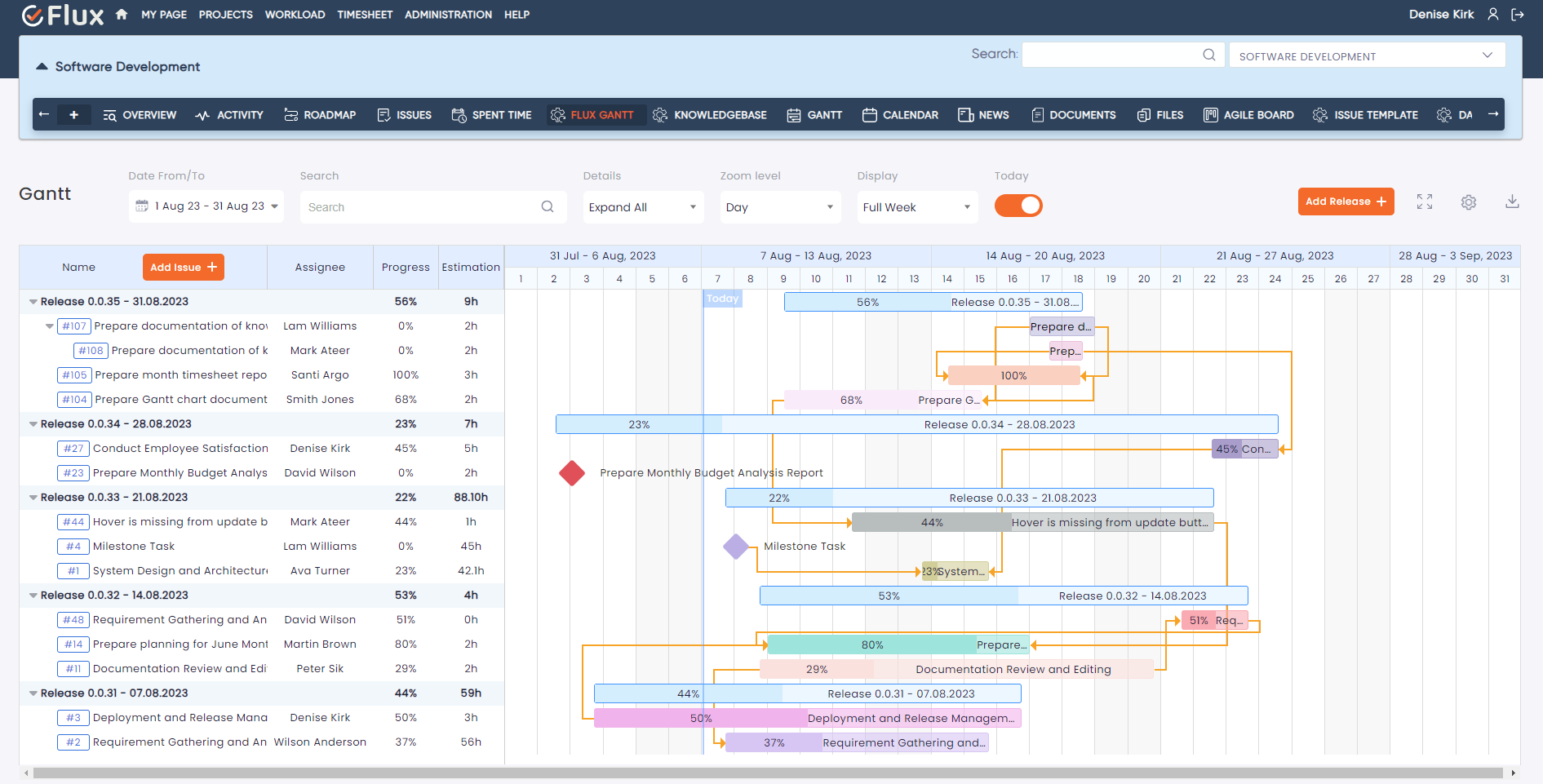
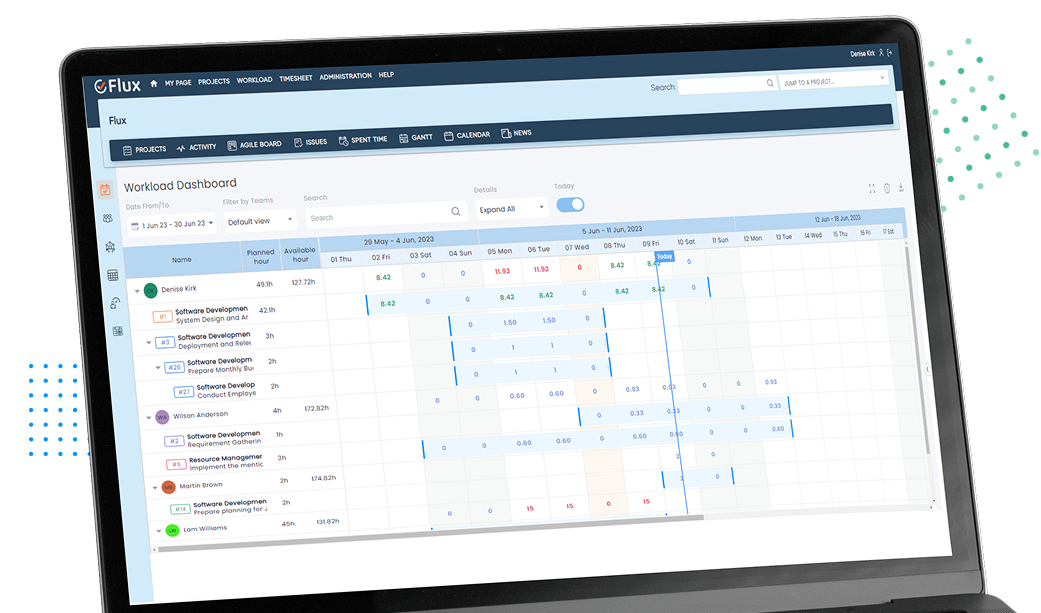
redmine flux gantt chart plugin dashboard view

Visualize Tasks & Milestones with Redmine Gantt Chart Plugin

Plan & schedule projects leveraging a visualized timeline view. Identify available resources, project dependencies, and milestones to ensure project success through an efficient team.

Stay updated on projects

Peek inside every single action is taken with regard to any project to stay updated & ensure on-schedule project delivery.

Efficient resource allocation

Get a clear picture of the task load on individual resources & identify who is occupied, overloaded, or idle.

Monitor progress

View the progress of a project right after you schedule it. Decisions can be strategized way earlier if deviations or delays are forecasted.

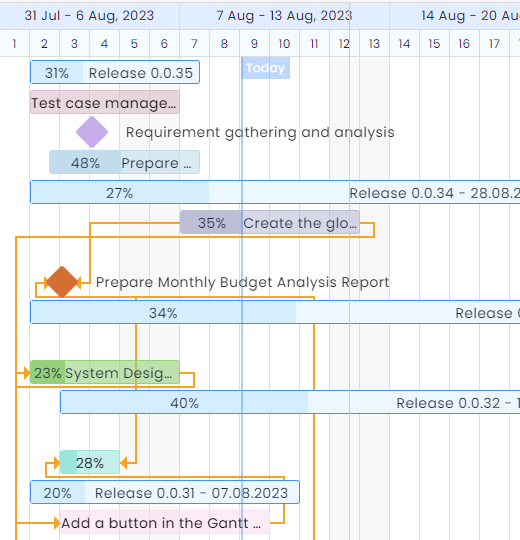
redmine flux gantt chart plugin final small image

Visualize tasks & milestones with Redmine Gantt Charts

Plan & schedule projects leveraging a visualized timeline view. Identify available resources, project dependencies, and milestones to ensure project success through an efficient team.

Stay updated on projects

Peek inside every single action is taken with regard to any project to stay updated & ensure on-schedule project delivery.

Efficient resource allocation

Get a clear picture of the task load on individual resources & identify who is occupied, overloaded, or idle.

Monitor progress

View the progress of a project right after you schedule it. Decisions can be strategized way earlier if deviations or delays are forecasted.

Compare Plans and Actual Results with Powerful Visual Tools

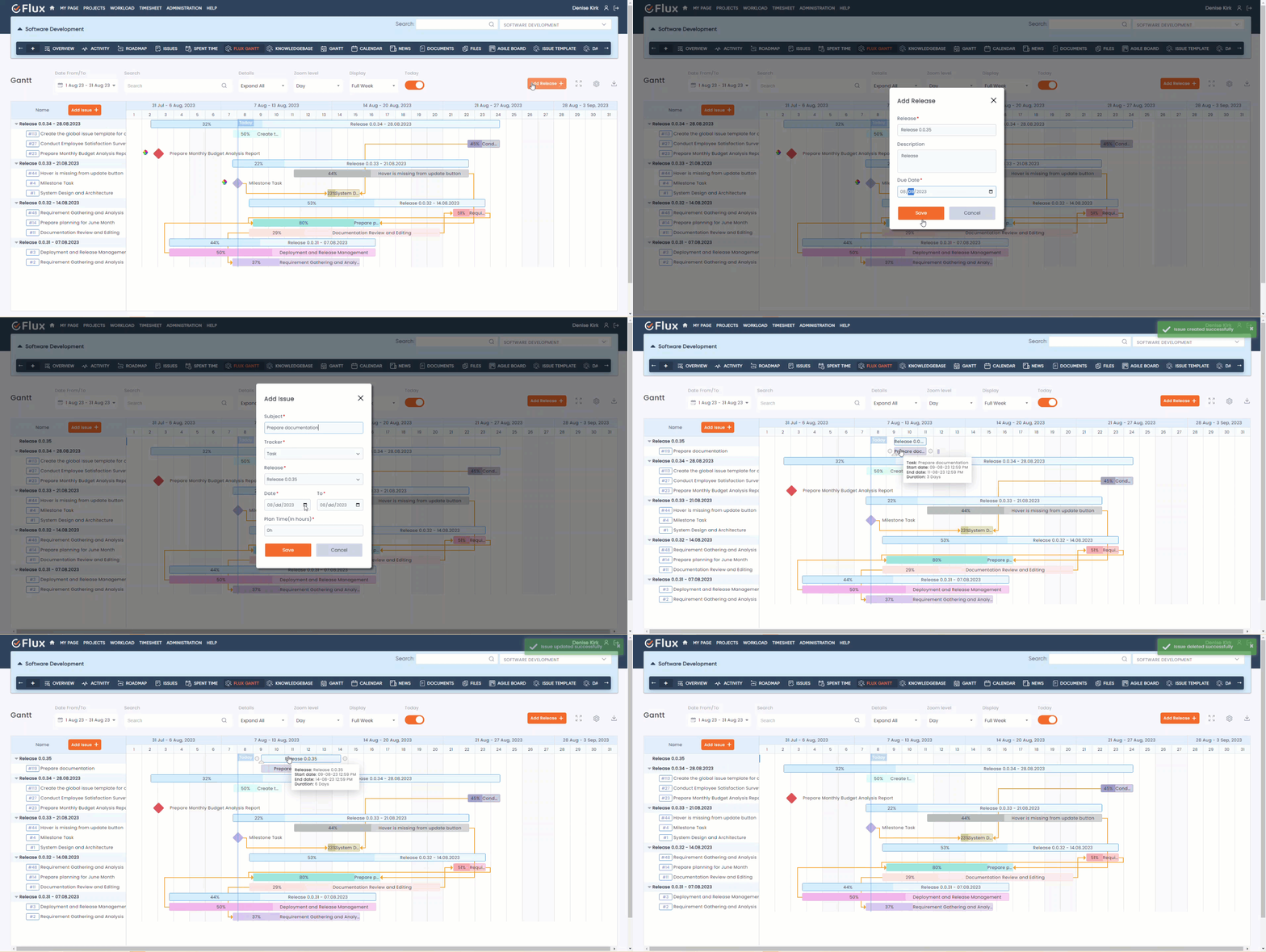
redmine flux gantt chart plugin project planning and task management window

Project Planning and Task Management

Gantt Chart Plugin simplifies project planning and task management for Redmine users. Redmineflux Gantt Chart Plugin allows users to create new releases or versions and add tasks to the releases. Users can update tasks and releases in real-time using the Gantt Chart Redmine Plugin.

redmine flux gantt chart plugin project planning and task management window

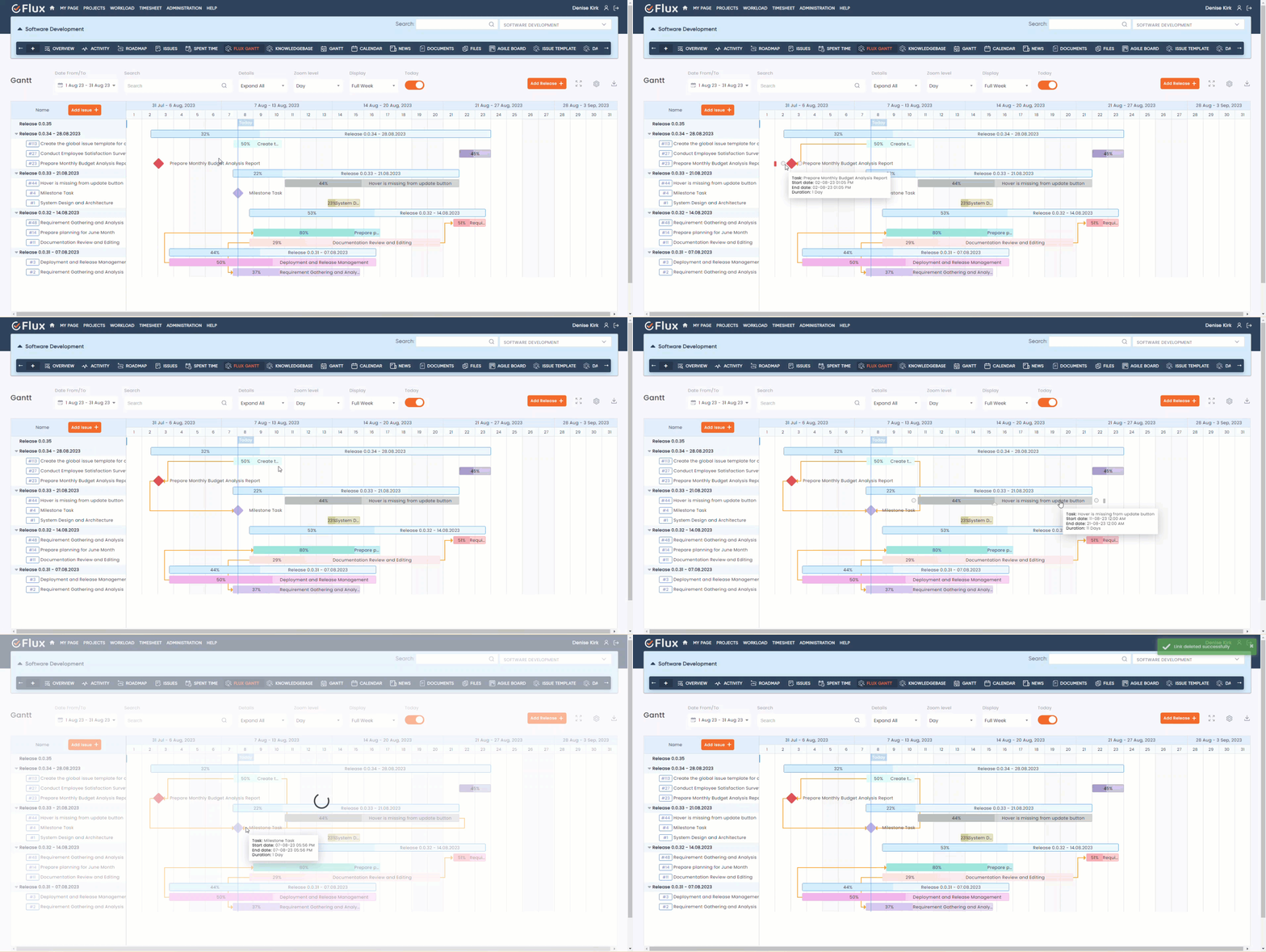
Manage Task Relation

With this plugin, users can create new task relations, specifying different dependency types such as “start to start,” “start to finish,” “finish to start,” or “finish to finish.” This feature helps establish clear relationships between tasks, enabling project managers to plan and schedule tasks more efficiently. Additionally, the plugin allows users to delete task relations effortlessly. By simply double-clicking on a link, users can remove task dependencies when they are no longer required or need to be updated. 

redmine flux gantt chart plugin add link
redmine flux gantt chart plugin drag and drop

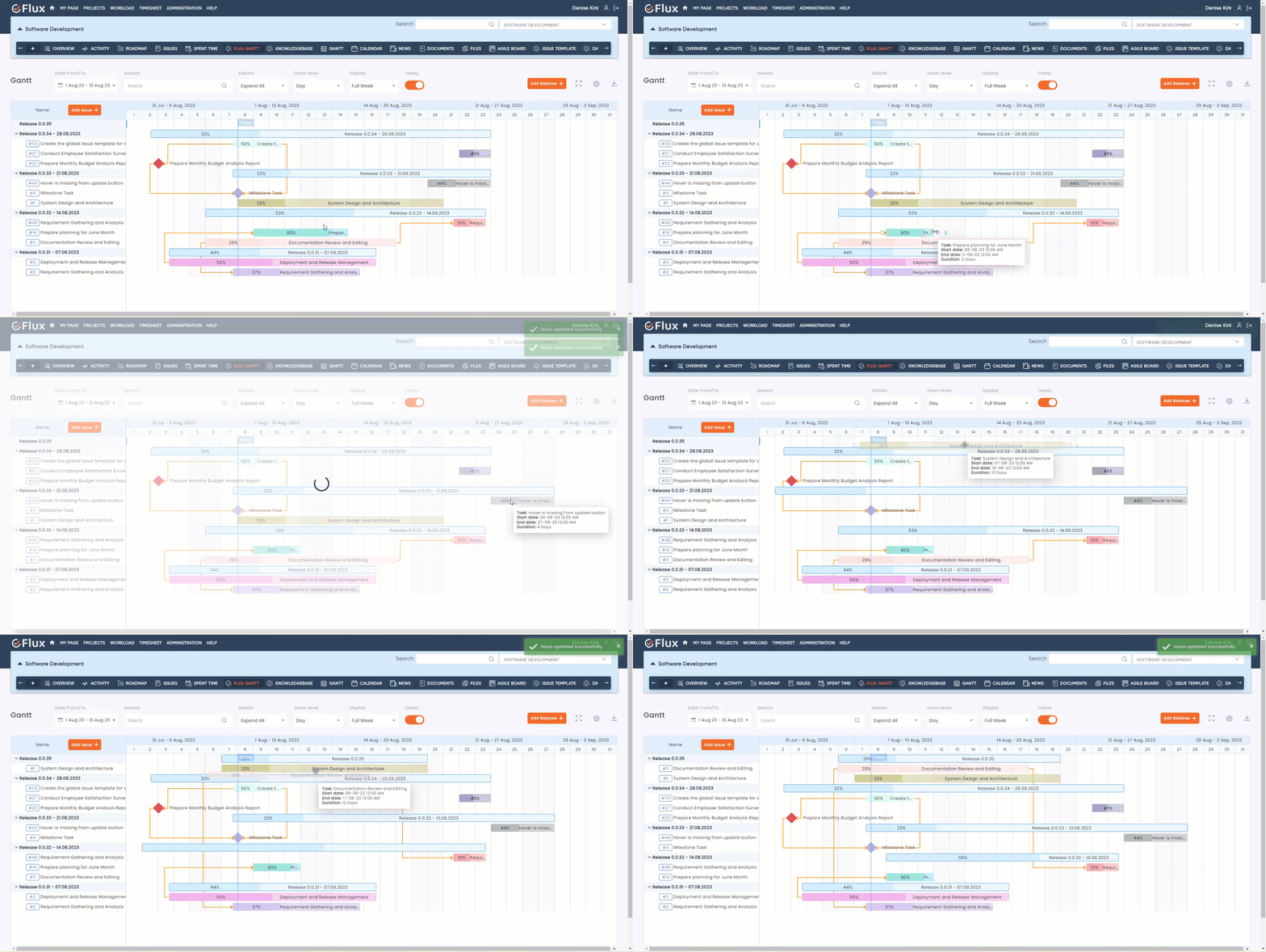
Effortless Task Management with Interactive Drag and Drop Interface

Redmineflux Gantt Chart Plugin provides the flexibility to drag and drop tasks vertically and horizontally in the Gantt timeline area, and users can schedule tasks (update task start and end date) effectively through Gantt Chart Redmine Plugin.

redmine flux gantt chart plugin drag and drop

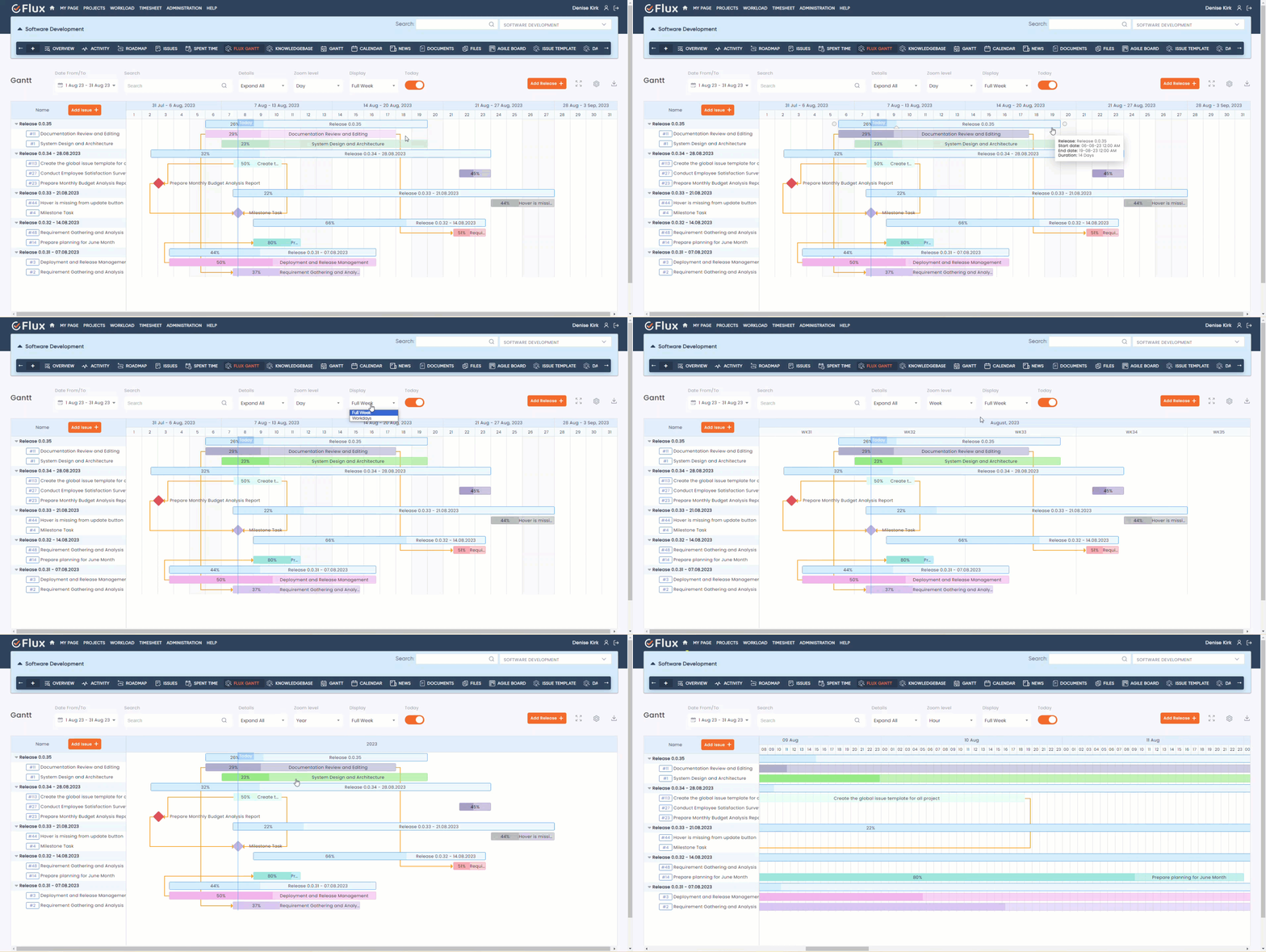
Custom Color Options and Enhanced Zooming Functionality

Redmineflux Gantt Chart Plugin provides users a color picker to change taskbar colors, allowing for easy customization and visual differentiation of tasks. Users can zoom the Gantt chart in various views, such as day, hour, month, or year, to adjust the level of detail. Additionally, the plugin offers a convenient full-day and weekday zoomlevel feature for more precise filtering and planning.

redmine flux gantt chart plugin task bar and zoom
redmine flux gantt chart plugin milestone and progress

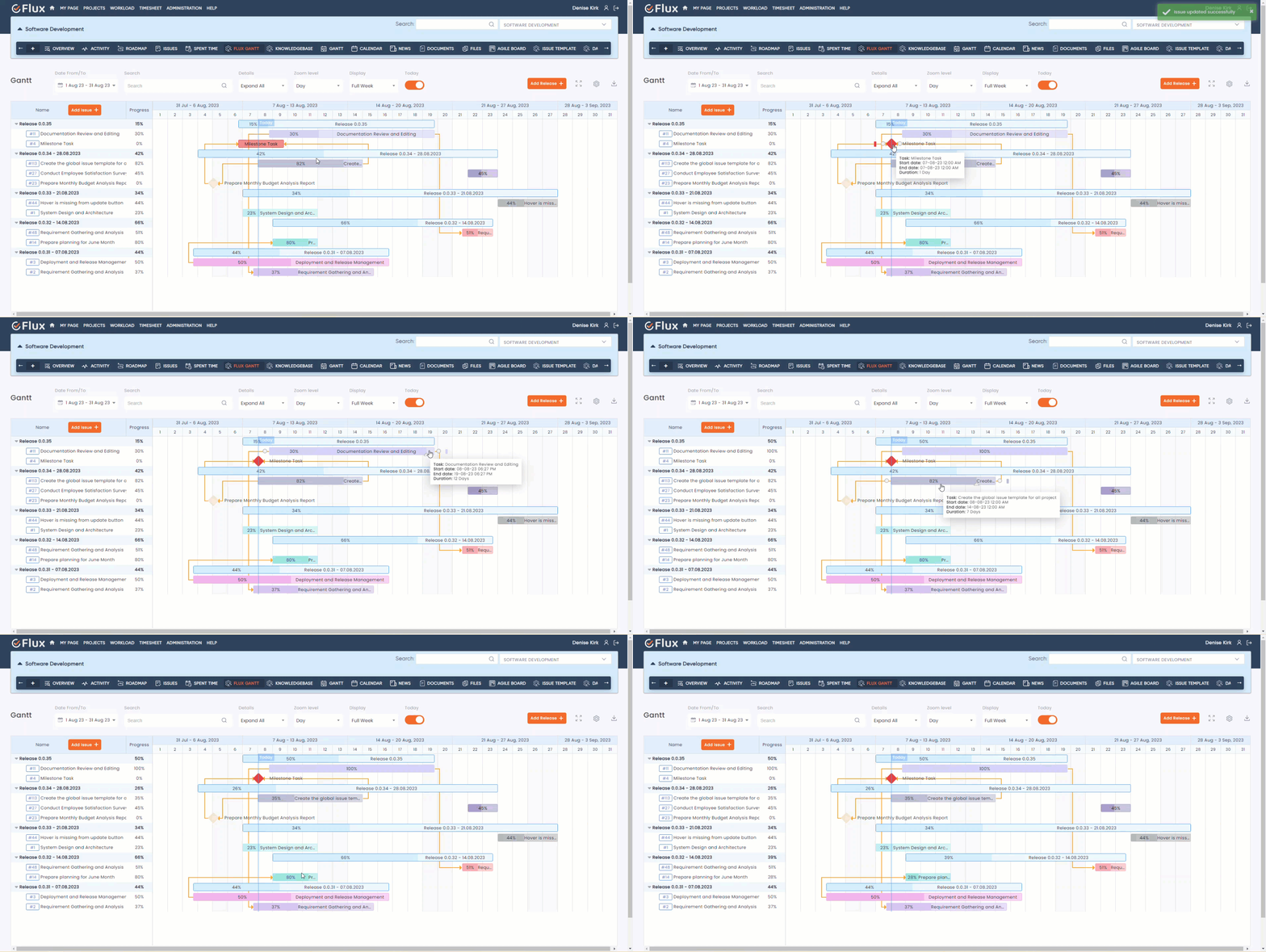
Milestone Task and Progress Tracking

The Redmineflux Gantt chart plugin facilitates the creation of milestone tasks, allowing users to define significant project stages or achievements. With the interactive Gantt chart Redmine plugin, users can effectively monitor project progress in real-time, providing valuable insights for better project management.

redmine flux gantt chart plugin milestone and progress

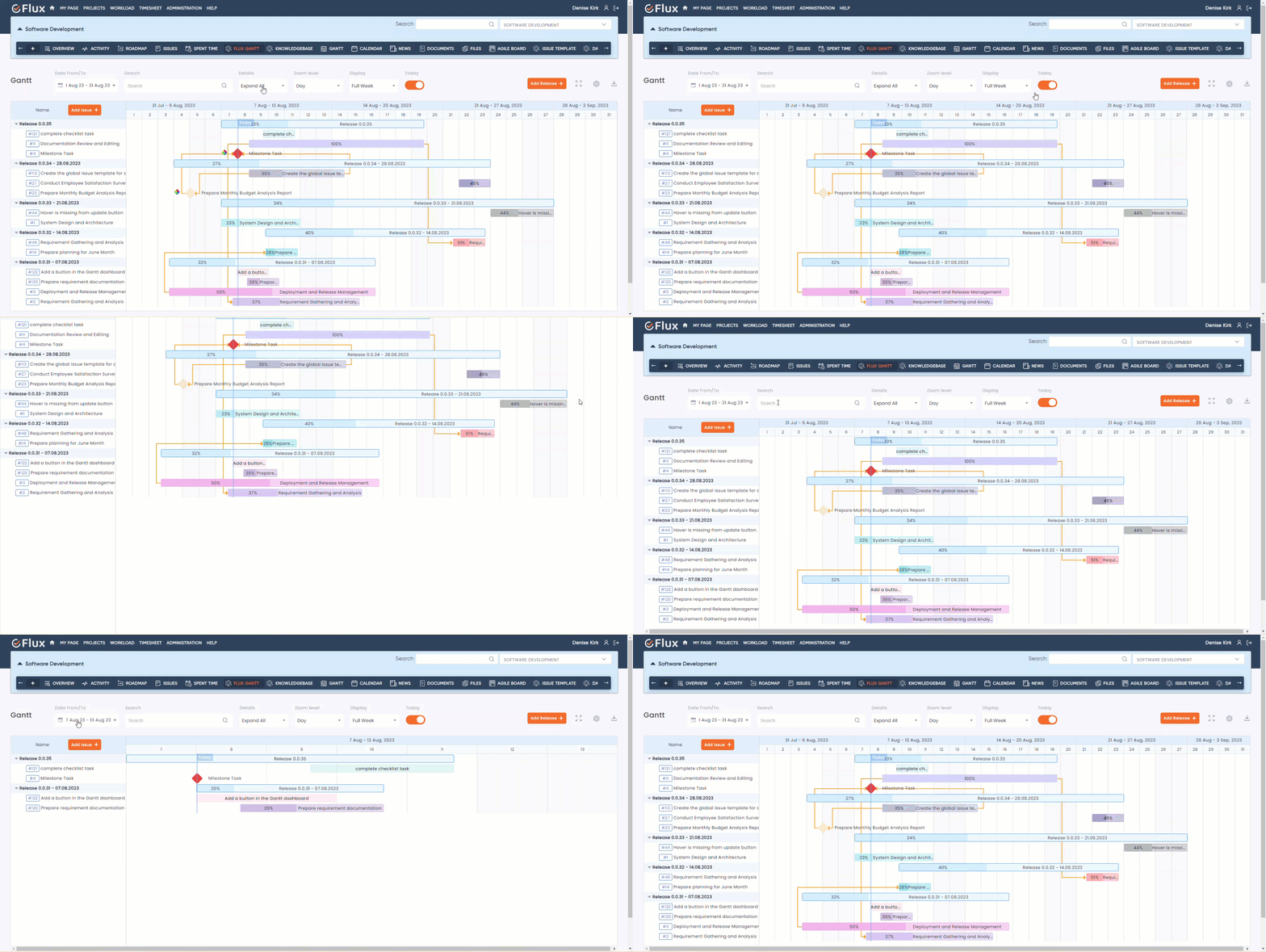
Advanced Customization Options

The Redmineflux Gantt Chart Plugin enables users to customize columns within the Gantt chart, displaying relevant project information tailored to their needs. Users have the flexibility to expand and collapse the Gantt chart. The plugin includes a search feature allowing users to find tasks and projects within the Gantt chart quickly. Users can seamlessly view the Gantt chart in full-screen mode. The Redmineflux Gantt chart plugin allows viewing different ranges of Gantt chart. Users can add a filter for today’s line in the Gantt chart. 

redmine flux gantt chart plugin advance customize option

Requirements

Redmine4.1.x – 5.0.8
Ruby2.6+
DatabaseMySQL, PostgreSQL

Compatible With

Redmine 4.1.x – Redmine-5.0.8 (default Redmine)
Default Redmine Themes (default, alternate, classic)
All plugins you can see within the Redmineflux Demo
For support and feedback Email us

Testimonial

What people are saying!

Redmineflux plugins have been a game-changer for our Redmine setup. The enhanced features like advanced time tracking, custom workflows, and improved reporting have significantly boosted our productivity. The integration was seamless, and the support team was fantastic. Highly recommend these plugins to any Redmine user!

profile

Alex Tucker

Project Manager, Newyork

Getting all of my business data organized in one place is all I wanted. With Redmineflux, I can filter data and simplify my agile operations.

profile

Alfred Fleischer

Project Manager

Redmineflux themes have completely transformed the look and feel of our Redmine instance. We were looking for a way to make our Redmine more visually appealing and user-friendly, and these themes delivered on both fronts. The customization options are fantastic, allowing us to tailor the design to our company’s branding.

profile

Chen Jun Hao

Project Manager, Singapore

Redmineflux has an easy-to-use interface & is easily customizable. It helps active coordination and focuses project resources in one direction.

profile

Marlena Sievers

CEO

image 25

Enhance collaboration, elevate productivity, & meet goals with Redmineflux.

Enhance collaboration, elevate productivity, & meet goals with Redmineflux.

FAQ’s

The Gantt Chart Redmine Plugin by Redmineflux comprises all the advanced and most required features needed to make a Gantt chart. Using our Redmine plugin, you can manage resources effectively, track progress continuously, & update task completion percentages whenever needed.

For integrating the Redmineflux Gantt Chart Plugin, you must have Ruby on Rails, Redmine, and any database (PostgreSQL, MySQL) installed in your system. 

Here’s how you can integrate the Gantt Chart plugin: 

  • Extract the Redmineflux Gantt Chart plugin zip to Redmine-4.2.8/plugins/
  • Run the below command to migrate the Gantt Chart plugin – RAILS_ENV=production bundle exec rails redmine:plugins:migrate 
  • After migrating the plugin restart the Redmine server 

Following are the features & functionalities included in our Gantt Chart plugin: 

  • Easy drag and drop
  • Add tasks & subtasks from the Gantt chart  
  • Project Dashboard
  • Adjustable zoom level 
  • Advanced filters (like workdays & priorities)  
  • Export to Excel, PNG, & PD
  • Show critical path
  • Undo or redo actions
  • Create task relations
  • Set time gaps between tasks 
  • Show critical path  
  • Undo or redo actions   
  • Create task relations  
  • Set time gaps between tasks  

With Redmineflux Gantt Chart plugin, you embrace the following benefits 

  • Optimal resource management 
  • Maximized productivity 
  • Complete overview of project progress 
  • Improved team communication 
  • Enhanced team cohesion 
  • See task dependencies & overlapping activities 

Subscribe to our newsletter

Get the latest news & updates on Redmineflux delivered straight to your inbox.