
Fluxshot – capture, annotate, and send to Redmine without leaving your browser.
For QA leads and developers who need visual bug reports in Redmine without switching tools.
one-time purchase · 1 year of support included
Support renewal after 1 year 30% of plugin price · multi-step server setup required
Today in bug reporting
Text descriptions of visual bugs take three messages to understand.
Without a built-in capture tool, bug reporting is slower than it needs to be. Screenshots taken with system tools require manual upload to Redmine, adding extra steps and losing the page context that explains what was happening. No annotation capability means marking the exact problem area requires a separate image editor. UI bugs get deprioritised because the effort to reproduce from a text description is too high – and the issue sits unresolved while the developer asks for more information.
In plain words
What is Fluxshot?
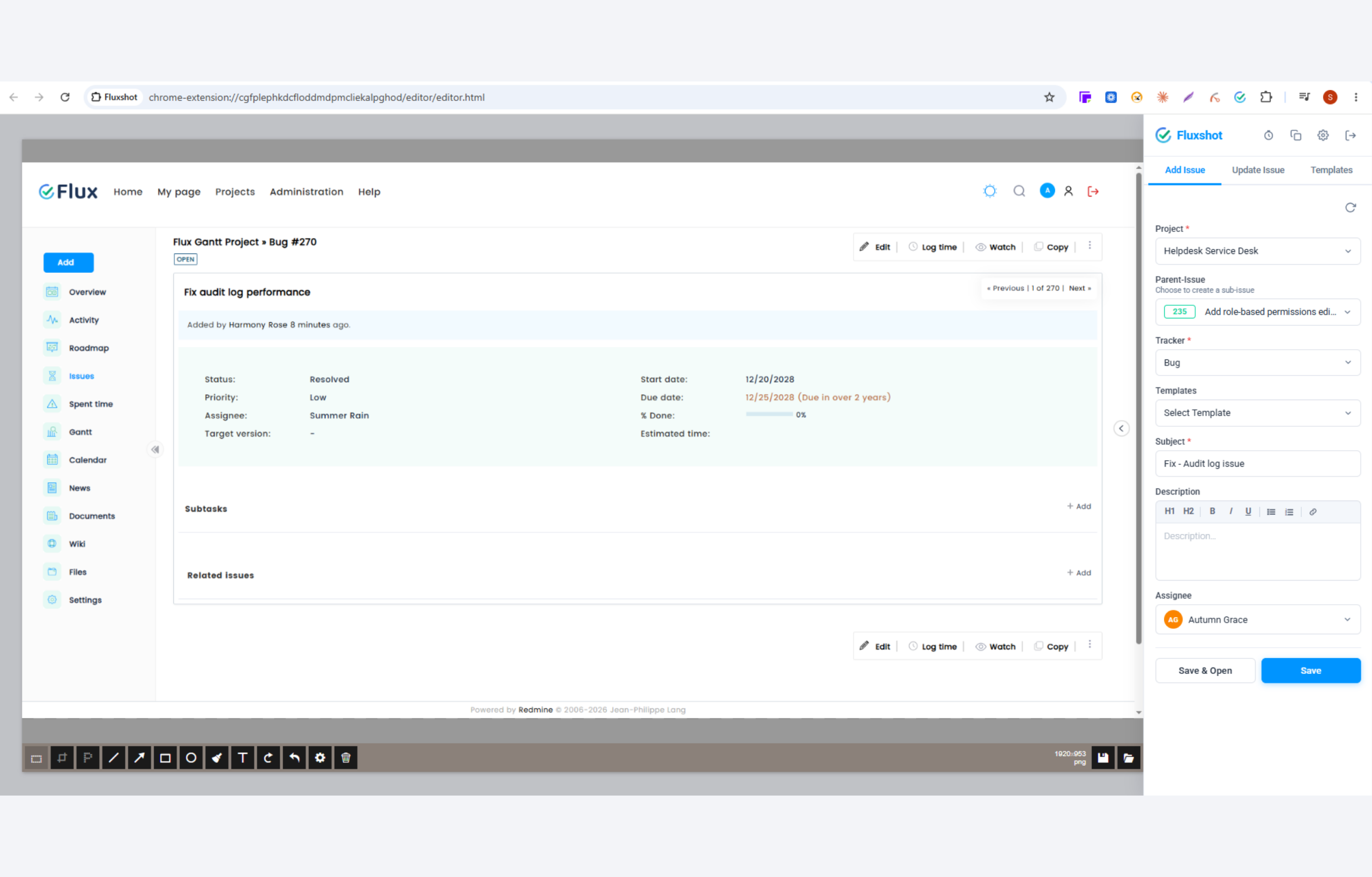
Fluxshot is a Chrome browser extension built by Redmineflux to bring visual bug reporting directly into your Redmine workflow. Click the extension icon and the current tab opens instantly in the Fluxshot editor – annotate with arrows, shapes, text, and blur, then submit directly to Redmine as a new issue or update an existing one.
Visual context belongs inside the issue, not in a separate message.
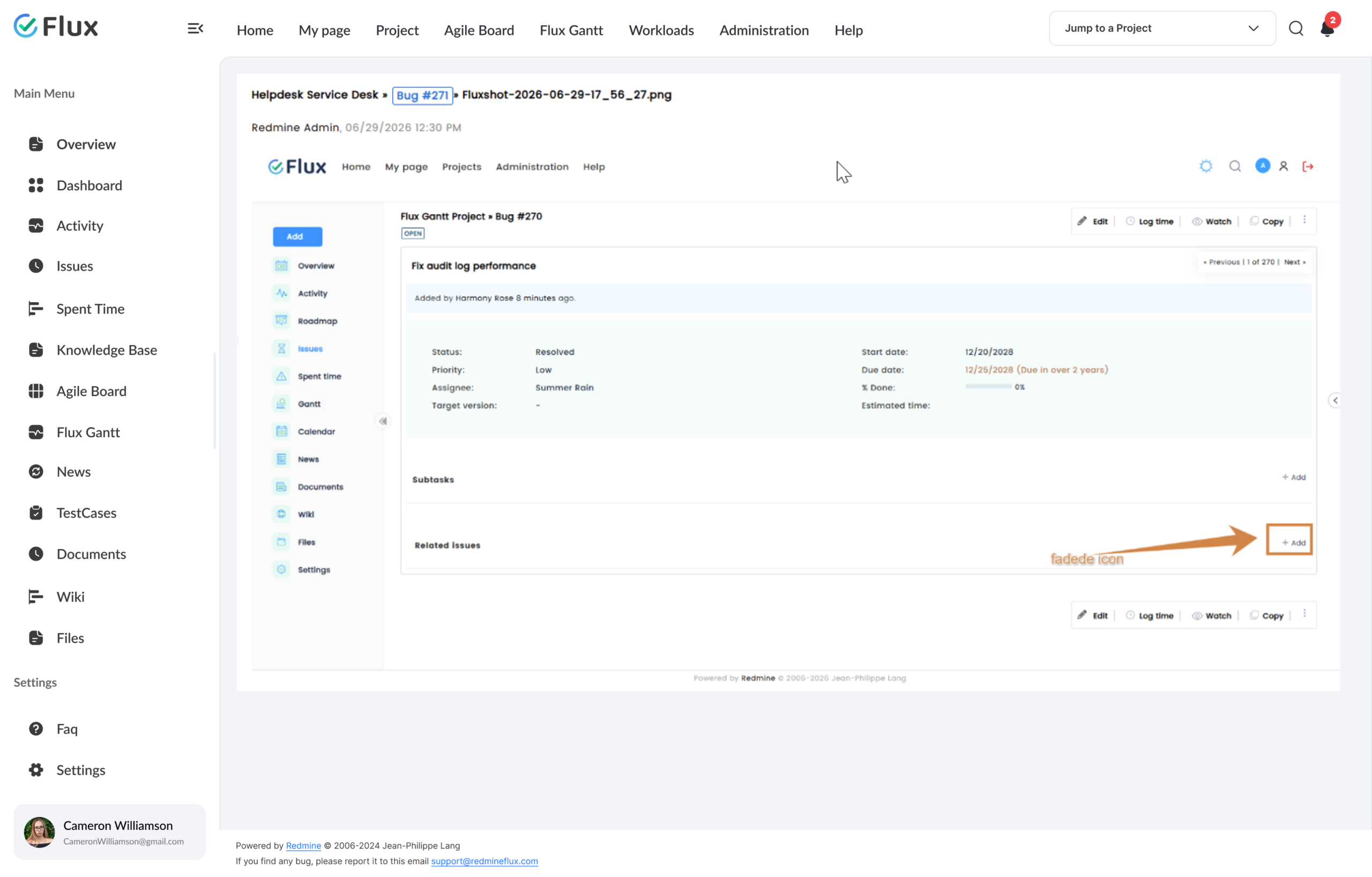
Fluxshot removes the gap between seeing a problem and reporting it. Every capture goes directly into Redmine as an annotated screenshot – the developer who picks up the issue sees exactly what the reporter saw, with the problem area already marked.
Fewer clarification rounds. Faster resolution. QA teams running structured test execution can attach annotated screenshots directly to failing test issues for immediate developer handoff – without leaving the page being tested.
What your team gains
A screenshot with an arrow beats ten paragraphs.
Click any shift to see what changes in the reporting workflow.
01
Visual bug reports in Redmine in under 30 seconds.
Capture and submit from any browser tab without a save step, navigate step, or separate upload. The screenshot goes directly to Redmine with one click from inside the extension. The reporting cycle that previously required four steps and a context switch now happens inside the browser.
02
Full annotation capability without an external image editor.
Mark arrows, add text labels, draw shapes, and highlight regions directly inside the extension. The problem area is marked before submission so developers do not need to ask where to look. No Snagit, no Skitch, no round-trip to an external tool.
03
Capture hover states and dynamic UI without switching tabs.
Use the timer capture (3, 5, or 10 seconds) to set up dropdowns, tooltips, or hover states before the screenshot fires. Bugs that only appear on interaction are now capturable without an external tool or a second pair of hands.
04
No workflow interruption during active QA sessions.
Capture, annotate, and submit without leaving the page being tested. Teams can attach captures to checklist step comments without losing their place in the test queue. QA progress continues without the reporting interruption that system screenshots and manual uploads impose.
05
Faster bug resolution through visual clarity.
Developers who receive annotated screenshots resolve issues faster because the problem is visible, not described. Fewer back-and-forth comment cycles mean the issue moves to resolved sooner. Teams that switched from text-only bug reports to Fluxshot eliminate the clarification round entirely on visual issues.
Core capabilities
The specifics, for people who want them.
Capture the current tab and open the editor in one click.
- One-click capture of the current browser tab – editor opens immediately in a new tab
- Timer capture (3, 5, or 10 seconds) to freeze hover states, dropdowns, and tooltips
- Copy annotated screenshot to clipboard without creating an issue
- Works across web apps, staging environments, and live production pages
Mark up exactly where the problem is before submitting.
- Arrow and line tools point to specific page elements without ambiguity
- Rectangle and circle shapes highlight areas of concern
- Text labels add written explanation directly on the screenshot
- Blur tool masks sensitive data before the screenshot leaves the browser
Send captures to Redmine without leaving the browser.
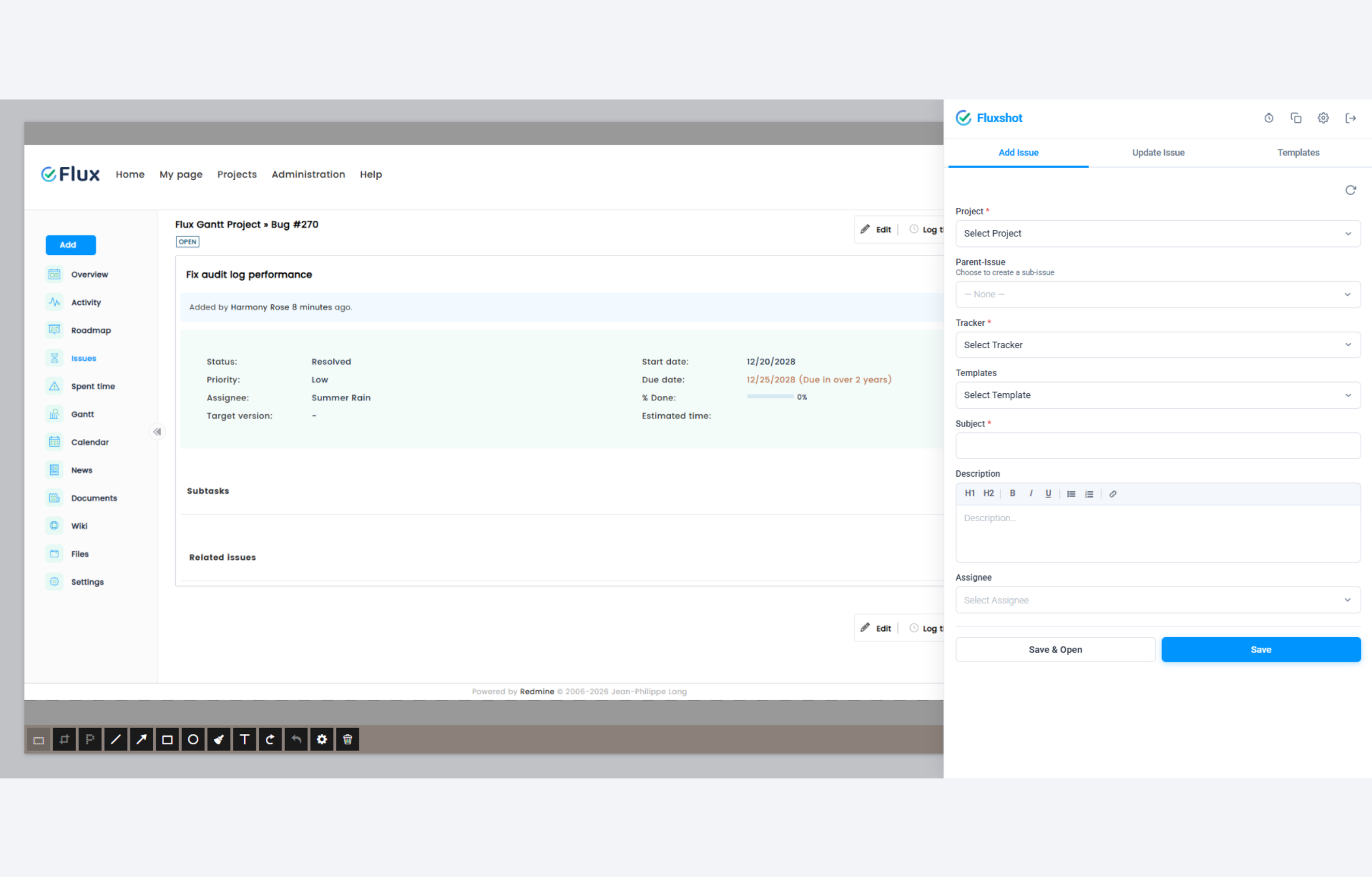
- New issue creation fills Project, Tracker, Subject, Description, and Assignee
- Attach to an existing issue by searching ID or title from the extension panel
- Submission confirmation includes a direct link to the created or updated issue
- Save & Open action creates the issue and navigates to it in Redmine immediately
Save issue templates to speed up repetitive bug submissions.
- Create private templates with a name, default subject, and description pre-filled
- Apply a template with one click to pre-populate the issue form instantly
- Edit or delete templates at any time from the Templates tab in the sidebar
- Templates are private per user – each team member manages their own set
200+
teams trust Redmineflux worldwide
6 yrs
focused on Redmine, nothing else
5000+
plugin downloads powering real projects
Bug reports used to be paragraphs of text that took three rounds of clarification. With Fluxshot, a screenshot with arrows does it in one comment. The issue is closed before we used to finish describing it.
How to connect
Fluxshot connects to Redmine via the API.
Managed Cloud
- Fluxshot works natively with Redmineflux Managed Cloud
- API pre-configured – install the extension and begin reporting
- No infrastructure configuration required
$2.99 / user / month
Get a Free Demo →Self-hosted Redmine
- Connect to any self-hosted Redmine via the REST API
- Enter Redmine URL, username, and password at first login
- Requires redmineflux_fluxshot plugin on the Redmine server
$199 one-time
Buy plugin →Fluxshot requires the redmineflux_fluxshot plugin on the Redmine server to expose its API endpoints.
Role by role
What Fluxshot changes for each role.
QA LeadBug reporting, test coverage
Annotated visual bug reports in Redmine in seconds – no separate tool, no upload step, no context switch during active test execution.
Project ManagerClient feedback, issue clarity
Client feedback with full page context attached to issues without back-and-forth. Annotated screenshots arrive in Redmine with no upload step or manual tool switch required.
Engineering LeadReproducibility, clarification
Developers receive fully contextualised visual reports – fewer clarification requests, faster reproduction, faster resolution on UI bugs.
Support LeadEscalation, customer issues
Customer issues captured with full page context for immediate escalation to engineering – without a second round of screenshots or descriptions.
Pricing
Three ways to get Fluxshot.
Buy this extension
Fluxshot Chrome Extension
Support renewal after 1 year 30% of plugin price
1 year of support included · connects to any Redmine instance
Buy Fluxshot →Save with a Bundle
All Plugins Bundle
Every plugin + Daisy and Scarlet themes.
Save 10% See the Bundle →Or use Managed Cloud
Redmineflux Cloud
Managed Redmine with Fluxshot pre-configured. Included in Standard and Pro Cloud plans.
See Cloud plans →Try it on your next bug report
See Fluxshot submit a bug to your Redmine.
An engineer connects Fluxshot to a live Redmine environment. Real capture, real annotation, real issue creation in under 30 seconds.
Frequently asked
Questions before you install.
The questions teams actually ask before adopting Fluxshot. If yours isn't here, check pricing or contact support.
Does Fluxshot work with self-hosted Redmine instances?
Yes. Fluxshot connects to any self-hosted Redmine instance via the Redmine REST API. At first login, enter your Redmine base URL, username, and password – the extension handles authentication internally. Note: the redmineflux_fluxshot plugin must be installed on your Redmine server to enable the API endpoints Fluxshot uses.
Can I attach a screenshot to an existing Redmine issue instead of creating a new one?
Yes. After annotating your capture, Fluxshot gives you the option to create a new issue or attach to an existing one. Search by issue ID or title from within the extension, and the screenshot is attached to the existing issue immediately – no new issue is created.
Does the extension capture sensitive information automatically?
Fluxshot captures the visible content of the current browser tab. For pages with sensitive data, use the built-in blur annotation tool to mask fields before the screenshot is submitted. Only the content visible in the editor is sent to Redmine.
Is Fluxshot available for browsers other than Chrome?
Fluxshot is currently available as a Chrome extension and works in any Chromium-based browser including Microsoft Edge and Brave. A Firefox version is in the product roadmap. Check the Fluxshot product page for the current list of supported browsers.
How much does Fluxshot cost?
$199 one-time for the Chrome extension – 1 year of support included. Support renewal after 1 year 30% of plugin price. Bundle with the All Plugins Bundle ($4,754 one-time) for all plugins. Or hosted at $2.99/user/month via Redmineflux Cloud Standard and above – Fluxshot pre-configured. See the pricing section above.
Is there a free demo available?
Yes – request a free demo and we’ll send a personalised demo link straight to your inbox. No credit card required, no commitment. Explore the real product at full capacity, at your own pace. Cloud starts at $1.99/user/month.